Question

OneDrive configuration issues

  • September 20, 2023
  • 4 replies
  • 37 views

pTmichaelm
Forum|alt.badge.img+3

Hello guys

I'm struggling with the OneDrive configuration without any luck, some settings are not being applied and I cannot understand why.

I'm deploying OneDrive from Jamf's app catalog and with a configuration profile using .plist file I've created according to our organization's needs following Microsoft's documentation.

The goal is:

1. Allow sync using accounts within our organization only.

2. Personal OneDrive account sync is not allowed.

3. Disable the tutorial (this one works).

4. Redirect known folders (Desktop, Documents) to OneDrive

5. Redirect silently without notifications and prompts.

6. The user cannot disable folder backup.

7. Show notification that folders were redirected to OneDrive.

8. Open at login (this one works).


This is my .plist:

What am I missing?

<?xml version="1.0" encoding="UTF-8"?> <!DOCTYPE plist PUBLIC "-//Apple//DTD PLIST 1.0//EN" "http://www.apple.com/DTDs/PropertyList-1.0.dtd"> <plist version="1.0"> <dict> <key>AllowTenantList</key> <array> <string>MyTenantID</string> </array> <key>BlockExternalSync</key> <true/> <key>DisablePersonalSync</key> <true/> <key>DisableTutorial</key> <true/> <key>KFMBlockOptOut</key> <true/> <key>KFMSilentOptIn</key> <string>MyTenantID</string> <key>KFMSilentOptInWithNotification</key> <true/> <key>OpenAtLogin</key> <true/> </dict> </plist>

4 replies

Forum|alt.badge.img
  • New Contributor
  • September 20, 2023

OneDrive is still not working effectively. : /


AJPinto
Forum|alt.badge.img+26
  • Legendary Contributor
  • September 20, 2023

I would suggest using a Custom Schema. Your XML looks right, I have put the one I use below. If using a Custom Schema does not get you going I would suggest raising a case with JAMF and Microsoft. 


JSON-Schema-for-Jamf-Pro-Applications-and-Settings-MDM-Payload/Microsoft/OneDrive/OneDrive.json at master · Jamf-Custom-Profile-Schemas/JSON-Schema-for-Jamf-Pro-Applications-and-Settings-MDM-Payload · GitHub


Application Domain: com.microsoft.OneDrive <?xml version="1.0" encoding="UTF-8"?> <!DOCTYPE plist PUBLIC "-//Apple//DTD PLIST 1.0//EN" "http://www.apple.com/DTDs/PropertyList-1.0.dtd"> <plist version="1.0"> <dict> <key>AllowTenantList</key> <array> <string>Super-Secret-String-Of-Numbers-And-Letters</string> </array> <key>BlockExternalSync</key> <true/> <key>DisableHydrationToast</key> <false/> <key>DisablePersonalSync</key> <true/> <key>DisableTutorial</key> <true/> <key>EnableAllOcsiClients</key> <true/> <key>FilesOnDemandEnabled</key> <true/> <key>HideDockIcon</key> <true/> <key>OpenAtLogin</key> <true/> <key>Tier</key> <string>Production</string> <key>DisableAutoConfig</key> <integer>0</integer> </dict> </plist>


Forum|alt.badge.img+19
  • Honored Contributor
  • September 20, 2023

For KFM, there is an outstanding issue with KFM not being enabled properly with the profile key. The version of OneDrive currently rolling out is supposed to have fixed that. We are on the Deferred Tier so we may have to wait. 


pTmichaelm
Forum|alt.badge.img+3
  • Author
  • New Contributor
  • September 21, 2023

I would suggest using a Custom Schema. Your XML looks right, I have put the one I use below. If using a Custom Schema does not get you going I would suggest raising a case with JAMF and Microsoft. 


JSON-Schema-for-Jamf-Pro-Applications-and-Settings-MDM-Payload/Microsoft/OneDrive/OneDrive.json at master · Jamf-Custom-Profile-Schemas/JSON-Schema-for-Jamf-Pro-Applications-and-Settings-MDM-Payload · GitHub


Application Domain: com.microsoft.OneDrive <?xml version="1.0" encoding="UTF-8"?> <!DOCTYPE plist PUBLIC "-//Apple//DTD PLIST 1.0//EN" "http://www.apple.com/DTDs/PropertyList-1.0.dtd"> <plist version="1.0"> <dict> <key>AllowTenantList</key> <array> <string>Super-Secret-String-Of-Numbers-And-Letters</string> </array> <key>BlockExternalSync</key> <true/> <key>DisableHydrationToast</key> <false/> <key>DisablePersonalSync</key> <true/> <key>DisableTutorial</key> <true/> <key>EnableAllOcsiClients</key> <true/> <key>FilesOnDemandEnabled</key> <true/> <key>HideDockIcon</key> <true/> <key>OpenAtLogin</key> <true/> <key>Tier</key> <string>Production</string> <key>DisableAutoConfig</key> <integer>0</integer> </dict> </plist>


Thanks!

I already tried several jsons I fount online but this one is the most recent so I'm crossing my fingers for this one to work.

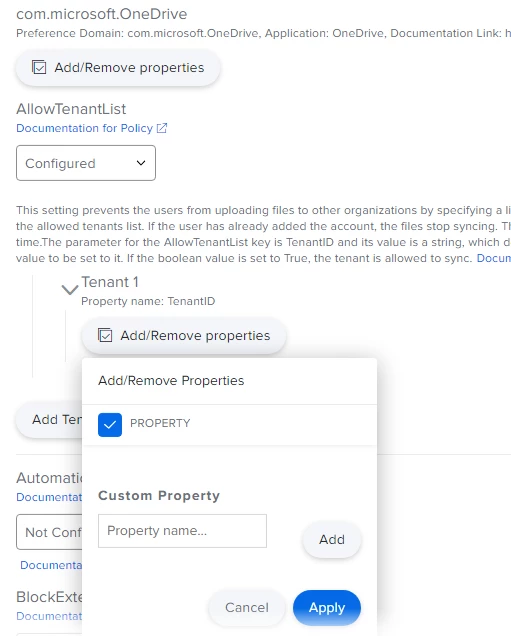
One question, how do I add the tenant ID?

There is no field to insert the string and there is no field for boolean value to set to "true"