Hi all,
We've decided that we do not want any of our iPads updating to iOS 10 this year, as we still have a large number of iPad2 and iPad Mini (original) devices that are not capable of updating. So, in an effort to ensure a consistent iOS environment in all of our classrooms we have decided to block access to iOS 10.
We are aware that once a device leaves our network then we have no control over their ability to update, but as the vast majority of our devices are shared in a cart-based environment in which they never leave the school, we feel this is a viable solution to cover the majority of our devices. Those that choose to update off-site will have to deal with the consequences of doing so (mostly: students complaining that what the teacher is showing via AirPlay doesn't look like what they are seeing at their desks).
Traditionally we would do this by simply filtering all traffic to mesu.apple.com with our Lightspeed webfilter, but in this case we don't want to do that because we still want iPads to be able to update to iOS 9.3.5 so they can apply that important security fix.
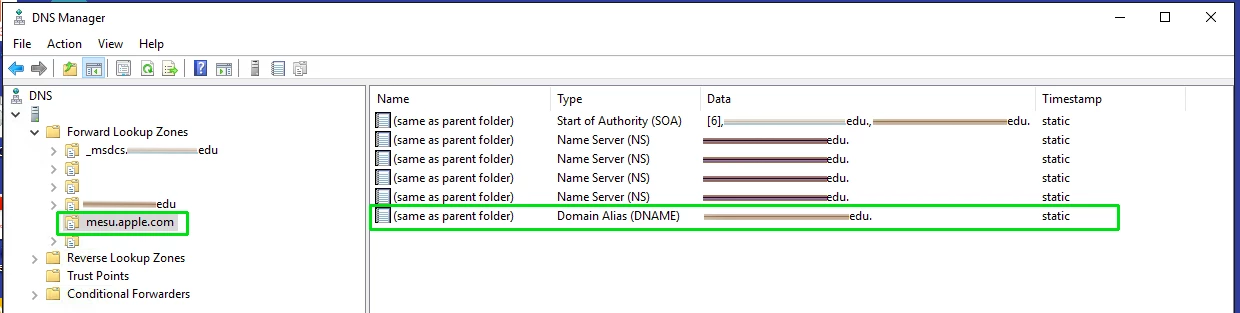
So our new method involves a DNS redirect to self-hosted XML files.
It is not complicated but we discovered a large number of XMLs that all needed to be self-hosted.
We initially tried it using only the XML that you've linked to in your post. After doing so we tailed the 404 log on the webserver and discovered a large number of other XML requests that were failing, so we manually downloaded each of those XML files and self-hosted them as well.
We are self-hosting 18 total XMLs.
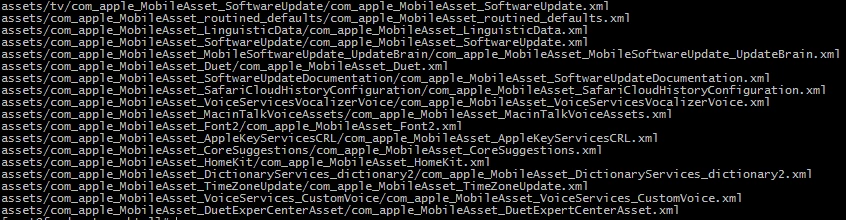
One quirk is that each XML is stored in a folder whose name matches exactly the name of the XML, minus the .xml extension.
i.e., For two different files, "example1.xml" and "example2.xml", they need to be stored at these paths: "/assets/example1/example1.xml" and "/assets/example2/example2.xml"... and so on...
I don't know for certain what else we may be breaking by redirecting ALL of those XMLs, but so far things have been working well. As far as I'm aware, mesu.apple.com is only a software update server so I don't think any other Apple services would be running through that URL.
The setup should look something like this:
- Redirect mesu.apple.com using a Domain Alias (DNAME) to the hostname of a webserver of which you have full control.
- At the webroot directory of that webserver, create the folder structure as shown in the attached image.
- Download the xml files from those locations (you'd better do this TODAY, September 12, 2016, before Apple updates them for iOS10. The sooner the better!). If you have already redirected DNS then you'll need to download those XMLs from offsite and send them back to yourself. Alternately, download them before you enable the DNS redirect.
- Host each of those XMLs in the folder that matches their name, which you just created on the webserver.
- Note that one of those XMLs sits at "/assets/tv/".
- Test it out!
Once we self-hosted all of those XMLs, we found that 9.3.4 and older devices on our network could see the update to 9.3.5 and perform the update. Devices that are at 9.3.5 do not see an update.
Now... we'll see what happens tomorrow when iOS 10 is released, but I'm confident that because we are redirecting their update server, no devices will see the update unless iOS 10 stops using mesu.apple.com entirely, which doesn't seem likely.
Good luck to everyone on release day!