
Hi all, I'm wondering if anyone has had success in packaging Maya 2022 with a non-network server license key, which our institution is able to put on 1200 machines. I tried referencing this post, but havent been able to successfully deploy the program with my modifications. Any help would be appreciated. Thank you.
- Home
- Community
- Get Support
- General Discussions
- Packaging Maya 2022
Question
Packaging Maya 2022
- April 9, 2021
- 73 replies
- 864 views
73 replies

 +5
+5- Contributor
- June 11, 2022
Is there anything special to getting their other products installed? We use the whole suite...
Here is the code I modified for Mudbox 2023. It shouldn't be hard to adapt it for the other Autodesk products. Key things to change for other softwares are pkgPaths, pKey, and networkServer, unless they use a pkg like the Fusion lab installer, then it's plug and play.
#!/bin/zsh

#Set variables

year="2023"
pkgPath1="/tmp/Autodesk/Install Mudbox 2023.app/Contents/Packages/Mudbox/Mudbox_core2023.pkg"
pkgPath2="/tmp/Autodesk/Install Mudbox 2023.app/Contents/Packages/Mudbox/Mudbox_AdLMconf2023.pkgg"
pkgPath3="/tmp/Autodesk/Install Mudbox 2023.app/Contents/Packages/ADLM/adskflexnetserverIPV6.pkg"
pkgPath4="/tmp/Autodesk/Install Mudbox 2023.app/Contents/Packages/ADLM/AdSSO-v2.pkg"
pkgPath5="/tmp/Autodesk/Install Mudbox 2023.app/Contents/Packages/ADLM/AdskLicensing-12.0.0.6529-mac-installer.pkg"


pKey="498O1"
networkServer="SERVER NAME OR IP"
licPath="/Library/Application Support/Autodesk/AdskLicensingService/${pKey}_${year}.0.0.F"
licFile="LICPATH.lic"


#Declare functions

runInstaller ()
{
    /usr/sbin/installer -verboseR -pkg "${pkgPath1}" -target /
    /usr/sbin/installer -verboseR -pkg "${pkgPath2}" -target /
    /usr/sbin/installer -verboseR -pkg "${pkgPath3}" -target /
    /usr/sbin/installer -verboseR -pkg "${pkgPath4}" -target /
    /usr/sbin/installer -verboseR -pkg "${pkgPath5}" -target /

}

createLicenseFiles ()
{
    if [[ ! -e "${licPath}" ]];
    then
        /bin/mkdir "${licPath}"
    fi
    /usr/bin/touch "${licPath}/${licFile}"
    /bin/chmod 777 "${licPath}/${licFile}"
    /bin/echo "SERVER ${networkServer} 000000000000" > "${licPath}/${licFile}"
    /bin/echo "USE_SERVER" >> "${licPath}/${licFile}"
}
licenceHelper ()
{
    /Library/Application\\ Support/Autodesk/AdskLicensing/Current/helper/AdskLicensingInstHelper change --pk "${pKey}" --pv "${year}.0.0.F" --lm NETWORK --ls "${networkServer}"
}
cleanUp ()
{
    /bin/rm -rf "${pkgPath}"
    /bin/rm -rf "${tmpfile}"
}

Run script
runInstaller
createLicenseFiles
licenceHelper
cleanUp
 +10
+10- Valued Contributor
- June 20, 2022
That time of year again to start updating software. Here's the updated script for Maya 2023, just had to do some small changes. This script assumes you have the installer located in /tmp.
#!/bin/zsh

#Set variables

year="2023"
pkgPath1="/tmp/AutoDesk/Install Maya 2023.app/Contents/Helper/Packages/Maya/MayaUSD.pkg"
pkgPath2="/tmp/AutoDesk/Install Maya 2023.app/Contents/Helper/Packages/Maya/Maya_AdLMconf2023.pkg"
pkgPath3="/tmp/AutoDesk/Install Maya 2023.app/Contents/Helper/Packages/Licensing/adskflexnetserverIPV6.pkg"
pkgPath4="/tmp/AutoDesk/Install Maya 2023.app/Contents/Helper/Packages/AdSSO/AdSSO-v2.pkg"
pkgPath5="/tmp/AutoDesk/Install Maya 2023.app/Contents/Helper/Packages/Licensing/AdskLicensing-12.0.0.6529-mac-installer.pkg"
pkgPath6="/tmp/AutoDesk/Install Maya 2023.app/Contents/Helper/Packages/Maya/Maya_core2023.pkg"
pkgPath7="/tmp/AutoDesk/Install Maya 2023.app/Contents/Helper/Packages/Maya/bifrost.pkg"
pkgPath8="/tmp/AutoDesk/Install Maya 2023.app/Contents/Helper/Packages/Maya/MtoA.pkg"
pkgPath9="/tmp/AutoDesk/Install Maya 2023.app/Contents/Helper/Packages/Maya/AdobeSubstance3DforMaya-2.2.2-2023-Darwin.pkg"
pkgPath10="/tmp/AutoDesk/Install Maya 2023.app/Contents/Helper/Packages/Maya/Pymel2023.pkg"


pKey="657O1"
networkServer="SERVER NAME"
licPath="/Library/Application Support/Autodesk/AdskLicensingService/${pKey}_${year}.0.0.F"
licFile="LICPATH.lic"


#Declare functions

runInstaller ()
{
    /usr/sbin/installer -verboseR -pkg "${pkgPath1}" -target /
    /usr/sbin/installer -verboseR -pkg "${pkgPath2}" -target /
    /usr/sbin/installer -verboseR -pkg "${pkgPath3}" -target /
    /usr/sbin/installer -verboseR -pkg "${pkgPath4}" -target /
    /usr/sbin/installer -verboseR -pkg "${pkgPath5}" -target /
    /usr/sbin/installer -verboseR -pkg "${pkgPath6}" -target /
    /usr/sbin/installer -verboseR -pkg "${pkgPath7}" -target /
    /usr/sbin/installer -verboseR -pkg "${pkgPath8}" -target /
    /usr/sbin/installer -verboseR -pkg "${pkgPath9}" -target /
    /usr/sbin/installer -verboseR -pkg "${pkgPath10}" -target /
}

createLicenseFiles ()
{
    if [[ ! -e "${licPath}" ]];
    then
        /bin/mkdir "${licPath}"
    fi
    /usr/bin/touch "${licPath}/${licFile}"
    /bin/chmod 777 "${licPath}/${licFile}"
    /bin/echo "SERVER ${networkServer} 000000000000" > "${licPath}/${licFile}"
    /bin/echo "USE_SERVER" >> "${licPath}/${licFile}"
}
licenceHelper ()
{
    /Library/Application\\ Support/Autodesk/AdskLicensing/Current/helper/AdskLicensingInstHelper change --pk "${pKey}" --pv "${year}.0.0.F" --lm NETWORK --ls "${networkServer}"
}
cleanUp ()
{
    /bin/rm -rf "${pkgPath}"
    /bin/rm -rf "${tmpfile}"
}

Run script
runInstaller
createLicenseFiles
licenceHelper
cleanUp
@mgshepherd Does Autodesk's own silent installer still not work properly then? e.g. as documented here? https://knowledge.autodesk.com/support/maya/learn-explore/caas/CloudHelp/cloudhelp/2023/ENU/Maya-Installlation/files/GUID-FBFA0C09-8E21-4EA1-95CD-E47A40D7C9F0-htm.html
EDIT: having now tried it myself I can confirm their new installation process works great, no problems. Does anyone know if there's a way to suppress the Data Privacy dialog that comes up at first launch? Other than that everything looks great.
EDIT 2: although now I've packaged it with Composer, I'm finding it doesn't work as a package with a postinstall script? what's that all about?
EDIT 3: so if I split up the files and the script into separate things (i.e. have a package that just puts the files on the machine, and then have the install command in a separate script) this works. what's different about the environment of a postinstall script in a package installer?
Aaand of course Mudbox 2023 uses a completely different installer :(
 +13
+13- Valued Contributor
- July 8, 2022
@mgshepherd Does Autodesk's own silent installer still not work properly then? e.g. as documented here? https://knowledge.autodesk.com/support/maya/learn-explore/caas/CloudHelp/cloudhelp/2023/ENU/Maya-Installlation/files/GUID-FBFA0C09-8E21-4EA1-95CD-E47A40D7C9F0-htm.html
EDIT: having now tried it myself I can confirm their new installation process works great, no problems. Does anyone know if there's a way to suppress the Data Privacy dialog that comes up at first launch? Other than that everything looks great.
EDIT 2: although now I've packaged it with Composer, I'm finding it doesn't work as a package with a postinstall script? what's that all about?
EDIT 3: so if I split up the files and the script into separate things (i.e. have a package that just puts the files on the machine, and then have the install command in a separate script) this works. what's different about the environment of a postinstall script in a package installer?
Aaand of course Mudbox 2023 uses a completely different installer :(
fwiw, running into odd issues myself. Maya has documentation for network deployment using the setup binary and feeding it an xml. AutoCAD doesn't seem to support this, and when I run setup --silent via a postinstall script, it hits some error then backs out the install. =(
 +6
+6- New Contributor
- July 8, 2022
I edited the original script because I needed it quick and I haven't had any issues. FWIW

 +12
+12- Valued Contributor
- July 8, 2022
@mgshepherd Does Autodesk's own silent installer still not work properly then? e.g. as documented here? https://knowledge.autodesk.com/support/maya/learn-explore/caas/CloudHelp/cloudhelp/2023/ENU/Maya-Installlation/files/GUID-FBFA0C09-8E21-4EA1-95CD-E47A40D7C9F0-htm.html
EDIT: having now tried it myself I can confirm their new installation process works great, no problems. Does anyone know if there's a way to suppress the Data Privacy dialog that comes up at first launch? Other than that everything looks great.
EDIT 2: although now I've packaged it with Composer, I'm finding it doesn't work as a package with a postinstall script? what's that all about?
EDIT 3: so if I split up the files and the script into separate things (i.e. have a package that just puts the files on the machine, and then have the install command in a separate script) this works. what's different about the environment of a postinstall script in a package installer?
Aaand of course Mudbox 2023 uses a completely different installer :(
I had a similar headache with Corel Painter. Three separate parts to get it installed.

 +10
+10- New Contributor
- July 28, 2022
Just thought I'd share my latest solution to silently install 2023 versions of AutoCAD, Maya & Mudbox with network licenses, while at the login window (aka a lab/classroom install). My goal was to make it as simple to use and to modify as possible. I've been using a variation of methods shared here for years (thanks by the way!) but decided it was time to really get to the bottom of things for myself.
It's a mashup of Autodesk's 'legit' install method with a simplified version of the custom network licensing steps we all know & love. However I do make note of the 'legit' network license registration steps for those who care, or are curious as I was (it does work, I just prefer the custom method). All details are in the script.
I've only deployed to macOS 12.4 Intel & Silicon, so ymmv, but I'm happy to report it's working perfectly for me on over 100 stations so far. Enjoy!
#!/bin/zsh

### Install AutoDesk Combo 2023 (AutoCAD, Maya & MudBox)
### silently @ login window with network licenses (aka multi-user lab/classroom deploy)

### 2022.07.27 by JonW

### Simply update variables/products below the function section as desired
### Read the additional details at the end of the script for more clarity on licensing.

### Ensure:
### 1) installer app(s) re-packed from .dmg by Composer & deployed to /private/tmp (root:wheel 755)
### 2) the network license server is functional
### 3) optionally, that previous Autodesk installations have been removed.
### and if so, you've also unloaded com.autodesk.AdskLicensingService.plist

#################################################


installFunction ()
{
	### Before install, clear quarantine that may step on Setup.app when run at the login window.
	### Also as of 2023, Mudbox still uses a different setup app path with --noui flag NOT --silent
	### Finally, remove the installer app when complete

	/usr/bin/xattr -rc /private/tmp/"${installerApp}"

	if echo "$installerApp" | grep -iq "Mudbox"; then
		/private/tmp/"${installerApp}"/Contents/MacOS/setup --noui
	else
		/private/tmp/"${installerApp}"/Contents/Helper/Setup.app/Contents/MacOS/Setup --silent
	fi

	/bin/rm -rf /private/tmp/"${installerApp}"
}


licenseFunction ()
{
	### based off Onkstons's terrific work (I think they we're the first?) but simplified for 2023.
	### see also, addl details at the end of script for alternative 'legit' licensing method.
	licensePath="/Library/Application Support/Autodesk/AdskLicensingService/${productKey}_${year}.0.0.F"
	/bin/mkdir -p "${licensePath}"
	/usr/bin/touch "${licensePath}/licpath.lic"
	/bin/echo "SERVER ${networkServer} 000000000000" > "${licensePath}/licpath.lic"
	/bin/echo "USE_SERVER" >> "${licensePath}/licpath.lic"

	/Library/Application\\ Support/Autodesk/AdskLicensing/Current/helper/AdskLicensingInstHelper change --pk "${productKey}" --pv "${year}.0.0.F" --lm NETWORK --ls "${networkServer}"
}


#################################################


networkServer="your.network.license.server.here"

### AutoCAD
productKey="777O1"
year="2023"
installerApp="Install Autodesk AutoCAD 2023 for Mac.app"
installFunction
licenseFunction


### Maya
productKey="657O1"
year="2023"
installerApp="Install Maya 2023.app"
installFunction
licenseFunction


### Mudbox
productKey="498O1"
year="2023"
installerApp="Install Mudbox 2023.app"
installFunction
licenseFunction


#################################################

### Verify license details - not required, but kind of nice to see.
/Library/Application\\ Support/Autodesk/AdskLicensing/Current/helper/AdskLicensingInstHelper list
echo "Autodesk network licensing complete"


##################################################


### Additional network license details:
### For those who are curious, or if the above ever ceases to function:

### The 'legit' method for initial silent license registration (using autoCAD as an example) uses the 'register' command instead of 'change'.
### It also requires use of the --cf flag to denote a path to the app's config (.pit) file.

### e.g.
### configFile="/Library/Application Support/Autodesk/ADLM/.config/ProductInformation.pit"
### /Library/Application\\ Support/Autodesk/AdskLicensing/Current/helper/AdskLicensingInstHelper register --pk "${productKey}" --pv "${year}.0.0.F" --cf "${configFile}" --lm NETWORK --ls "${networkServer}"

### The end result is the same as the 'change' method used above (at least after the initial app launch).
### Essentially the 'change' method works backwards to manually create the licpath.lic directory & file,
### then uses the 'change' command to register it.

### Anecdotally, the 'change' method appears to produce a slightly faster initial app launch,
### but it's hard to say which is better.
### Either way, it's good to know both & having handle on the AdskLicensingInstHelper utility helps a lot!

### Check these out >>>
### /Library/Application\\ Support/Autodesk/AdskLicensing/Current/helper/AdskLicensingInstHelper register --help
### /Library/Application\\ Support/Autodesk/AdskLicensing/Current/helper/AdskLicensingInstHelper change --help

### Also, either method seems to deploy fine while at the login window, so no worries there.

### Some good tips & reference:
### https://knowledge.autodesk.com/support/autocad/troubleshooting/caas/sfdcarticles/sfdcarticles/Use-Installer-Helper.html
### https://knowledge.autodesk.com/search-result/caas/CloudHelp/cloudhelp/ENU/Autodesk-Installation-Basic-ODIS/files/ODIS-silent-install-htm.html


### Hope this helps some folks out!
+12- Valued Contributor
- July 28, 2022
Just thought I'd share my latest solution to silently install 2023 versions of AutoCAD, Maya & Mudbox with network licenses, while at the login window (aka a lab/classroom install). My goal was to make it as simple to use and to modify as possible. I've been using a variation of methods shared here for years (thanks by the way!) but decided it was time to really get to the bottom of things for myself.
It's a mashup of Autodesk's 'legit' install method with a simplified version of the custom network licensing steps we all know & love. However I do make note of the 'legit' network license registration steps for those who care, or are curious as I was (it does work, I just prefer the custom method). All details are in the script.
I've only deployed to macOS 12.4 Intel & Silicon, so ymmv, but I'm happy to report it's working perfectly for me on over 100 stations so far. Enjoy!
#!/bin/zsh

### Install AutoDesk Combo 2023 (AutoCAD, Maya & MudBox)
### silently @ login window with network licenses (aka multi-user lab/classroom deploy)

### 2022.07.27 by JonW

### Simply update variables/products below the function section as desired
### Read the additional details at the end of the script for more clarity on licensing.

### Ensure:
### 1) installer app(s) re-packed from .dmg by Composer & deployed to /private/tmp (root:wheel 755)
### 2) the network license server is functional
### 3) optionally, that previous Autodesk installations have been removed.
### and if so, you've also unloaded com.autodesk.AdskLicensingService.plist

#################################################


installFunction ()
{
	### Before install, clear quarantine that may step on Setup.app when run at the login window.
	### Also as of 2023, Mudbox still uses a different setup app path with --noui flag NOT --silent
	### Finally, remove the installer app when complete

	/usr/bin/xattr -rc /private/tmp/"${installerApp}"

	if echo "$installerApp" | grep -iq "Mudbox"; then
		/private/tmp/"${installerApp}"/Contents/MacOS/setup --noui
	else
		/private/tmp/"${installerApp}"/Contents/Helper/Setup.app/Contents/MacOS/Setup --silent
	fi

	/bin/rm -rf /private/tmp/"${installerApp}"
}


licenseFunction ()
{
	### based off Onkstons's terrific work (I think they we're the first?) but simplified for 2023.
	### see also, addl details at the end of script for alternative 'legit' licensing method.
	licensePath="/Library/Application Support/Autodesk/AdskLicensingService/${productKey}_${year}.0.0.F"
	/bin/mkdir -p "${licensePath}"
	/usr/bin/touch "${licensePath}/licpath.lic"
	/bin/echo "SERVER ${networkServer} 000000000000" > "${licensePath}/licpath.lic"
	/bin/echo "USE_SERVER" >> "${licensePath}/licpath.lic"

	/Library/Application\\ Support/Autodesk/AdskLicensing/Current/helper/AdskLicensingInstHelper change --pk "${productKey}" --pv "${year}.0.0.F" --lm NETWORK --ls "${networkServer}"
}


#################################################


networkServer="your.network.license.server.here"

### AutoCAD
productKey="777O1"
year="2023"
installerApp="Install Autodesk AutoCAD 2023 for Mac.app"
installFunction
licenseFunction


### Maya
productKey="657O1"
year="2023"
installerApp="Install Maya 2023.app"
installFunction
licenseFunction


### Mudbox
productKey="498O1"
year="2023"
installerApp="Install Mudbox 2023.app"
installFunction
licenseFunction


#################################################

### Verify license details - not required, but kind of nice to see.
/Library/Application\\ Support/Autodesk/AdskLicensing/Current/helper/AdskLicensingInstHelper list
echo "Autodesk network licensing complete"


##################################################


### Additional network license details:
### For those who are curious, or if the above ever ceases to function:

### The 'legit' method for initial silent license registration (using autoCAD as an example) uses the 'register' command instead of 'change'.
### It also requires use of the --cf flag to denote a path to the app's config (.pit) file.

### e.g.
### configFile="/Library/Application Support/Autodesk/ADLM/.config/ProductInformation.pit"
### /Library/Application\\ Support/Autodesk/AdskLicensing/Current/helper/AdskLicensingInstHelper register --pk "${productKey}" --pv "${year}.0.0.F" --cf "${configFile}" --lm NETWORK --ls "${networkServer}"

### The end result is the same as the 'change' method used above (at least after the initial app launch).
### Essentially the 'change' method works backwards to manually create the licpath.lic directory & file,
### then uses the 'change' command to register it.

### Anecdotally, the 'change' method appears to produce a slightly faster initial app launch,
### but it's hard to say which is better.
### Either way, it's good to know both & having handle on the AdskLicensingInstHelper utility helps a lot!

### Check these out >>>
### /Library/Application\\ Support/Autodesk/AdskLicensing/Current/helper/AdskLicensingInstHelper register --help
### /Library/Application\\ Support/Autodesk/AdskLicensing/Current/helper/AdskLicensingInstHelper change --help

### Also, either method seems to deploy fine while at the login window, so no worries there.

### Some good tips & reference:
### https://knowledge.autodesk.com/support/autocad/troubleshooting/caas/sfdcarticles/sfdcarticles/Use-Installer-Helper.html
### https://knowledge.autodesk.com/search-result/caas/CloudHelp/cloudhelp/ENU/Autodesk-Installation-Basic-ODIS/files/ODIS-silent-install-htm.html


### Hope this helps some folks out!
Beautiful work! I love it! Thank you @jonw ! I have a question though... Are all those 000000000000 supposed to be like that, or do I have to substitute something in its place?
licenseFunction ()
{
	### based off Onkstons's terrific work (I think they we're the first?) but simplified for 2023.
	### see also, addl details at the end of script for alternative 'legit' licensing method.
	licensePath="/Library/Application Support/Autodesk/AdskLicensingService/${productKey}_${year}.0.0.F"
	/bin/mkdir -p "${licensePath}"
	/usr/bin/touch "${licensePath}/licpath.lic"
	/bin/echo "SERVER ${networkServer} 000000000000" > "${licensePath}/licpath.lic"
	/bin/echo "USE_SERVER" >> "${licensePath}/licpath.lic"

	/Library/Application\\ Support/Autodesk/AdskLicensing/Current/helper/AdskLicensingInstHelper change --pk "${productKey}" --pv "${year}.0.0.F" --lm NETWORK --ls "${networkServer}"
}
Also, does anyone know if the Arnold renderer is bundled in Maya or Mudbox? I remember years ago that it was a stand-alone installer.
+10- New Contributor
- July 28, 2022
@kwoodard Thanks! Yep the '000000000000' should be just like that. Nothing to replace. If you run the 'legit' license command it produces exactly this as well, no idea why, but it needs to be that way. I want to say Arnold comes down with the Maya install, but I wasn't watching closely. Here's what I see after install:
/Applications/Autodesk/Arnold/mtoa/2023/blah...blah
That said, I did pull down a standalone 'Autodesk MtoA-5.1.3.2-darwin-2023.pkg' as well, but didn't install it. The pkg contents appear to be the same as what comes with Maya.
+12- Valued Contributor
- July 28, 2022
@kwoodard Thanks! Yep the '000000000000' should be just like that. Nothing to replace. If you run the 'legit' license command it produces exactly this as well, no idea why, but it needs to be that way. I want to say Arnold comes down with the Maya install, but I wasn't watching closely. Here's what I see after install:
/Applications/Autodesk/Arnold/mtoa/2023/blah...blah
That said, I did pull down a standalone 'Autodesk MtoA-5.1.3.2-darwin-2023.pkg' as well, but didn't install it. The pkg contents appear to be the same as what comes with Maya.
Awesome! Thank you @jonw !
One last question, it seems that we have a server license for Maya and AutoCAD, but use a serial number for Mudbox. How would I modify the code to use the serial number over the server?
+10- New Contributor
- July 29, 2022
That's a great question! ... I have no idea 😉
Though this should be a good place to start:
https://knowledge.autodesk.com/support/autocad/troubleshooting/caas/sfdcarticles/sfdcarticles/Use-Installer-Helper.html
I'm in higher education, so luckily we just use the free education network licenses. If an instructor wants an 'offline' version we have them create their own account to deal with annual license verifications themselves. They almost always opt to just use the network license.
+10- New Contributor
- July 29, 2022
Actually now that I look closer you're probably better off using the 'legit' register command. There's a flag for a serial number --sn and I'm guessing your --lm for MudBox would be USER or STANDALONE
Install one of the apps, then check this out for details:
/Library/Application\\ Support/Autodesk/AdskLicensing/Current/helper/AdskLicensingInstHelper register --help
Good luck!
+12- Valued Contributor
- August 15, 2022
OK, I am stuck... The above scripts work great for a network licensing server setup... For the life of me I cannot figure out how to do a serial number setup. On our campus, we have a serial number license for Mudbox. I have tried using the following, but I get an error: "flag provided but not defined: -sn"
licenseFunction2 ()
{
	licensePath="/Library/Application Support/Autodesk/AdskLicensingService/${productKey}_${year}.0.0.F"
	/bin/mkdir -p "${licensePath}"
	/usr/bin/touch "${licensePath}/licpath.lic"
	#/bin/echo "SERVER ${networkServer} 000000000000" > "${licensePath}/licpath.lic"
	#/bin/echo "USE_SERVER" >> "${licensePath}/licpath.lic"

	/Library/Application\\ Support/Autodesk/AdskLicensing/Current/helper/AdskLicensingInstHelper change --pk "498O1" --pv "2023.0.0.F" --sn "xxx-xxxxxxxx" --lm STANDALONE
}
I commented out the server stuff since our Mudbox uses a serial...Lord knows why.
+12- Valued Contributor
- August 16, 2022
OK, I am stuck... The above scripts work great for a network licensing server setup... For the life of me I cannot figure out how to do a serial number setup. On our campus, we have a serial number license for Mudbox. I have tried using the following, but I get an error: "flag provided but not defined: -sn"
licenseFunction2 ()
{
	licensePath="/Library/Application Support/Autodesk/AdskLicensingService/${productKey}_${year}.0.0.F"
	/bin/mkdir -p "${licensePath}"
	/usr/bin/touch "${licensePath}/licpath.lic"
	#/bin/echo "SERVER ${networkServer} 000000000000" > "${licensePath}/licpath.lic"
	#/bin/echo "USE_SERVER" >> "${licensePath}/licpath.lic"

	/Library/Application\\ Support/Autodesk/AdskLicensing/Current/helper/AdskLicensingInstHelper change --pk "498O1" --pv "2023.0.0.F" --sn "xxx-xxxxxxxx" --lm STANDALONE
}
I commented out the server stuff since our Mudbox uses a serial...Lord knows why.
I talked the guy that manages our server license for Autodesk to add Mudbox to the license server... Now everything works great. Thanks @jonw , your script is awesome!
Anyone know how to suppress the two dialog boxes that show up when the app starts (mainly Maya and CAD)? My stuff from 2018 doesn't seem to be the case anymore.
 +1
+1- New Contributor
- August 19, 2022
Thanks for this, really helpful indeed. I customised it slightly for register rather than change the license and also added my distribution server element to it
/Library/Application\\ Support/Autodesk/AdskLicensing/Current/helper/AdskLicensingInstHelper register --pk "${pKey}" --pv "${year}.0.0.F" --lt "${lic_server_type}" --lt DISTRIBUTED --lm NETWORK --ls "${networkServer}" --sn 572-13572357 --el UK --cf /Applications/Autodesk/maya2022/adlmreg/MayaConfig.pit --nu
For those of you looking for a STANDALONE deployment check out @robertojok's solution here. Amazing! Thank you @robertojok
Here is the full script for 2023 Standalone Serial
#!/bin/sh

#Instructions for next time
#Copy installer app to /tmp using Composer package
#Modify values below as necessary (Usually: year pKey and serial)
#Make sure to check pkgPath1-10 match latest installer

#Set variables

year="2023"
pkgPath1="/tmp/Install Maya 2023.app/Contents/Helper/Packages/Maya/MayaUSD.pkg"
pkgPath2="/tmp/Install Maya 2023.app/Contents/Helper/Packages/Maya/Maya_AdLMconf2023.pkg"
pkgPath3="/tmp/Install Maya 2023.app/Contents/Helper/Packages/Licensing/adlmflexnetserverIPV6.pkg"
pkgPath4="/tmp/Install Maya 2023.app/Contents/Helper/Packages/AdSSO/AdSSO-v2.pkg"
pkgpath4a="/tmp/Install Maya 2023.app/Contents/Helper/Packages/Licensing/adskflexnetserverIPV6.pkg"
pkgPath5="/tmp/Install Maya 2023.app/Contents/Helper/Packages/Licensing/AdskLicensing-12.1.0.7121-mac-installer.pkg"
pkgPath6="/tmp/Install Maya 2023.app/Contents/Helper/Packages/Maya/Maya_core2023.pkg"
pkgPath7="/tmp/Install Maya 2023.app/Contents/Helper/Packages/Maya/bifrost.pkg"
pkgPath8="/tmp/Install Maya 2023.app/Contents/Helper/Packages/Maya/MtoA.pkg"
pkgPath9="/tmp/Install Maya 2023.app/Contents/Helper/Packages/Maya/AdobeSubstance3DforMaya-2.2.3-2023-Darwin.pkg"
pkgPath10="/tmp/Install Maya 2023.app/Contents/Helper/Packages/Maya/Pymel2023.pkg"

pKey="657O1"
serial="573-08068767"
licPath="/Library/Application Support/Autodesk/AdskLicensingService/${pKey}_${year}.0.0.F"
licFile="LICPATH.lic"
lgsFile="LGS.data"

#Declare functions

runInstaller ()
{
    /usr/sbin/installer -verboseR -pkg "${pkgPath1}" -target /
    /usr/sbin/installer -verboseR -pkg "${pkgPath2}" -target /
    /usr/sbin/installer -verboseR -pkg "${pkgPath3}" -target /
    /usr/sbin/installer -verboseR -pkg "${pkgPath4}" -target /
    /usr/sbin/installer -verboseR -pkg "${pkgPath4a}" -target /
    /usr/sbin/installer -verboseR -pkg "${pkgPath5}" -target /
    /usr/sbin/installer -verboseR -pkg "${pkgPath6}" -target /
    /usr/sbin/installer -verboseR -pkg "${pkgPath7}" -target /
    /usr/sbin/installer -verboseR -pkg "${pkgPath8}" -target /
    /usr/sbin/installer -verboseR -pkg "${pkgPath9}" -target /
    /usr/sbin/installer -verboseR -pkg "${pkgPath10}" -target /
}

createLicenseFiles ()
{
    if [[ ! -e "${licPath}" ]];
    then
        /bin/mkdir "${licPath}"
    fi
    /usr/bin/touch "${licPath}/${lgsFile}"
    /bin/chmod 777 "${licPath}/${lgsFile}"
    /usr/bin/touch "${licPath}/${licFile}"
    /bin/chmod 777 "${licPath}/${licFile}"
    /bin/echo "SERVER ${networkServer} 000000000000" > "${licPath}/${licFile}"
    /bin/echo "USE_SERVER" >> "${licPath}/${licFile}"
    /bin/echo "_NETWORK" >> "${licPath}/${lgsFile}"
}
licenceHelper ()
{
        /Library/Application\\ Support/Autodesk/AdskLicensing/Current/helper/AdskLicensingInstHelper register --pk ${pKey} --pv ${year}.0.0.F --lm STANDALONE --sn ${serial} --cf /Applications/Autodesk/maya2023/adlmreg/MayaConfig.pit --nu
}
cleanUp ()
{
    /bin/rm -rf "${pkgPath}"
    /bin/rm -rf "${tmpfile}"
}

#Run script
runInstaller
createLicenseFiles
licenceHelper
cleanUp
 +2
+2- New Contributor
- August 26, 2022
Hello! I just edited my old Maya 2020 script from here: https://community.jamf.com/t5/jamf-pro/packaging-maya-2020/td-p/229754
Below is the updated code for Maya 2022. It has an option to input your server if you do have a network license. This script also requires you to put Install Maya 2022.app in the /tmp/ folder. You will need to package that move. I used composer.
#!/bin/sh

#Instructions for next time
#Import install disk image with munkiimport
#Change installer_type to copy_from_dmg
#Copy installer app to /tmp
#Modify values below as necessary (Usually: year and pKey)

#Set variables

year="2022"
pkgPath1="/tmp/Install Maya 2022.app/Contents/Helper/Packages/Maya/MayaUSD.pkg"
pkgPath2="/tmp/Install Maya 2022.app/Contents/Helper/Packages/Maya/Maya_AdLMconf2022.pkg"
pkgPath3="/tmp/Install Maya 2022.app/Contents/Helper/Packages/Licensing/adlmflexnetserverIPV6.pkg"
pkgPath4="/tmp/Install Maya 2022.app/Contents/Helper/Packages/AdSSO/AdSSO-v2.pkg"
pkgpath4a="/tmp/Install Maya 2022.app/Contents/Helper/Packages/Licensing/adlmframework18.pkg"
pkgPath5="/tmp/Install Maya 2022.app/Contents/Helper/Packages/Licensing/AdskLicensing-11.0.0.4854-mac-installer.pkg"
pkgPath6="/tmp/Install Maya 2022.app/Contents/Helper/Packages/Maya/Maya_core2022.pkg"
pkgPath7="/tmp/Install Maya 2022.app/Contents/Helper/Packages/Maya/bifrost.pkg"
pkgPath8="/tmp/Install Maya 2022.app/Contents/Helper/Packages/Maya/MtoA.pkg"
pkgPath9="/tmp/Install Maya 2022.app/Contents/Helper/Packages/Maya/SubstanceInMaya-2.1.9-2022-Darwin.pkg"
pkgPath10="/tmp/Install Maya 2022.app/Contents/Helper/Packages/Maya/motion-library.maya2022-2.0.0.pkg"
pkgPath11="/tmp/Install Maya 2022.app/Contents/Helper/Packages/Maya/Pymel2022.pkg"

pKey="657N1"
networkServer="[your server]"
licPath="/Library/Application Support/Autodesk/AdskLicensingService/${pKey}_${year}.0.0.F"
licFile="LICPATH.lic"
lgsFile="LGS.data"

#Declare functions

runInstaller ()
{
    /usr/sbin/installer -verboseR -pkg "${pkgPath1}" -target /
    /usr/sbin/installer -verboseR -pkg "${pkgPath2}" -target /
    /usr/sbin/installer -verboseR -pkg "${pkgPath3}" -target /
    /usr/sbin/installer -verboseR -pkg "${pkgPath4}" -target /
    /usr/sbin/installer -verboseR -pkg "${pkgPath4a}" -target /
    /usr/sbin/installer -verboseR -pkg "${pkgPath5}" -target /
    /usr/sbin/installer -verboseR -pkg "${pkgPath6}" -target /
    /usr/sbin/installer -verboseR -pkg "${pkgPath7}" -target /
    /usr/sbin/installer -verboseR -pkg "${pkgPath8}" -target /
    /usr/sbin/installer -verboseR -pkg "${pkgPath9}" -target /
    /usr/sbin/installer -verboseR -pkg "${pkgPath10}" -target /
    /usr/sbin/installer -verboseR -pkg "${pkgPath11}" -target /
}

createLicenseFiles ()
{
    if [[ ! -e "${licPath}" ]];
    then
        /bin/mkdir "${licPath}"
    fi
    /usr/bin/touch "${licPath}/${lgsFile}"
    /bin/chmod 777 "${licPath}/${lgsFile}"
    /usr/bin/touch "${licPath}/${licFile}"
    /bin/chmod 777 "${licPath}/${licFile}"
    /bin/echo "SERVER ${networkServer} 000000000000" > "${licPath}/${licFile}"
    /bin/echo "USE_SERVER" >> "${licPath}/${licFile}"
    /bin/echo "_NETWORK" >> "${licPath}/${lgsFile}"
}
licenceHelper ()
{
    /Library/Application\\ Support/Autodesk/AdskLicensing/Current/helper/AdskLicensingInstHelper change --pk "${pKey}" --pv "${year}.0.0.F" --lm NETWORK --ls "${networkServer}"
}
cleanUp ()
{
    /bin/rm -rf "${pkgPath}"
    /bin/rm -rf "${tmpfile}"
}

#Run script
runInstaller
createLicenseFiles
licenceHelper
cleanUp
Hi, our devices are running Monterey 12.5.1. Do you know if your script is compatible with this version? Tnx
+2- New Contributor
- August 26, 2022
That time of year again to start updating software. Here's the updated script for Maya 2023, just had to do some small changes. This script assumes you have the installer located in /tmp.
#!/bin/zsh

#Set variables

year="2023"
pkgPath1="/tmp/AutoDesk/Install Maya 2023.app/Contents/Helper/Packages/Maya/MayaUSD.pkg"
pkgPath2="/tmp/AutoDesk/Install Maya 2023.app/Contents/Helper/Packages/Maya/Maya_AdLMconf2023.pkg"
pkgPath3="/tmp/AutoDesk/Install Maya 2023.app/Contents/Helper/Packages/Licensing/adskflexnetserverIPV6.pkg"
pkgPath4="/tmp/AutoDesk/Install Maya 2023.app/Contents/Helper/Packages/AdSSO/AdSSO-v2.pkg"
pkgPath5="/tmp/AutoDesk/Install Maya 2023.app/Contents/Helper/Packages/Licensing/AdskLicensing-12.0.0.6529-mac-installer.pkg"
pkgPath6="/tmp/AutoDesk/Install Maya 2023.app/Contents/Helper/Packages/Maya/Maya_core2023.pkg"
pkgPath7="/tmp/AutoDesk/Install Maya 2023.app/Contents/Helper/Packages/Maya/bifrost.pkg"
pkgPath8="/tmp/AutoDesk/Install Maya 2023.app/Contents/Helper/Packages/Maya/MtoA.pkg"
pkgPath9="/tmp/AutoDesk/Install Maya 2023.app/Contents/Helper/Packages/Maya/AdobeSubstance3DforMaya-2.2.2-2023-Darwin.pkg"
pkgPath10="/tmp/AutoDesk/Install Maya 2023.app/Contents/Helper/Packages/Maya/Pymel2023.pkg"


pKey="657O1"
networkServer="SERVER NAME"
licPath="/Library/Application Support/Autodesk/AdskLicensingService/${pKey}_${year}.0.0.F"
licFile="LICPATH.lic"


#Declare functions

runInstaller ()
{
    /usr/sbin/installer -verboseR -pkg "${pkgPath1}" -target /
    /usr/sbin/installer -verboseR -pkg "${pkgPath2}" -target /
    /usr/sbin/installer -verboseR -pkg "${pkgPath3}" -target /
    /usr/sbin/installer -verboseR -pkg "${pkgPath4}" -target /
    /usr/sbin/installer -verboseR -pkg "${pkgPath5}" -target /
    /usr/sbin/installer -verboseR -pkg "${pkgPath6}" -target /
    /usr/sbin/installer -verboseR -pkg "${pkgPath7}" -target /
    /usr/sbin/installer -verboseR -pkg "${pkgPath8}" -target /
    /usr/sbin/installer -verboseR -pkg "${pkgPath9}" -target /
    /usr/sbin/installer -verboseR -pkg "${pkgPath10}" -target /
}

createLicenseFiles ()
{
    if [[ ! -e "${licPath}" ]];
    then
        /bin/mkdir "${licPath}"
    fi
    /usr/bin/touch "${licPath}/${licFile}"
    /bin/chmod 777 "${licPath}/${licFile}"
    /bin/echo "SERVER ${networkServer} 000000000000" > "${licPath}/${licFile}"
    /bin/echo "USE_SERVER" >> "${licPath}/${licFile}"
}
licenceHelper ()
{
    /Library/Application\\ Support/Autodesk/AdskLicensing/Current/helper/AdskLicensingInstHelper change --pk "${pKey}" --pv "${year}.0.0.F" --lm NETWORK --ls "${networkServer}"
}
cleanUp ()
{
    /bin/rm -rf "${pkgPath}"
    /bin/rm -rf "${tmpfile}"
}

Run script
runInstaller
createLicenseFiles
licenceHelper
cleanUp
Have you encountered any issues with macOS Monterey 12.5.1?
+2- New Contributor
- September 7, 2022
Here is the code I modified for Mudbox 2023. It shouldn't be hard to adapt it for the other Autodesk products. Key things to change for other softwares are pkgPaths, pKey, and networkServer, unless they use a pkg like the Fusion lab installer, then it's plug and play.
#!/bin/zsh

#Set variables

year="2023"
pkgPath1="/tmp/Autodesk/Install Mudbox 2023.app/Contents/Packages/Mudbox/Mudbox_core2023.pkg"
pkgPath2="/tmp/Autodesk/Install Mudbox 2023.app/Contents/Packages/Mudbox/Mudbox_AdLMconf2023.pkgg"
pkgPath3="/tmp/Autodesk/Install Mudbox 2023.app/Contents/Packages/ADLM/adskflexnetserverIPV6.pkg"
pkgPath4="/tmp/Autodesk/Install Mudbox 2023.app/Contents/Packages/ADLM/AdSSO-v2.pkg"
pkgPath5="/tmp/Autodesk/Install Mudbox 2023.app/Contents/Packages/ADLM/AdskLicensing-12.0.0.6529-mac-installer.pkg"


pKey="498O1"
networkServer="SERVER NAME OR IP"
licPath="/Library/Application Support/Autodesk/AdskLicensingService/${pKey}_${year}.0.0.F"
licFile="LICPATH.lic"


#Declare functions

runInstaller ()
{
    /usr/sbin/installer -verboseR -pkg "${pkgPath1}" -target /
    /usr/sbin/installer -verboseR -pkg "${pkgPath2}" -target /
    /usr/sbin/installer -verboseR -pkg "${pkgPath3}" -target /
    /usr/sbin/installer -verboseR -pkg "${pkgPath4}" -target /
    /usr/sbin/installer -verboseR -pkg "${pkgPath5}" -target /

}

createLicenseFiles ()
{
    if [[ ! -e "${licPath}" ]];
    then
        /bin/mkdir "${licPath}"
    fi
    /usr/bin/touch "${licPath}/${licFile}"
    /bin/chmod 777 "${licPath}/${licFile}"
    /bin/echo "SERVER ${networkServer} 000000000000" > "${licPath}/${licFile}"
    /bin/echo "USE_SERVER" >> "${licPath}/${licFile}"
}
licenceHelper ()
{
    /Library/Application\\ Support/Autodesk/AdskLicensing/Current/helper/AdskLicensingInstHelper change --pk "${pKey}" --pv "${year}.0.0.F" --lm NETWORK --ls "${networkServer}"
}
cleanUp ()
{
    /bin/rm -rf "${pkgPath}"
    /bin/rm -rf "${tmpfile}"
}

Run script
runInstaller
createLicenseFiles
licenceHelper
cleanUp
Our institution has three license servers. Ho do I populate 'networkServer=' correctly with the license server names/IPs?
+12- Valued Contributor
- September 7, 2022
Our institution has three license servers. Ho do I populate 'networkServer=' correctly with the license server names/IPs?
Autodesk’s guide states to separate them by a “ ; ” but I was not able to get that to work.
+2- New Contributor
- September 7, 2022
Autodesk’s guide states to separate them by a “ ; ” but I was not able to get that to work.
Thanks for responding. Yeah, same here, no joy!
+1- New Contributor
- January 10, 2023
I tried using @jonw 's script, but I seem to be running into an issue where Maya doesn't install and I believe it rolls everything back. Not sure where to check exactly as to what is happening. I made a new package with the --silent removed and the Install worked, but obviously had to click through all the menus. Does anyone have any idea as to what might be causing the install to fail? Should the postinstall script be in Composer or Jamf?
Thanks!
The summary log in the macos consolde shows this.
******************** Install Summary ********************
Bundle: Autodesk Maya 2023
Installation Failure in Bundle: Autodesk Maya 2023
Application Name : Autodesk Maya 2023
Package Name : Maya AdLM Configuration Files
Error code : 10
Please explore possible solution from: https://knowledge.autodesk.com/search?knowledgeSource=Technical%20Support&sort=score&page=1&cg=Troubleshooting&p=MAYAUL&search=Error%2010&mktvar002=45103257008%7CEML
Package Name : Autodesk Single Sign On Component MAC
Error code : 10
Please explore possible solution from: https://knowledge.autodesk.com/search?knowledgeSource=Technical%20Support&sort=score&page=1&cg=Troubleshooting&p=MAYAUL&search=Error%2010&mktvar002=45103257008%7CEML
Package Name : Autodesk Licensing Installer 1.0
Error code : 10
Please explore possible solution from: https://knowledge.autodesk.com/search?knowledgeSource=Technical%20Support&sort=score&page=1&cg=Troubleshooting&p=MAYAUL&search=Error%2010&mktvar002=45103257008%7CEML
**************************** End ***************************
+10- New Contributor
- January 10, 2023
I tried using @jonw 's script, but I seem to be running into an issue where Maya doesn't install and I believe it rolls everything back. Not sure where to check exactly as to what is happening. I made a new package with the --silent removed and the Install worked, but obviously had to click through all the menus. Does anyone have any idea as to what might be causing the install to fail? Should the postinstall script be in Composer or Jamf?
Thanks!
The summary log in the macos consolde shows this.
******************** Install Summary ********************
Bundle: Autodesk Maya 2023
Installation Failure in Bundle: Autodesk Maya 2023
Application Name : Autodesk Maya 2023
Package Name : Maya AdLM Configuration Files
Error code : 10
Please explore possible solution from: https://knowledge.autodesk.com/search?knowledgeSource=Technical%20Support&sort=score&page=1&cg=Troubleshooting&p=MAYAUL&search=Error%2010&mktvar002=45103257008%7CEML
Package Name : Autodesk Single Sign On Component MAC
Error code : 10
Please explore possible solution from: https://knowledge.autodesk.com/search?knowledgeSource=Technical%20Support&sort=score&page=1&cg=Troubleshooting&p=MAYAUL&search=Error%2010&mktvar002=45103257008%7CEML
Package Name : Autodesk Licensing Installer 1.0
Error code : 10
Please explore possible solution from: https://knowledge.autodesk.com/search?knowledgeSource=Technical%20Support&sort=score&page=1&cg=Troubleshooting&p=MAYAUL&search=Error%2010&mktvar002=45103257008%7CEML
**************************** End ***************************
@Medo Funny timing, I'm actually working on Autodesk updates this week.
I can confirm my script worked without issue a few weeks ago on a dozen Intel iMacs with macOS 13.1 using the same 2023 pkg's I've used since July.
BUT, just yesterday I had Maya fail on a fresh install as well! Kicking the licensing service, fully removing & re-installing worked fine on the 2nd round. Go figure.
I've noticed the install app does perform a curl to Autodesk during installation, I'm wonder if a failed network connection is the culprit? Just a thought.
btw, here's my removal script, I take no responsibility for its use, it needs some cleanup, please use with care. My policy always runs this prior to an install/re-install.
#!/bin/bash

### Quick & dirty Autodesk removal
### last updated 2022.07.15 @JonW

### Remove Autodesk (ALL apps & licenses prior and current, note some files/directories may no longer be present)
### CAUTION!! /Library/Application\\ Support/FLEXnet\\ Publisher/Service is shared with Movie Magic & potentially others (MM dirs are: 11.16.4 & 11.8.0). Remove with care!


### Stop licensing service
launchctl bootout system /Library/LaunchDaemons/com.autodesk.AdskLicensingService.plist
launchctl bootout system /Library/LaunchDaemons/com.autodesk.adskaccessservicehost.plist

### Remove
rm -rf /Library/Application\\ Support/Autodesk/AdskLicensing
pkgutil --forget com.autodesk.AdskLicensing

rm -rf /Applications/Allegorithmic
rm -rf /Applications/Autodesk
rm -rf /Applications/solidangle
rm -rf /Applications/Substance
rm -rf /Library/Application\\ Support/Autodesk
rm -rf /Library/Application\\ Support/FLEXnet\\ Publisher/Service/11.13.1
rm -rf /Library/Application\\ Support/FLEXnet\\ Publisher/Service/11.14.1
rm -rf /Library/Application\\ Support/FLEXnet\\ Publisher/Service/11.16.2
rm -rf /Library/Application\\ Support/FLEXnet\\ Publisher/Service/11.17.0
rm -rf /Library/Fonts/Artifakt*
rm -rf /Library/Frameworks/Adlm.framework
rm -rf /Library/LaunchDaemons/com.autodesk*
rm -rf /Library/Management/lab_sync/Library/Application\\ Support/Autodesk
rm -rf /Library/Preferences/.com.flexnetlicensing
rm -rf /Library/Preferences/FLEXnet\\ Publisher/.acadplaceholder
rm -rf /Library/Preferences/com.autodesk*
rm -rf /Users/Shared/Autodesk
rm -rf /private/var/db/receipts/autodesk*
rm -rf /private/var/db/receipts/com.allegorithmic*
rm -rf /private/var/db/receipts/com.autodesk*
rm -rf /private/var/db/receipts/com.solidangle*
rm -rf /private/var/flexlm
rm -rf /Applications/Autodesk

pkgutil --forget com.autodesk.*
pkgutil --pkgs | grep -i autodesk | xargs -n1 pkgutil --forget

echo "Autodesk has been removed"

exit 0
+10- New Contributor
- January 10, 2023
I tried using @jonw 's script, but I seem to be running into an issue where Maya doesn't install and I believe it rolls everything back. Not sure where to check exactly as to what is happening. I made a new package with the --silent removed and the Install worked, but obviously had to click through all the menus. Does anyone have any idea as to what might be causing the install to fail? Should the postinstall script be in Composer or Jamf?
Thanks!
The summary log in the macos consolde shows this.
******************** Install Summary ********************
Bundle: Autodesk Maya 2023
Installation Failure in Bundle: Autodesk Maya 2023
Application Name : Autodesk Maya 2023
Package Name : Maya AdLM Configuration Files
Error code : 10
Please explore possible solution from: https://knowledge.autodesk.com/search?knowledgeSource=Technical%20Support&sort=score&page=1&cg=Troubleshooting&p=MAYAUL&search=Error%2010&mktvar002=45103257008%7CEML
Package Name : Autodesk Single Sign On Component MAC
Error code : 10
Please explore possible solution from: https://knowledge.autodesk.com/search?knowledgeSource=Technical%20Support&sort=score&page=1&cg=Troubleshooting&p=MAYAUL&search=Error%2010&mktvar002=45103257008%7CEML
Package Name : Autodesk Licensing Installer 1.0
Error code : 10
Please explore possible solution from: https://knowledge.autodesk.com/search?knowledgeSource=Technical%20Support&sort=score&page=1&cg=Troubleshooting&p=MAYAUL&search=Error%2010&mktvar002=45103257008%7CEML
**************************** End ***************************
sorry, duplicate reply
+1- New Contributor
- January 12, 2023
sorry, duplicate reply
Thanks for the update. I ended up removing the script from Composer and adding it to Jamf. Then I added the the script to the policy that had the Composer package. That seems to have fixed the issue for me. Deployed the policy successfully to 30 M1 iMacs. Maybe a permission issue with whatever the installer downloads when it runs?!
On a side note, do you have a solution to automate the privacy/data collection popup on first launch or do you just run it once on all computers?
Thanks for sharing your script.
+10- New Contributor
- January 12, 2023
No problem! And yep, I would expect the script to fail as part of the Composer built pkg.
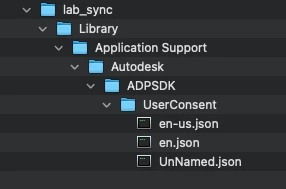
I get around the privacy/data collection popup by deploying this directory & json files (grabbed from an already agreed login) to all user accounts prior to first launch. I don't recall if I made any edits to the files, you might want to take a look & test/edit for your environment.
.
 +2
+2- New Contributor
- January 17, 2023
Just thought I'd share my latest solution to silently install 2023 versions of AutoCAD, Maya & Mudbox with network licenses, while at the login window (aka a lab/classroom install). My goal was to make it as simple to use and to modify as possible. I've been using a variation of methods shared here for years (thanks by the way!) but decided it was time to really get to the bottom of things for myself.
It's a mashup of Autodesk's 'legit' install method with a simplified version of the custom network licensing steps we all know & love. However I do make note of the 'legit' network license registration steps for those who care, or are curious as I was (it does work, I just prefer the custom method). All details are in the script.
I've only deployed to macOS 12.4 Intel & Silicon, so ymmv, but I'm happy to report it's working perfectly for me on over 100 stations so far. Enjoy!
#!/bin/zsh

### Install AutoDesk Combo 2023 (AutoCAD, Maya & MudBox)
### silently @ login window with network licenses (aka multi-user lab/classroom deploy)

### 2022.07.27 by JonW

### Simply update variables/products below the function section as desired
### Read the additional details at the end of the script for more clarity on licensing.

### Ensure:
### 1) installer app(s) re-packed from .dmg by Composer & deployed to /private/tmp (root:wheel 755)
### 2) the network license server is functional
### 3) optionally, that previous Autodesk installations have been removed.
### and if so, you've also unloaded com.autodesk.AdskLicensingService.plist

#################################################


installFunction ()
{
	### Before install, clear quarantine that may step on Setup.app when run at the login window.
	### Also as of 2023, Mudbox still uses a different setup app path with --noui flag NOT --silent
	### Finally, remove the installer app when complete

	/usr/bin/xattr -rc /private/tmp/"${installerApp}"

	if echo "$installerApp" | grep -iq "Mudbox"; then
		/private/tmp/"${installerApp}"/Contents/MacOS/setup --noui
	else
		/private/tmp/"${installerApp}"/Contents/Helper/Setup.app/Contents/MacOS/Setup --silent
	fi

	/bin/rm -rf /private/tmp/"${installerApp}"
}


licenseFunction ()
{
	### based off Onkstons's terrific work (I think they we're the first?) but simplified for 2023.
	### see also, addl details at the end of script for alternative 'legit' licensing method.
	licensePath="/Library/Application Support/Autodesk/AdskLicensingService/${productKey}_${year}.0.0.F"
	/bin/mkdir -p "${licensePath}"
	/usr/bin/touch "${licensePath}/licpath.lic"
	/bin/echo "SERVER ${networkServer} 000000000000" > "${licensePath}/licpath.lic"
	/bin/echo "USE_SERVER" >> "${licensePath}/licpath.lic"

	/Library/Application\\ Support/Autodesk/AdskLicensing/Current/helper/AdskLicensingInstHelper change --pk "${productKey}" --pv "${year}.0.0.F" --lm NETWORK --ls "${networkServer}"
}


#################################################


networkServer="your.network.license.server.here"

### AutoCAD
productKey="777O1"
year="2023"
installerApp="Install Autodesk AutoCAD 2023 for Mac.app"
installFunction
licenseFunction


### Maya
productKey="657O1"
year="2023"
installerApp="Install Maya 2023.app"
installFunction
licenseFunction


### Mudbox
productKey="498O1"
year="2023"
installerApp="Install Mudbox 2023.app"
installFunction
licenseFunction


#################################################

### Verify license details - not required, but kind of nice to see.
/Library/Application\\ Support/Autodesk/AdskLicensing/Current/helper/AdskLicensingInstHelper list
echo "Autodesk network licensing complete"


##################################################


### Additional network license details:
### For those who are curious, or if the above ever ceases to function:

### The 'legit' method for initial silent license registration (using autoCAD as an example) uses the 'register' command instead of 'change'.
### It also requires use of the --cf flag to denote a path to the app's config (.pit) file.

### e.g.
### configFile="/Library/Application Support/Autodesk/ADLM/.config/ProductInformation.pit"
### /Library/Application\\ Support/Autodesk/AdskLicensing/Current/helper/AdskLicensingInstHelper register --pk "${productKey}" --pv "${year}.0.0.F" --cf "${configFile}" --lm NETWORK --ls "${networkServer}"

### The end result is the same as the 'change' method used above (at least after the initial app launch).
### Essentially the 'change' method works backwards to manually create the licpath.lic directory & file,
### then uses the 'change' command to register it.

### Anecdotally, the 'change' method appears to produce a slightly faster initial app launch,
### but it's hard to say which is better.
### Either way, it's good to know both & having handle on the AdskLicensingInstHelper utility helps a lot!

### Check these out >>>
### /Library/Application\\ Support/Autodesk/AdskLicensing/Current/helper/AdskLicensingInstHelper register --help
### /Library/Application\\ Support/Autodesk/AdskLicensing/Current/helper/AdskLicensingInstHelper change --help

### Also, either method seems to deploy fine while at the login window, so no worries there.

### Some good tips & reference:
### https://knowledge.autodesk.com/support/autocad/troubleshooting/caas/sfdcarticles/sfdcarticles/Use-Installer-Helper.html
### https://knowledge.autodesk.com/search-result/caas/CloudHelp/cloudhelp/ENU/Autodesk-Installation-Basic-ODIS/files/ODIS-silent-install-htm.html


### Hope this helps some folks out!
This worked in the Mac Labs at our college. Really appreciate your work on this! Saved me a bunch of time. Deployed Maya 2023 successfully in our Mac Studio lab and pointed to our License server. You Rock!
Enter your E-mail address. We'll send you an e-mail with instructions to reset your password.