Solved

Parallels 12 Business Edition

  • September 6, 2016
  • 9 replies
  • 45 views

Forum|alt.badge.img+6

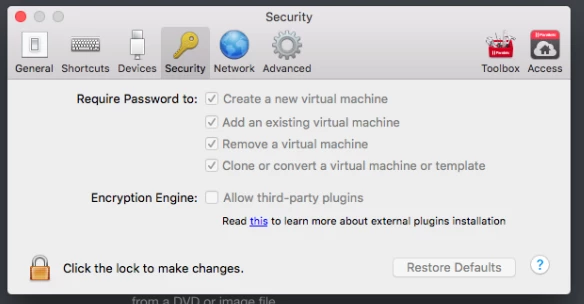
Hi i was wondering if anyone has deployed Parallels 12 with the following restriction Locking down what images they can use Password Protect it so new images cannot be created by users .

i was advised i can do this by a console but i cant seem to find it

In addition i would like to know the following
best way to package it best way to maintain images

Any advise would be grateful as we are looking to test and deploy it this week

Best answer by donmontalvo

Make sure you're using version 1.2.8 of the wrapper. See page 50 for download link.

http://download.parallels.com/desktop/v12/docs/en_US/Parallels%20Desktop%20Business%20Edition%20Administrator's%20Guide.pdf

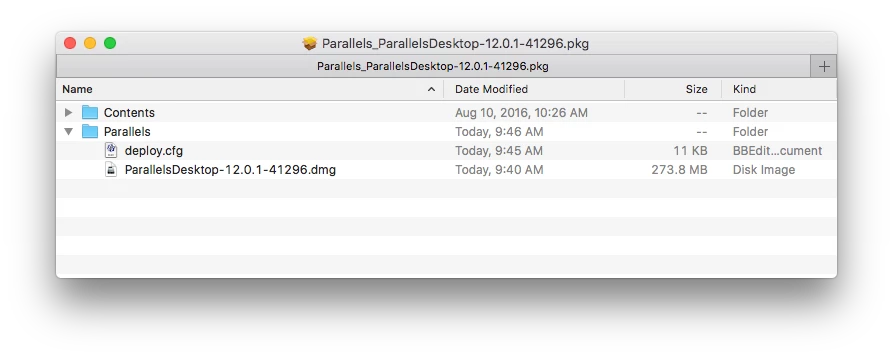
We usually re-name the wrapper to fit our Naming Standards. The only folder you need to go to is the Parallels folder. That's where the deploy.cfg is, and it needs to be edited (add your business license, set to Shared, disable updates, etc.). Add the unaltered Parallels installer DMG into the same folder as deploy.cfg, then upload the PKG to JSS.

I sent an email to the Parallels dev team to please stop using spaces in their URL. ;)

Don

9 replies

Forum|alt.badge.img+13
  • Honored Contributor
  • September 6, 2016

What you're probably looking for is the AutoDeploy Tool Parallels produces. I use it for packaging the installer with the license and a few customizations. When new instances of Parallels release I just generate a new installer via the AutoDeploy tool and then test/vet/deploy. I've not had any experience with lock down of user images but the tool does work pretty well for the things I've needed.

direct download available here


Forum|alt.badge.img+1
  • New Contributor
  • September 6, 2016

Andrew, how are you deploying Parallels via Casper? Every time I import the pkg file with the Parallels DMG built into it, it gets compressed to a Zip file and it won't deploy for me. I think I'm missing a step somewhere with the deployment via Self Service.


Forum|alt.badge.img+6
  • Author
  • Contributor
  • September 6, 2016

Hi i am having issues installing the Auto Deployment tool it fail , can anyone tell me if they experience this issue ,

Has anyone been able to lock down all the settings to not a local admin password


Forum|alt.badge.img+4
  • Contributor
  • September 6, 2016

i have the same issue as ljkelly. also i was never successful to use the auto deploy tools since version 11.

if someone as a good how to i will take it!


donmontalvo
Forum|alt.badge.img+36
  • Hall of Fame
  • Answer
  • September 6, 2016

Make sure you're using version 1.2.8 of the wrapper. See page 50 for download link.

http://download.parallels.com/desktop/v12/docs/en_US/Parallels%20Desktop%20Business%20Edition%20Administrator's%20Guide.pdf

We usually re-name the wrapper to fit our Naming Standards. The only folder you need to go to is the Parallels folder. That's where the deploy.cfg is, and it needs to be edited (add your business license, set to Shared, disable updates, etc.). Add the unaltered Parallels installer DMG into the same folder as deploy.cfg, then upload the PKG to JSS.

I sent an email to the Parallels dev team to please stop using spaces in their URL. ;)

Don


Forum|alt.badge.img+6
  • Author
  • Contributor
  • September 8, 2016

@donmontalvo thank you


donmontalvo
Forum|alt.badge.img+36
  • Hall of Fame
  • July 19, 2017

Parallels Standard/Pro versions now at 12.2.1:

Parallels Desktop 12 for Mac Standard and Pro Edition updates summary

Parallels Business version only shows 12.2.0:

Parallels Desktop 12 for Mac Business Edition updates summary

12.2.1 seems to be required for 10.13 Beta...no love for Mac admins...

Known issues with macOS 10.13 High Sierra and Parallels Desktop for Mac

FWIW, manually installing 12.2.1 over 12.2.0 works, so we opened a ticket with @parallels @Peterson to request an update to their mass deploy tool.


donmontalvo
Forum|alt.badge.img+36
  • Hall of Fame
  • August 18, 2017

Parallels Support responded that 12.2.1 is now supported for Parallels Business.

High Sierra still doesn't work, despite their blog (probably written by a marketing person adept in Photoshop).

https://forum.parallels.com/threads/cannot-create-high-sierra-vm.341506


donmontalvo
Forum|alt.badge.img+36
  • Hall of Fame
  • August 18, 2017

Parallels Support responded that 12.2.1 is now supported for Parallels Business.

As of High Sierra Beta 6, the option to not use APFS is gone, so it won't install...they really should update their blog.

https://forum.parallels.com/threads/cannot-create-high-sierra-vm.341506

I hear Parallels is going through a difficult time, so not holding my breath that this'll be fixed any time soon.

#VMwareFTW