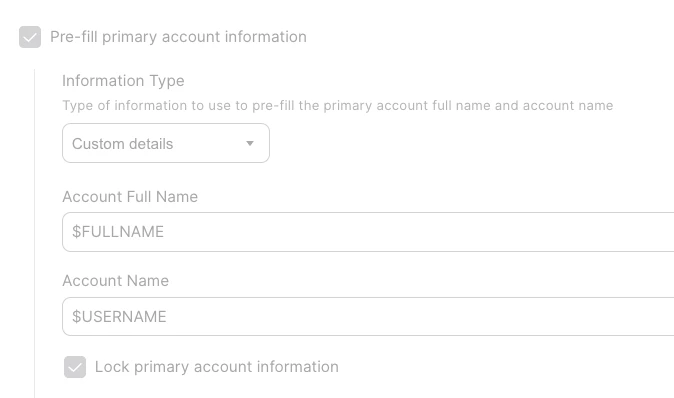
Hi @MehdiYawari,
Great questions! Let me provide documentation-backed answers.
Apple Official Documentation on Account Name (Short Name) Requirements
Apple's macOS Server documentation explicitly defines the allowed characters for account names (short names):
"The short name is typically eight or fewer characters, but can be up to 255 roman characters. Use only the characters a through z, A through Z, 0 through 9, . (period), _ (underscore), or - (hyphen)."
Reference: Apple - Create a user account in macOS Server
While this documentation technically allows both uppercase (A-Z) and lowercase (a-z), the important observation is that macOS Setup Assistant automatically converts suggested account names to lowercase when creating new users. This is intentional behavior built into macOS.
POSIX/Unix Standard Convention
macOS is POSIX-compliant (IEEE Std 1003.1), and while POSIX technically allows uppercase characters in usernames, major Unix/Linux distributions enforce lowercase-only:
- Debian/Ubuntu:
^[a-z][-a-z0-9]*$ - shadow-utils (upstream):
^[a-z_][a-z0-9_-]*[$]$
Reference: systemd.io User/Group Name Syntax
Known Issue: PreStage Enrollment with Uppercase Characters
There is a documented behavior in Jamf Nation where PreStage Enrollment Account Name variables are not applied when the value contains uppercase letters:
- When
$USERNAME or other variables contain capital letters, the value is not pre-filled in the macOS account setup screen - The "Lock primary account information" feature does not work as expected
- This appears to be validation behavior where macOS Setup Assistant rejects uppercase characters for the Account Name field during automated enrollment
Reference: Jamf Nation - PreStage Enrollment Account Name variables are not used if a capital letter is included
Your FileVault Testing Results
Your observation is correct and consistent with expected macOS behavior. macOS login authentication (including FileVault) is case-insensitive – users can type their username in any case and authentication will succeed. However, this doesn't mean uppercase usernames are problem-free:
- The stored username retains its original case
- Case-sensitive scripts and integrations will see the original case
- The filesystem (HFS+/APFS) is case-preserving but case-insensitive by default
Additional Considerations Beyond Scripts
Beyond your VPN certificate/ADCS verification scripts, watch for:
- Certificate Subject/SAN Matching - Many CA systems (including Microsoft ADCS) perform case-sensitive matching
- Kerberos Principal Names - Some implementations are case-sensitive
- SCEP Challenge Validation - May validate username case
- Home Folder Path References - Scripts using
/Users/$USERNAME may fail if case doesn't match - Third-Party Enterprise Applications - VPN clients, security software may have varying case-sensitivity
Recommended Solution
Since the root cause is that Jamf Pro payload variables pass through values as-is from your IdP, the most reliable solution is to implement case transformation at the IdP level. For Entra ID, you can use the ToLowercase() claim transformation:
- In Microsoft Entra admin center, navigate to Entra ID > Enterprise apps > [Your Jamf Pro App]
- Select Single sign-on > Attributes & Claims > Edit
- For the username claim, set Source to Transformation and apply ToLowercase() to your source attribute
Reference: Microsoft - Customize SAML token claims
This ensures the username is converted to lowercase before it reaches Jamf Pro, resolving both the PreStage Enrollment issue and ensuring consistency across all downstream systems.