
Question

Payload Variables for Configuration Profiles are in capital letters

  • December 15, 2025
  • 6 replies
  • 44 views

Forum|alt.badge.img+7

Hi everyone
is it possible to get the result of the variable for configuration profile in lower case?
Currently I have configured “Lock primary account information” with variables(see screenshot)
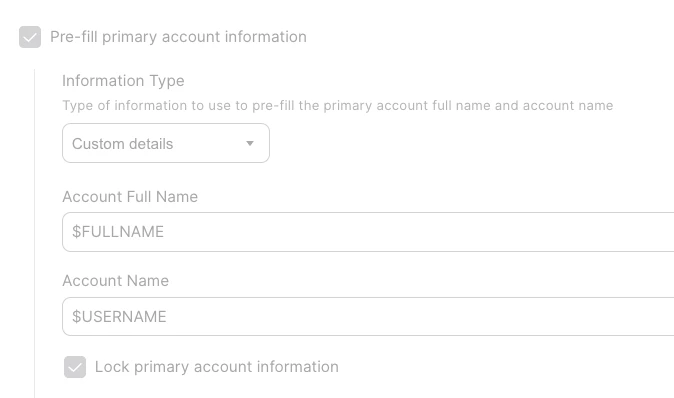
 

The result of the variable is always in upper case. it is possible to change it to lower case? if yes then how?

 

6 replies

h1431532403240
Forum|alt.badge.img+3

Hi MehdiYawari,

This is actually an important issue to address. macOS expects the account short name (username) to be lowercase - this is Apple's long-standing convention based on Unix standards. Using uppercase in the Account Name field during Setup Assistant can cause issues, including the "Lock primary account information" feature not working properly when the value contains capital letters.

The root cause: Jamf Pro's payload variables like $USERNAME simply pass through whatever value is stored in the inventory - there's no built-in function to transform the case. If your source data (from Azure AD, Okta, or wherever you're syncing users from) contains uppercase characters, that's exactly what gets passed to the configuration profile.

Recommended solutions:

  1. Fix at the source (preferred) - Check your identity provider or LDAP mapping configuration. The sAMAccountNameor username attribute should ideally be lowercase when synced to Jamf Pro. Many organizations configure their IdP to normalize usernames to lowercase.
  2. Jamf Pro user attribute mapping - Review how the username is being populated in Jamf Pro. If you're using LDAP User Mapping or SCIM provisioning, you may be able to adjust which attribute is mapped and ensure it's lowercase.
  3. Submit a Feature Request - Jamf currently doesn't support variable modifiers (like $USERNAME:lowercase). You could submit a feature request to Jamf for case transformation options on payload variables through Jamf Nation or your account team.

What identity provider are you using for user data? That would help narrow down where the case transformation should happen.


Forum|alt.badge.img+7
  • Author
  • Contributor
  • January 14, 2026

Hi ​@h1431532403240 
We use Entra ID as our IDP.
I thought of your first recommendation. I think we could create a new Claim to get the username in lower-case.  

Still I am trying to figure out, if it is possible to get the $username in lowercase with Jamf Pro attribute mapping. So far I havent found anything.

The Feature Request is a good idea. But dont think Jamf would implement it any time soon.


Forum|alt.badge.img+7
  • Author
  • Contributor
  • January 14, 2026

In Jamf Pro User extension attribute, I only have the Input Type: Text and Popup menu. No Directory Service Attribute
By Jamf Pro Computer extension attribute, I have Directory Service Attribute.


h1431532403240
Forum|alt.badge.img+3
  • New Contributor
  • January 14, 2026

Hi ​@MehdiYawari,

Thanks for confirming you're using Entra ID – that actually gives us a clear path forward!

Good news: Entra ID has built-in lowercase transformation

You can configure a claim transformation directly in Entra ID to convert the username to lowercase before it's sent to Jamf Pro. Here's how:

  1. In the Microsoft Entra admin center, navigate to Entra ID > Enterprise apps > All applications
  2. Select your Jamf Pro SAML application
  3. Click Single sign-on in the left menu
  4. Under Attributes & Claims, click Edit
  5. Either modify the existing claim or Add new claim for the username
  6. For the Source, select Transformation
  7. Apply the ToLowercase() transformation to your source attribute (e.g., user.userprincipalname or user.samaccountname)
  8. Save the configuration

You can use the Test transformation feature to verify the output before deploying.

Reference: Customize SAML token claims - Microsoft identity platform

Regarding Jamf Pro User Extension Attributes

You're correct that User Extension Attributes only support Text and Popup menu input types – they don't have the LDAP Attribute Mapping option. This is by design:

  • Computer Extension Attributes can use LDAP Attribute Mapping because they query LDAP based on the assigned username during inventory collection
  • User Extension Attributes are tied to User objects in Jamf Pro's database, not directly to LDAP queries in the same way

So for your specific use case (Pre-fill primary account information with lowercase username), the IdP claim transformation is really the right approach. The username value that Jamf Pro receives and stores in inventory will already be lowercase, and that's what $USERNAME will pass through to the Configuration Profile.

Let me know if you need help with the specific Entra ID configuration steps!


Forum|alt.badge.img+7
  • Author
  • Contributor
  • January 14, 2026

Thank you very much for your detailed information.
 

I discussed it this in our Team. We have had user initiated enrollment for years now and want to switch to ADE enrollment now.
Do you have some Information and documentation to share, on why macOS needs to be in lower-case or can the usernames be all in upper-case?
your experience?
We dont have much experience in this case.
Currently, we have an issue with our scripts as they expected to local username to be in lower-case.
We have these script to verify that the user has created the local username correctly, as it would cause a problem with User-level configuration profile that we use for our VPN certificate(ADCS).
Once the scripts are updated, the verification should succeed.
another point that we have tested for a better user experience is that If the username is in upper-case, the user must log in to the mac(fielvault login) in upper-case or the authentication would fail.
We tested it and that is not the case. Even if  the username is upper-case, the user can enter his credentials in lower-case and the authentication succeeds

What else are we missing?


h1431532403240
Forum|alt.badge.img+3
  • New Contributor
  • January 14, 2026

Hi ​@MehdiYawari,

Great questions! Let me provide documentation-backed answers.

Apple Official Documentation on Account Name (Short Name) Requirements

Apple's macOS Server documentation explicitly defines the allowed characters for account names (short names):

"The short name is typically eight or fewer characters, but can be up to 255 roman characters. Use only the characters a through z, A through Z, 0 through 9, . (period), _ (underscore), or - (hyphen)."

Reference: Apple - Create a user account in macOS Server

While this documentation technically allows both uppercase (A-Z) and lowercase (a-z), the important observation is that macOS Setup Assistant automatically converts suggested account names to lowercase when creating new users. This is intentional behavior built into macOS.

POSIX/Unix Standard Convention

macOS is POSIX-compliant (IEEE Std 1003.1), and while POSIX technically allows uppercase characters in usernames, major Unix/Linux distributions enforce lowercase-only:

  • Debian/Ubuntu: ^[a-z][-a-z0-9]*$
  • shadow-utils (upstream): ^[a-z_][a-z0-9_-]*[$]$

Reference: systemd.io User/Group Name Syntax

Known Issue: PreStage Enrollment with Uppercase Characters

There is a documented behavior in Jamf Nation where PreStage Enrollment Account Name variables are not applied when the value contains uppercase letters:

  • When $USERNAME or other variables contain capital letters, the value is not pre-filled in the macOS account setup screen
  • The "Lock primary account information" feature does not work as expected
  • This appears to be validation behavior where macOS Setup Assistant rejects uppercase characters for the Account Name field during automated enrollment

Reference: Jamf Nation - PreStage Enrollment Account Name variables are not used if a capital letter is included

Your FileVault Testing Results

Your observation is correct and consistent with expected macOS behavior. macOS login authentication (including FileVault) is case-insensitive – users can type their username in any case and authentication will succeed. However, this doesn't mean uppercase usernames are problem-free:

  • The stored username retains its original case
  • Case-sensitive scripts and integrations will see the original case
  • The filesystem (HFS+/APFS) is case-preserving but case-insensitive by default

Additional Considerations Beyond Scripts

Beyond your VPN certificate/ADCS verification scripts, watch for:

  • Certificate Subject/SAN Matching - Many CA systems (including Microsoft ADCS) perform case-sensitive matching
  • Kerberos Principal Names - Some implementations are case-sensitive
  • SCEP Challenge Validation - May validate username case
  • Home Folder Path References - Scripts using /Users/$USERNAME may fail if case doesn't match
  • Third-Party Enterprise Applications - VPN clients, security software may have varying case-sensitivity

Recommended Solution

Since the root cause is that Jamf Pro payload variables pass through values as-is from your IdP, the most reliable solution is to implement case transformation at the IdP level. For Entra ID, you can use the ToLowercase() claim transformation:

  1. In Microsoft Entra admin center, navigate to Entra ID > Enterprise apps > [Your Jamf Pro App]
  2. Select Single sign-on > Attributes & Claims > Edit
  3. For the username claim, set Source to Transformation and apply ToLowercase() to your source attribute

Reference: Microsoft - Customize SAML token claims

This ensures the username is converted to lowercase before it reaches Jamf Pro, resolving both the PreStage Enrollment issue and ensuring consistency across all downstream systems.