Question

Policy quick view issue after Jamf Pro 10.11.1 upgrade

  • April 15, 2019
  • 8 replies
  • 30 views

Forum|alt.badge.img+7

Our Jamf Pro (Cloud) was recently upgraded to 10.11.1. I cannot quick view any policies anyone else having the same issue?

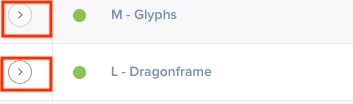
Each time I want to view the contents of the policy I have to click to open it up.
8 replies

PatrickD
Forum|alt.badge.img+9
  • Valued Contributor
  • April 15, 2019

Could be wrong, but have you flushed your browser cache? Not uncommon to encounter UI issues when the cache isn't flushed after an upgrade.


Forum|alt.badge.img+7
  • Author
  • Contributor
  • April 15, 2019

Thanks tried that and tried using a different user account, different web browsers no luck. I have reported it to Jamf support.


ImAMacGuy
Forum|alt.badge.img+23
  • Esteemed Contributor
  • April 16, 2019

I've noticed some weird UI quirks too since the cloud was updated to 10.11.1.
Glad to see it's not my imagination.


Forum|alt.badge.img+8
  • Contributor
  • April 16, 2019

Hi I had this problem as well..

It seems to be a PI but not yet confirmed.

As a workaround, increase the 'Show' count at the bottom. (and refresh the page) should work

EDIT: btw an auditor user seems to be unable to expand the policy's no matter what you do .


Forum|alt.badge.img+26
  • Honored Contributor
  • April 16, 2019

Same boat. On prem updated from 10.9 to 10.11.1. Since the upgrade, clicking on the arrow next to a policy does not show the details about the policy. I've tried different browsers. Near the Filter field, it shows we have 210 policies.

Work around - adjusting the Show value to either 500 or 1000 does allow the quick view details to appear. (I suggest refreshing the page after changing the Show value.


JasonAtCSUMB
Forum|alt.badge.img+6
  • Contributor
  • April 16, 2019

I have the same problem in Jamf 10.11.1. Tried Chrome 73.0.3683.103 (Mac) and Safari 12.1. Cleared caches.


Forum|alt.badge.img+6
  • Contributor
  • April 18, 2019

It seems that sometimes the first item in a category works and then the rest of the category does not for some reason. Experiencing this issue as well.


Forum|alt.badge.img+11
  • Contributor
  • May 30, 2019

After setting the show value to 500 or more and refreshing I can now see that some policies do expand, but not all.

filtering or searching policies, is also a hit and miss to expand the policy view.