
Question

Populating PreStage with MUT

  • August 26, 2021
  • 6 replies
  • 68 views

Forum|alt.badge.img+4

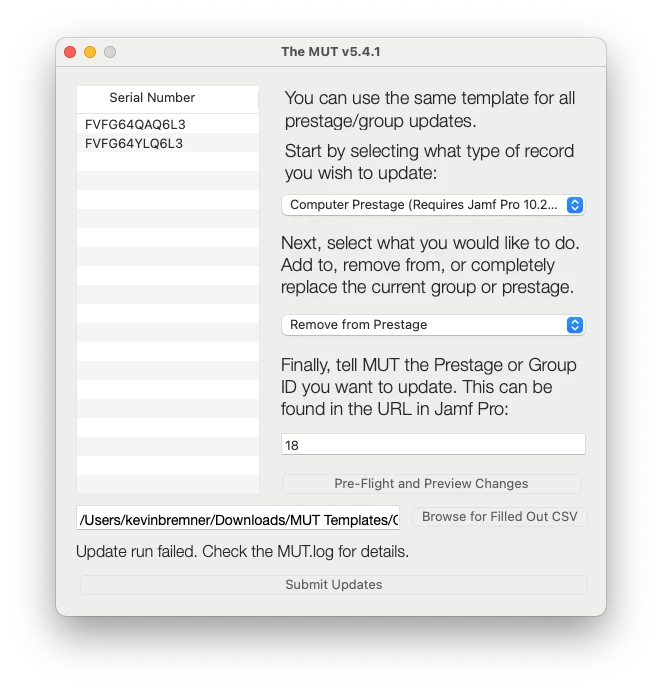
I'm trying to change some computer Prestage assignments using the MUT tool but having difficulty. In MUT I have selected 'Remove from Prestage' and then input the appropriate id# but when I run it it errors out with "404 error: Computer Prestage with id 18 does not exist". Except it does. Is this an issue others have had or am I doing something wrong?

MUT screen:
URL from browser:

 

Log results:

2021-08-26 04:03:50 [INFO ]: Token has 222 seconds left to live. Proceeding with current token. 2021-08-26 04:03:50 [INFO ]: Beginning CSV Parse - Scope update. 2021-08-26 04:03:50 [INFO ]: Getting current prestage scope from https://mtbluersd.jamfcloud.com/uapi/v2/computer-prestages/18/scope 2021-08-26 04:03:50 [ERROR ]: Failed GET. 404. 2021-08-26 04:03:50 [ERROR ]: { "httpStatus" : 404, "errors" : [ { "code" : "INVALID_ID", "description" : "Computer Prestage with id 18 does not exist", "id" : "18", "field" : "id" } ] } 2021-08-26 04:03:50 [INFO ]: Updating the current prestage scope at https://mtbluersd.jamfcloud.com/uapi/v2/computer-prestages/18/scope/delete-multiple 2021-08-26 04:03:50 [ERROR ]: Failed scope update. 404. 2021-08-26 04:03:50 [ERROR ]: { "httpStatus" : 404, "errors" : [ { "code" : "INVALID_ID", "description" : "Computer Prestage with id 18 does not exist", "id" : "18", "field" : "id" } ] }


6 replies

Forum|alt.badge.img+8
  • Contributor
  • August 27, 2021

I would go to the App Store and download MUT Classic as this will try to submit the devices one by one whereas MUT v5 submits the list all at once. https://apps.apple.com/us/app/mut-classic/id1473487226?mt=12 


After downloading it I would toggle on Advanced Debugging in the Settings pane on the App Menu Bar


Forum|alt.badge.img+4
  • Author
  • Contributor
  • August 27, 2021

I would go to the App Store and download MUT Classic as this will try to submit the devices one by one whereas MUT v5 submits the list all at once. https://apps.apple.com/us/app/mut-classic/id1473487226?mt=12 


After downloading it I would toggle on Advanced Debugging in the Settings pane on the App Menu Bar


I thought about that but Prestage isn't one of the attribute options to update.


Forum|alt.badge.img+8
  • Contributor
  • August 27, 2021

I thought about that but Prestage isn't one of the attribute options to update.


Are the devices unassigned from a prestage and pointed at your production server? 


Forum|alt.badge.img+4
  • Author
  • Contributor
  • August 27, 2021

Are the devices unassigned from a prestage and pointed at your production server? 


No, they are currently in a prestage. I want to remove them so I can put them in a different prestage. 


Forum|alt.badge.img+8
  • Contributor
  • August 27, 2021

No, they are currently in a prestage. I want to remove them so I can put them in a different prestage. 


So what I would try is to manually remove them from their current Prestage and then add them using MUT to see if that works? I can't say that I've run into many issues using MUT


Forum|alt.badge.img+10
  • Contributor
  • October 21, 2021

@ChaseEndy @kbremner MUT v6 has a fix for this. 🙂

MUT v6 will fall back to "classic mode" if you have a group or prestage update that fails. https://community.jamf.com/t5/jamf-pro/mut-v6-0-0-is-now-available/m-p/249538

EDIT: I just re-read your post. It appears the issue is actually that you do not have a Computer Prestage with ID of 18 in your environment. Those look like they could possibly be mobile device Serial Numbers. Is it possible that you are attempting to add Mobile Devices to a Computer Prestage, but used the Mobile Device Prestage ID?