Question

Popup to allow Jamf access to Finder - Privacy Profile installed allowing jamf already Jamf 10.9

  • December 21, 2018
  • 8 replies
  • 62 views

Forum|alt.badge.img+4

I just updated our jamf environment to 10.9 so we could utilize the Privacy Settings Configuration profile and enabled some apps to have Full Disk Access. The Jamf binaries are supposed to be enabled by default it seems as there is a separate Privacy Config Profile just for that. Even after that profile is applied there is still a user prompt to allow Jamf access to finder. Has anybody else seen that?

If I open a terminal window and type in "sudo jamf recon" I also get a complaint to let terminal access calendar/photos etc.. But its using the jamf executable so why wouldn't that be allowed?

Thanks!

8 replies

Forum|alt.badge.img+15
  • Valued Contributor
  • December 21, 2018

The profile that Jamf auto pushes covers the bare minimum for Jamf to install itself/operate. If you're getting additional requests to control Finder/etc then there's something in your standard config or enrollment process that requires whitelisting for some AppleEvents. Check out this profile, and you should be good to go.


Forum|alt.badge.img+4
  • Author
  • Contributor
  • December 28, 2018

Thanks for the response. I had seen that link before. It doesn't seem to fix the issue with terminal though either. Is there a way to use that profile and add in terminal to whitelist? What if I want to whitelist other applications as well?


Forum|alt.badge.img+4
  • Author
  • Contributor
  • December 28, 2018

I just came across the PPPC_Utility looks like it lets me build custom profiles easily that way. https://github.com/jamf/PPPC-Utility/releases.

If I choose "to Allow All Files" Do I sitll need to allow all the other items like Photos/Calendar and even specify the Apple Events like SystemUIServer and Finder? Hoping "allow All" is all encompassing and just means that app can do anything?


Forum|alt.badge.img+15
  • Valued Contributor
  • December 28, 2018

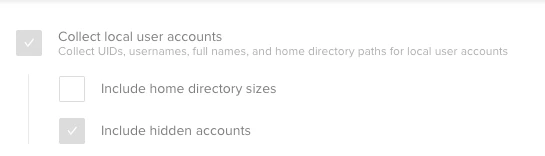
@jerdill For Terminal you'll want full disk access to lower the chance of permissions/access issues in Mojave when running commands/scripts. The most common reason I've seen a permissions pop-up for Photos/Calendar/etc from Terminal is because your Inventory Collection settings in Jamf are set to "Include home directory sizes."

If you really need/want that data you'll need to add those things into the profile. As you've discovered "All Files" doesn't really mean all files. Check out my Terminal profile as an example, although I don't include Photos/Calendars/Address Book/Reminders.


Forum|alt.badge.img+10
  • Valued Contributor
  • December 28, 2018

I'm using the PPPC Utility. I have a BASH script that I use "Platypus" with that takes my BASH script and creates a .APP file

For some reason I cannot import my app into the PPPC utility.

Would anyone know why I cannot do this?

Thanks in advance.


Forum|alt.badge.img+12
  • Contributor
  • December 28, 2018

@Chuey is it code signed? I think that is a requirement.


Forum|alt.badge.img+10
  • Valued Contributor
  • December 28, 2018

@marklamont Originally it was not -- I made an independent discussion regarding my specific situation and I was able to manually sign my .app with a cert i created in my developer account, then loaded it into PPPC Utility, and added "Finder" to "Apple Events > Allow", upload to my JSS and bang -- it works!


Forum|alt.badge.img+12
  • Valued Contributor
  • July 18, 2020

@sshort The profile at https://github.com/rtrouton/privacy_preferences_control_profiles/tree/master/Privacy%20Settings%20Whitelist%20-%20Jamf%20Notifications/Unsigned worked for my environment. Thanks for sharing that! It sure saved me hours from experimenting with my own solution to get rid of those popups to allow Jamf access to the Finder.