Question

PreStage Imaging broken when a configuration is use and the PreStage is set to automatically run - PI-005827

  • May 3, 2018
  • 5 replies
  • 48 views

Forum|alt.badge.img+10

I ran into a problem with JAMF Pro 10.3.0, 10.3.1, and 10.4.0 running on Mac and Windows, were our current PreStage Image payload, which is set to automatically run, it fails by asking for credentials.
Even when the box for "Require login for PreStage Imaging and Autorun imaging" in Computer Management >> Security is uncheck.
This issue only occurs when a configuration is set in the payload/profile.
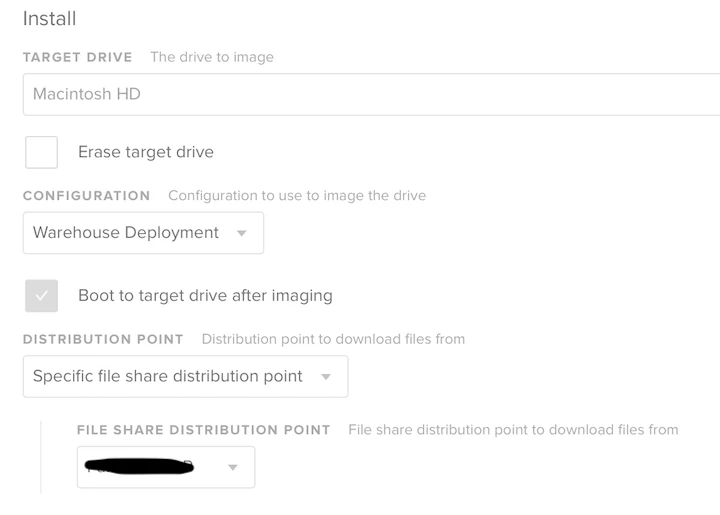
If I remove the configuration and add the packages and scripts manually, the PreStage Imaging works.

Have anyone seen this?
I want to raise the level of importance for this product issue. Even with a workaround, it is not convenient. We have also notice in our testing, that with the workaround, the device do not get managed. So I am currently testing if by adding the QuickAdd to the packages, it solves this of the device not getting manage.

For reference, here is the number: PI-005827

5 replies

Forum|alt.badge.img+6
  • Contributor
  • May 3, 2018

isradame,

ALL imaging is broken in 10.3+. I'm told it may have to do with complex characters in passwords - but I'm not about to test that!


Forum|alt.badge.img+10
  • Author
  • Contributor
  • May 3, 2018

I don't have complex passwords, this PI is an add on I guess to the password complex issues.
This issue is only for when a PreStage Imaging has a configuration in it.

But thanks for the additional information.


Forum|alt.badge.img+11
  • Contributor
  • June 21, 2018

Just want to add my experience here, as well. My DEV server is 10.4.0 and I've not been able to get "Image Automatically" to work. I had done some initial testing in our Production JSS (which is still on 10.3.1 FWIW) and it seemed to work. I stopped working in Production after my first test or so, so I may need to go back and try a bit more.

For clarification, I have tried both using the package and script installs directly in the PreStage Imaging AND with a Configuration, but neither worked for me.

UPDATE: OK, I was incorrect. The original issue described is, in fact, what I'm seeing, as well. Choose a configuration, it doesn't work. Choose no configuration, but add all the same packages and scripts, then it works.

What I'm noticing, however, is that when it "works" I'm ending up with an Unmanaged machine. Is that a side effect anyone else is seeing?


Forum|alt.badge.img+7
  • Contributor
  • June 25, 2018

file a support ticket, there's a workaround for this issue that technical support is aware of.


L3nny5
Forum|alt.badge.img+8
  • Contributor
  • September 11, 2018

I guess still not fixed?