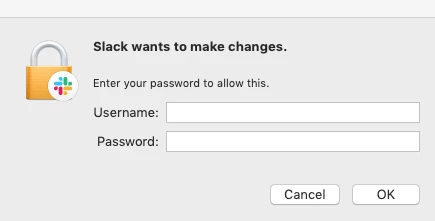
Hi,
we're currently running our mac's with automatic install scripts via jamf.
Our users don't have admin privilegues.
When they update Slack (which is simply a new installation of the most recent client), it always shows the dialogue mentioned in the subject or attached screenshot on every app start, until someone types in admin creds.
If you click on cancel, the app still starts. But the pop-up on every start is still anoying.
I do get an output from terminal saying:
May 10 11:58:30 Slack[21065]: DEPRECATED USE in libdispatch client: dispatch source activated with no event handler set; set a breakpoint on _dispatch_bug_deprecated to debug
May 10 11:58:30 SecurityAgent[21094]: objc[21094]: Class TKTokenRefImpl is implemented in both /System/Library/Frameworks/Security.framework/Versions/A/Security (0x7fff9712afa8) and /System/Library/Frameworks/Security.framework/Versions/A/MachServices/SecurityAgent.bundle/Contents/MacOS/SecurityAgent (0x10522fce8). One of the two will be used. Which one is undefined.
May 10 11:58:30 SecurityAgent[21094]: objc[21094]: Class TKTokenRefCtkd is implemented in both /System/Library/Frameworks/Security.framework/Versions/A/Security (0x7fff9712afd0) and /System/Library/Frameworks/Security.framework/Versions/A/MachServices/SecurityAgent.bundle/Contents/MacOS/SecurityAgent (0x10522fd10). One of the two will be used. Which one is undefined.
May 10 11:58:31 SecurityAgent[21094]: DEPRECATED USE in libdispatch client: dispatch source activated with no event handler set; set a breakpoint on _dispatch_bug_deprecated to debug
No system.log output when i press cancel, neither when i enter the admin credentials.
Any ideas how i can fix that?