
Solved

Printer Preset as Default

  • June 6, 2017
  • 10 replies
  • 183 views

Forum|alt.badge.img+5

Hi All,

I feel like I am missing something very simple here, but I can't seem to work it out.

We have a DMG which pushes out B&W and Colour Presets for our printers. This was created a long time ago during our JAMF Kick Start and has worked ever since. We are replacing our printers shortly and will be using a Windows Printer Server.

When I install the Print Server Queue, and then install the DMG, it installs our presets as desired, but they aren't set as default. This means users won't use them.

So currently on MS Word it shows "Default Settings" under presets (below)

but I want it to have "B&W" as the default as per below
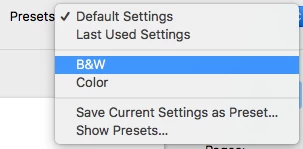

I have loaded up composer and taken a snapshot of me holding the ALT key and printing as B&W, created a DMG and pushed it out with the fill directories options ticked. I thought this would save the preference files, but it doesn't seem work.

We can't really afford to go round and do this on 200 end user machines, and I'm sure it can be scripted in some way, I just can't work it out!

Any help will be greatly appreciated!

Best answer by kerouak

Set all your presets, then deploy the com.apple.print.custompresets.plist file to users.

Bobs your uncle etc. etc.

:-)

10 replies

mkolb
Forum|alt.badge.img+8
  • Contributor
  • June 6, 2017

Hi,

on a client, where the printer is already installed, go to the terminal and type

 lpoptions -l

This will show you all options, which are available for the printer driver. If you add a printer in terminal, using this options, you can define which should be default, for example black and white printing. We using this and the command for our printers looks like this:

lpadmin -p PRINTERNAME -E -v lpd://PRINTSERVER/QUEUENAME -o printer-is-shared=false -P "PATH TO PRINTER-DRIVER" -o ColorModel=Gray -o Duplex=DuplexNoTumble -o Option19=One -o Option27=True -o Option25=True -o Option21=True -o Option22=True -o Option17=DF770 -o Option18=HardDisk

To know what all this option numbers mean, you would have to use the first command. Also, depending on your used printer model, this options could have different names, for example real ones instead of just numbers.

Hope this helps a little bit!

Greetings,
Marco


Forum|alt.badge.img+5
  • Author
  • Contributor
  • June 6, 2017

Hi Marco,

Thank you for your response!

Would this allow users to still select colour if they wished though? We have B&W usually as the default, then users can select Colour if required?


mkolb
Forum|alt.badge.img+8
  • Contributor
  • June 6, 2017

Yes, this just defines the default, but of course this settings can be changed for individual print jobs.


Forum|alt.badge.img+13
  • Valued Contributor
  • Answer
  • June 6, 2017

Set all your presets, then deploy the com.apple.print.custompresets.plist file to users.

Bobs your uncle etc. etc.

:-)


Forum|alt.badge.img+13
  • Valued Contributor
  • June 6, 2017

Copy to /Library/Preferences.

Available to all users.


Forum|alt.badge.img+5
  • Author
  • Contributor
  • June 6, 2017

Thank you @kerouak

This worked, but I had to make sure the computer rebooted, otherwise changes didn't take effect!


Forum|alt.badge.img+2
  • New Contributor
  • June 6, 2017

@billystanton I use

killall cfprefsd

at the end of the install and it seems to load them without having to reboot.


Forum|alt.badge.img+4
  • New Contributor
  • June 7, 2018

@kbingham is this still the case? I cannot get Presets to show up

I made a script:
killall cfprefsd
that runs after the Preference files are installed and its not showing up

I restarted the computer to see if the rest of the policy works and the presets do show up


Forum|alt.badge.img+1
  • New Contributor
  • January 9, 2019

@rocrusso

Same issue here...still requires a restart for presets to show. Would love to avoid a reboot for our policy.


Forum|alt.badge.img
  • New Contributor
  • April 1, 2019
defaults import <domain> <filename>

seems to apply immediately without the need to kill the cfprefsd process, but this is per-user.