Solved

Prohibit Internet Sharing?

  • Apr 25, 2012 9:51 PM UTC
  • 24 replies
  • 412 views

Forum|alt.badge.img+18

Hi folks,

I am looking for a way to prohibit enabling of Internet Sharing since it can be a pretty serious security risk. I was able to do it with Quest's QAS group policies, but we've stopped using that product.

Is there a way to granularly disable Internet Sharing permanently using managed preferences?

Thanks!

Best answer by talkingmoose

Is this assuming your users are admins on their own machines? If they're Standard users then they cannot enable this feature.

You can use MCX to force Internet Sharing off.

Apply Setting To: System Level Enforced
Domain: com.apple.MCX
Key Name: forceInternetSharingOff
Key Type: boolean
Value: true

View original

24 replies

talkingmoose
Forum|alt.badge.img+36
  • Community Manager
  • Answer
  • Apr 25, 2012 10:09 PM UTC

Is this assuming your users are admins on their own machines? If they're Standard users then they cannot enable this feature.

You can use MCX to force Internet Sharing off.

Apply Setting To: System Level Enforced
Domain: com.apple.MCX
Key Name: forceInternetSharingOff
Key Type: boolean
Value: true


Forum|alt.badge.img+18
  • Author
  • Contributor
  • Apr 25, 2012 10:26 PM UTC

Thanks, I'll give this a try, I'm surprised it's not listed in the existing preferences for com.apple.MCX.

Edit: Worked like a champ! I appreciate the quick and accurate response.


talkingmoose
Forum|alt.badge.img+36
  • Community Manager
  • Apr 25, 2012 10:31 PM UTC

I used Workgroup Manager on my own computer and found I could set this specific preference via the GUI. Once I did that I went to the Details tab to view the actual preference settings.

The JSS has lots of templates but not everything.


Forum|alt.badge.img+18
  • Author
  • Contributor
  • Apr 25, 2012 10:36 PM UTC

Good to know, I've never used Workgroup Manager before so I know where to go now. Teach a man to fish, and all that.


Forum|alt.badge.img+13
  • Valued Contributor
  • Apr 25, 2012 10:36 PM UTC

Is there a document outlining the other keys to manage the other shared services in the same way?


talkingmoose
Forum|alt.badge.img+36
  • Community Manager
  • Apr 26, 2012 7:58 PM UTC

That's part of what manifests do. They're not straight-forward documentation but they allow you to view your options. They should contain human readable descriptions of each preference setting. (Not all applications include their own manifest files and not all manifest files contain a complete list of keys and value settings.)

For most of the Mac OS X system and application settings Casper users can do this:

  1. Locate /System/Library/CoreServices/ManagedClient.app
  2. Right-click or Control-click the file and select Show Package Contents.
  3. Navigate to Contents/Resources/.
  4. Select any one of the 26 manifest files you see there. I'll use com.apple.MCX as an example.
  5. Right-click or Control-click the com.apple.MCX.manifest file and select Show Package Contents.
  6. Navigate to Contents/Resources/com.apple.MCX.manifest.
  7. Use any text editor to open and view this file. You can also import it into the JSS under Managed Preferences to view the descriptions there and create a preference setting.

This particular manifest contains about 25 settings such as:

  • Create Portable Home Directory
  • Time Zone
  • Time Server
  • Disable Guest Account
  • Require Admin For AirPort Network Change

In this case note that the forceInternetSharingOff key isn't even mentioned in the manifest. It's undocumented. I only found this because I used Workgroup Manager to make the setting and then looked under the Details tab to see what changed.


Forum|alt.badge.img+5
  • New Contributor
  • Jul 20, 2012 4:54 PM UTC

I imported com.apple.MCX.manifest but I do not see the ForceIntenetSharingOff key. Am I looking at the wrong place?

I pulled up Workgroup Manager and saw the detail does point to com.apple.MCX. I just do not see it in JSS when I import the manifest.

Can someone please point me to the right place to find this key? Thanks.


mm2270
Forum|alt.badge.img+24
  • Legendary Contributor
  • Jul 20, 2012 5:12 PM UTC

See William's first post above (the one marked as the Answer) You can set this manually in the JSS rather than importing it. He mentions above that importing com.apple.MCX doesn't actually show the forceInternetSharingOff key.

Just choose "Create Managed Preference" in your JSS and then set up the options as outlined above.


Forum|alt.badge.img+10
  • Contributor
  • Jul 21, 2012 10:46 PM UTC

I just wrote a script/LaunchDaemon that checks if Ethernet is connected then it turns off the power to the airport. Not exactly what you are looking for but will accomplish this. Let me know if you would like it.


Forum|alt.badge.img+3
  • New Contributor
  • Jul 22, 2012 6:12 PM UTC

Hi Matt, I would be interested in the script you wrote - thanks!

Susan Spanovich
sspanovich@lifetimefitness.com


Forum|alt.badge.img+10
  • Contributor
  • Jul 24, 2012 7:02 PM UTC

Matt,

Are you able to share your script/launch damon? That sounds exactly like what I've been looking for.

Thanks!

-Greg K


Forum|alt.badge.img+4
  • Contributor
  • Apr 10, 2014 10:36 PM UTC

Hi Matt, I would be interested in the script you wrote Please and thank you in advance


Forum|alt.badge.img+2
  • New Contributor
  • Feb 20, 2015 7:05 PM UTC

Thread resurrection, I know, but I wanted to add that you can also do this with Profile Manager with the Custom Settings payload. com.apple.MCX for the preference domain, "forceInternetSharingOff" for the key, "Boolean" for the type and then check the box.


Forum|alt.badge.img+7
  • Contributor
  • Feb 22, 2016 5:34 PM UTC

Is there a way to do this using MDM Configuration profile.


Forum|alt.badge.img+9
  • Contributor
  • Feb 22, 2016 5:41 PM UTC

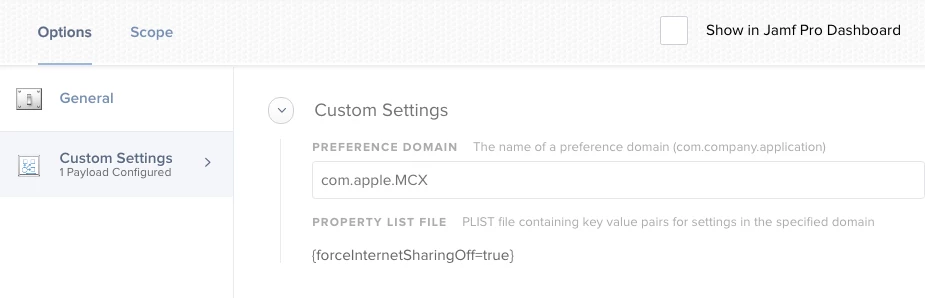
Yes, however it's effectively doing it in the same manner.

Custom Settings

com.apple.MCX
Property List File
PLIST file containing key value pairs for settings in the specified domain
{forceInternetSharingOff=true}


Forum|alt.badge.img+4
  • Contributor
  • Nov 20, 2018 3:35 PM UTC

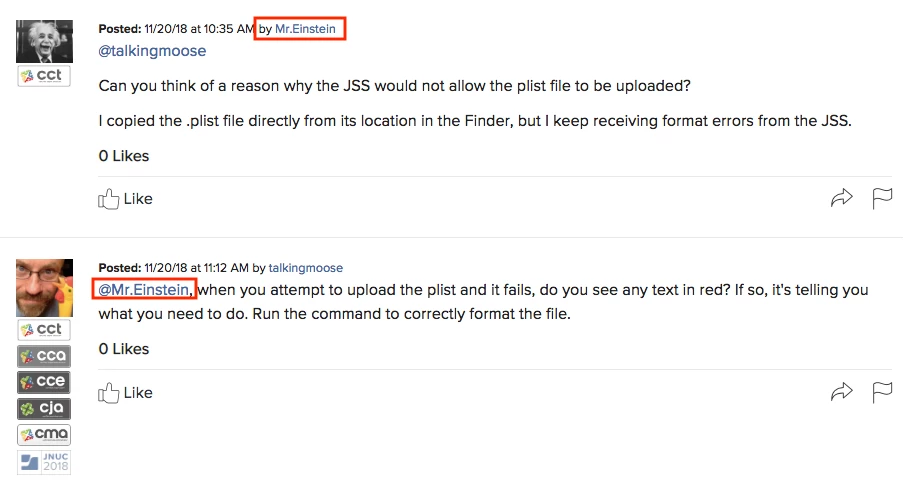
@talkingmoose

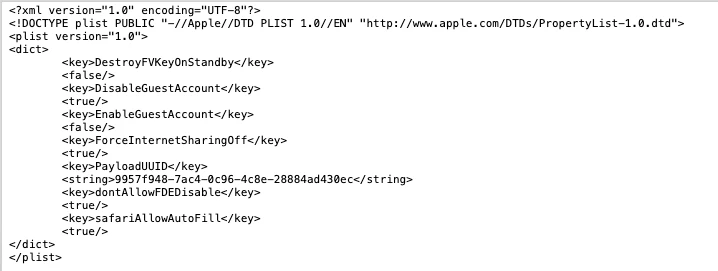
Can you think of a reason why the JSS would not allow the plist file to be uploaded?

I copied the .plist file directly from its location in the Finder, but I keep receiving format errors from the JSS.


talkingmoose
Forum|alt.badge.img+36
  • Community Manager
  • Nov 20, 2018 4:12 PM UTC

@Mr.Einstein, when you attempt to upload the plist and it fails, do you see any text in red? If so, it's telling you what you need to do. Run the command to correctly format the file.


donmontalvo
Forum|alt.badge.img+36
  • Hall of Fame
  • Nov 29, 2018 3:23 AM UTC

This came up today, so figured I'd search here first to see if what we've done in the past is still the right approach.

Found this thread, and these last two posts...you've GOT to appreciate the subtle irony and humor. :) #priceless

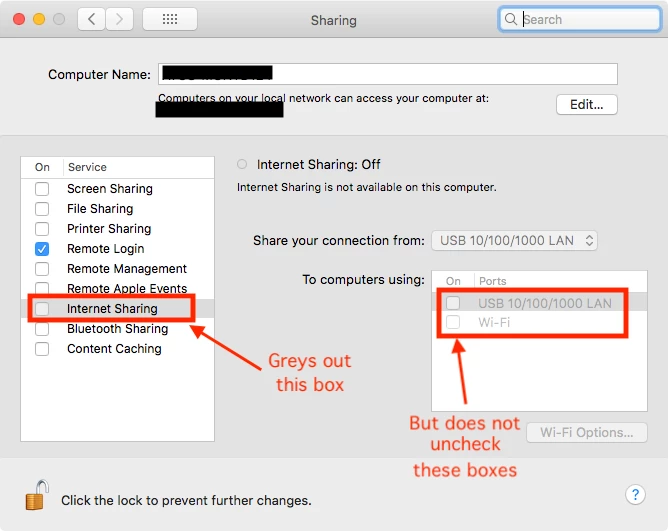
We've had a Configuration Profile in place for some time...it greys out the box service box, but does not uncheck the network interface boxes:

Seems to do what it is advertised to do...however the bigger question (at least on our side) is how to disable it if it is already on.

We use an EA to determine if Internet Sharing is (or was) enabled:

#!/bin/bash
#
# Check Internet Sharing.
#
#    FileDoesNotExist = /Library/Preferences/SystemConfiguration/com.apple.nat.plist does not exist
#    (was never enabled, or a clever user enabled it and is covering his/her tracks)
#    
#    Enabled = enabled
#    (/Library/Preferences/SystemConfiguration/com.apple.nat.plist exists, and it is enabled)
#    
#    Disabled = disabled
#    (/Library/Preferences/SystemConfiguration/com.apple.nat.plist exists, so it was enabled in the past)

if [ -e /Library/Preferences/SystemConfiguration/com.apple.nat.plist ]; then
    if [ $( /usr/libexec/PlistBuddy -c "Print :NAT:Enabled" /Library/Preferences/SystemConfiguration/com.apple.nat.plist ) == 1 ]; then
        echo "<result>Enabled</result>"
    else
        echo "<result>Disabled</result>"
    fi
else
    echo "<result>FileDoesNotExist</result>"
fi

Ok, so now you can tell who has it enabled, or who had it enabled. What if you want to uncheck the network interface cards, IOW delete the plist file that the EA checks? Trust me, you don't want to know...


Forum|alt.badge.img
  • New Contributor
  • Oct 7, 2019 9:09 PM UTC

@donmontalvo do you care to share the contents of your plist file to disable internet sharing?


Forum|alt.badge.img+5
  • Contributor
  • Jan 10, 2020 12:51 PM UTC

All,

I have added the key to my com.Apple.MCX but Still it doent stop or prevent the user from turning on Internet sharing .. is there something im doing wrong?

I have created a com.apple.MCX.plist - It contains some more settings. Deployed it via customer setting config profile.
I can see its deployed to the system

but when i close and open systems preferences / Sharing / I can still select Internet sharing and the 2 adapters that I want to share..

Is there something im missing?

Thanks


wmehilos
Forum|alt.badge.img+11
  • Valued Contributor
  • Jan 31, 2020 9:36 PM UTC

@rkelegha

Looks like you typo'd the key name. The F in forced should be lowercase.


mateow
Forum|alt.badge.img+4
  • New Contributor
  • Dec 2, 2021 8:45 PM UTC

is there a way to toggle ON the internet sharing via script or profile?


Chris_J
Forum|alt.badge.img+1
  • New Contributor
  • Jan 24, 2025 11:01 PM UTC

All,

I have added the key to my com.Apple.MCX but Still it doent stop or prevent the user from turning on Internet sharing .. is there something im doing wrong?

I have created a com.apple.MCX.plist - It contains some more settings. Deployed it via customer setting config profile.
I can see its deployed to the system

but when i close and open systems preferences / Sharing / I can still select Internet sharing and the 2 adapters that I want to share..

Is there something im missing?

Thanks


Speaking as one who recently struggled with this -- there are two payloads to configure to get the desired result:

  • forceInternetSharingOff --> true
    • toggles off internet sharing -- this payload alone will only disable the setting each time the profile is loaded (i.e. upon installation and at each reboot), but the end user can re-enable the setting afterwards
  • allowInternetSharingModification --> false
    • prevents end user from modifying internet sharing setting 


Example profile below (I haven't seen another one online yet that combines both payloads):

  • Notes:
    • update PayloadOrganization and UUID values as needed
    • you will need to sign this profile prior to uploading it to Jamf Pro, otherwise Jamf will override the one payload it doesn't recognize, per this article:
      • "Jamf Pro attempts to import all file's values to associate with known settings within the Jamf Pro console and allow further editing. If the <PayloadType> or specific <key> values in the profile are unknown to Jamf Pro, the deployed configuration profile may not contain those values or install correctly."


<?xml version="1.0" encoding="UTF-8"?> <!DOCTYPE plist PUBLIC "-//Apple//DTD PLIST 1.0//EN" "http://www.apple.com/DTDs/PropertyList-1.0.dtd"> <plist version="1.0"> <dict> <key>PayloadUUID</key> <string>UUID1</string> <key>PayloadType</key> <string>Configuration</string> <key>PayloadOrganization</key> <string>Your Organization Name</string> <key>PayloadIdentifier</key> <string>UUID1</string> <key>PayloadDisplayName</key> <string>Disable Internet Sharing</string> <key>PayloadDescription</key> <string/> <key>PayloadVersion</key> <integer>1</integer> <key>PayloadEnabled</key> <true/> <key>PayloadRemovalDisallowed</key> <true/> <key>PayloadScope</key> <string>System</string> <key>PayloadContent</key> <array> <dict> <key>PayloadUUID</key> <string>UUID2</string> <key>PayloadType</key> <string>com.apple.applicationaccess</string> <key>PayloadOrganization</key> <string>Your Organization Name</string> <key>PayloadIdentifier</key> <string>UUID2</string> <key>PayloadDisplayName</key> <string>Restrictions</string> <key>PayloadDescription</key> <string/> <key>PayloadVersion</key> <integer>1</integer> <key>PayloadEnabled</key> <true/> <key>allowInternetSharingModification</key> <false/> </dict> <dict> <key>PayloadUUID</key> <string>UUID3</string> <key>PayloadType</key> <string>com.apple.MCX</string> <key>PayloadOrganization</key> <string>Your Organization Name</string> <key>PayloadIdentifier</key> <string>UUID3</string> <key>PayloadDisplayName</key> <string>MCX</string> <key>PayloadDescription</key> <string></string> <key>PayloadVersion</key> <integer>1</integer> <key>PayloadEnabled</key> <true/> <key>forceInternetSharingOff</key> <true/> </dict> </array> </dict> </plist>


Chris_J
Forum|alt.badge.img+1
  • New Contributor
  • Jan 27, 2025 9:09 PM UTC

Speaking as one who recently struggled with this -- there are two payloads to configure to get the desired result:

  • forceInternetSharingOff --> true
    • toggles off internet sharing -- this payload alone will only disable the setting each time the profile is loaded (i.e. upon installation and at each reboot), but the end user can re-enable the setting afterwards
  • allowInternetSharingModification --> false
    • prevents end user from modifying internet sharing setting 


Example profile below (I haven't seen another one online yet that combines both payloads):

  • Notes:
    • update PayloadOrganization and UUID values as needed
    • you will need to sign this profile prior to uploading it to Jamf Pro, otherwise Jamf will override the one payload it doesn't recognize, per this article:
      • "Jamf Pro attempts to import all file's values to associate with known settings within the Jamf Pro console and allow further editing. If the <PayloadType> or specific <key> values in the profile are unknown to Jamf Pro, the deployed configuration profile may not contain those values or install correctly."


<?xml version="1.0" encoding="UTF-8"?> <!DOCTYPE plist PUBLIC "-//Apple//DTD PLIST 1.0//EN" "http://www.apple.com/DTDs/PropertyList-1.0.dtd"> <plist version="1.0"> <dict> <key>PayloadUUID</key> <string>UUID1</string> <key>PayloadType</key> <string>Configuration</string> <key>PayloadOrganization</key> <string>Your Organization Name</string> <key>PayloadIdentifier</key> <string>UUID1</string> <key>PayloadDisplayName</key> <string>Disable Internet Sharing</string> <key>PayloadDescription</key> <string/> <key>PayloadVersion</key> <integer>1</integer> <key>PayloadEnabled</key> <true/> <key>PayloadRemovalDisallowed</key> <true/> <key>PayloadScope</key> <string>System</string> <key>PayloadContent</key> <array> <dict> <key>PayloadUUID</key> <string>UUID2</string> <key>PayloadType</key> <string>com.apple.applicationaccess</string> <key>PayloadOrganization</key> <string>Your Organization Name</string> <key>PayloadIdentifier</key> <string>UUID2</string> <key>PayloadDisplayName</key> <string>Restrictions</string> <key>PayloadDescription</key> <string/> <key>PayloadVersion</key> <integer>1</integer> <key>PayloadEnabled</key> <true/> <key>allowInternetSharingModification</key> <false/> </dict> <dict> <key>PayloadUUID</key> <string>UUID3</string> <key>PayloadType</key> <string>com.apple.MCX</string> <key>PayloadOrganization</key> <string>Your Organization Name</string> <key>PayloadIdentifier</key> <string>UUID3</string> <key>PayloadDisplayName</key> <string>MCX</string> <key>PayloadDescription</key> <string></string> <key>PayloadVersion</key> <integer>1</integer> <key>PayloadEnabled</key> <true/> <key>forceInternetSharingOff</key> <true/> </dict> </array> </dict> </plist>


Cleaned up version of the previous config profile (I'm still learning...):


<?xml version="1.0" encoding="UTF-8"?> <!DOCTYPE plist PUBLIC "-//Apple//DTD PLIST 1.0//EN" "http://www.apple.com/DTDs/PropertyList-1.0.dtd"> <plist version="1.0"> <dict> <key>PayloadContent</key> <array> <dict> <key>PayloadDisplayName</key> <string>Restrictions</string> <key>PayloadIdentifier</key> <string>com.apple.applicationaccess.UUID2</string> <key>PayloadType</key> <string>com.apple.applicationaccess</string> <key>PayloadUUID</key> <string>UUID2</string> <key>PayloadVersion</key> <integer>1</integer> <key>allowInternetSharingModification</key> <false/> </dict> <dict> <key>PayloadDisplayName</key> <string>MCX</string> <key>PayloadIdentifier</key> <string>com.apple.MCX.UUID3</string> <key>PayloadType</key> <string>com.apple.MCX</string> <key>PayloadUUID</key> <string>UUID3</string> <key>PayloadVersion</key> <integer>1</integer> <key>forceInternetSharingOff</key> <true/> </dict> </array> <key>PayloadDescription</key> <string>Disables Internet Sharing setting system-wide</string> <key>PayloadDisplayName</key> <string>Security and Privacy - Disable Internet Sharing</string> <key>PayloadIdentifier</key> <string>com.example.DisableInternetSharing</string> <key>PayloadOrganization</key> <string>Your Organization</string> <key>PayloadRemovalDisallowed</key> <true/> <key>PayloadScope</key> <string>System</string> <key>PayloadType</key> <string>Configuration</string> <key>PayloadUUID</key> <string>UUID1</string> <key>PayloadVersion</key> <integer>1</integer> </dict> </plist>