Solved

Proper way to push these scripts out?

  • August 14, 2024
  • 10 replies
  • 69 views

Forum|alt.badge.img+5

Hello everyone,

I have received command entries from JAMF tech support to adjust our password policy that is reporting errors. I have been running these commands manually with a remote session with the user and it works. Is there a way to create Policies so that this will run without the user and myself involved? Reboot is not required but to run the commands requires user name and password in Terminal. 

  1. On the user's Mac in Terminal run  sudo jamf removeframework
  2. Once that completes stay in Terminal and  run  sudo profiles renew -type enrollment

Any help is much appreciated. 

 

Best answer by AJPinto

If you remove the framework, you can never run the second command as the framework runs commands. There is no way to perform an enrollment without user interaction, there WILL be a popup from macOS and the user MUST DO THE THING manually.


As others have said, removing the framework is extreme for troubleshooting a PW issue. Have you tried running sudo jamf manage to update the framework instead?

10 replies

jamf-42
Forum|alt.badge.img+17
  • Esteemed Contributor
  • August 14, 2024

removing jamf framework and re-enrolling seems over the top for a password policy issue. 

Once you remove framework, the device is not longer managed.. you could possibly do this with a script sent to a background task.. but re-enrolling seems wrong.


Forum|alt.badge.img+5
  • Author
  • Contributor
  • August 14, 2024

I want to add more detail for clarification of what I'm trying to accomplish: 

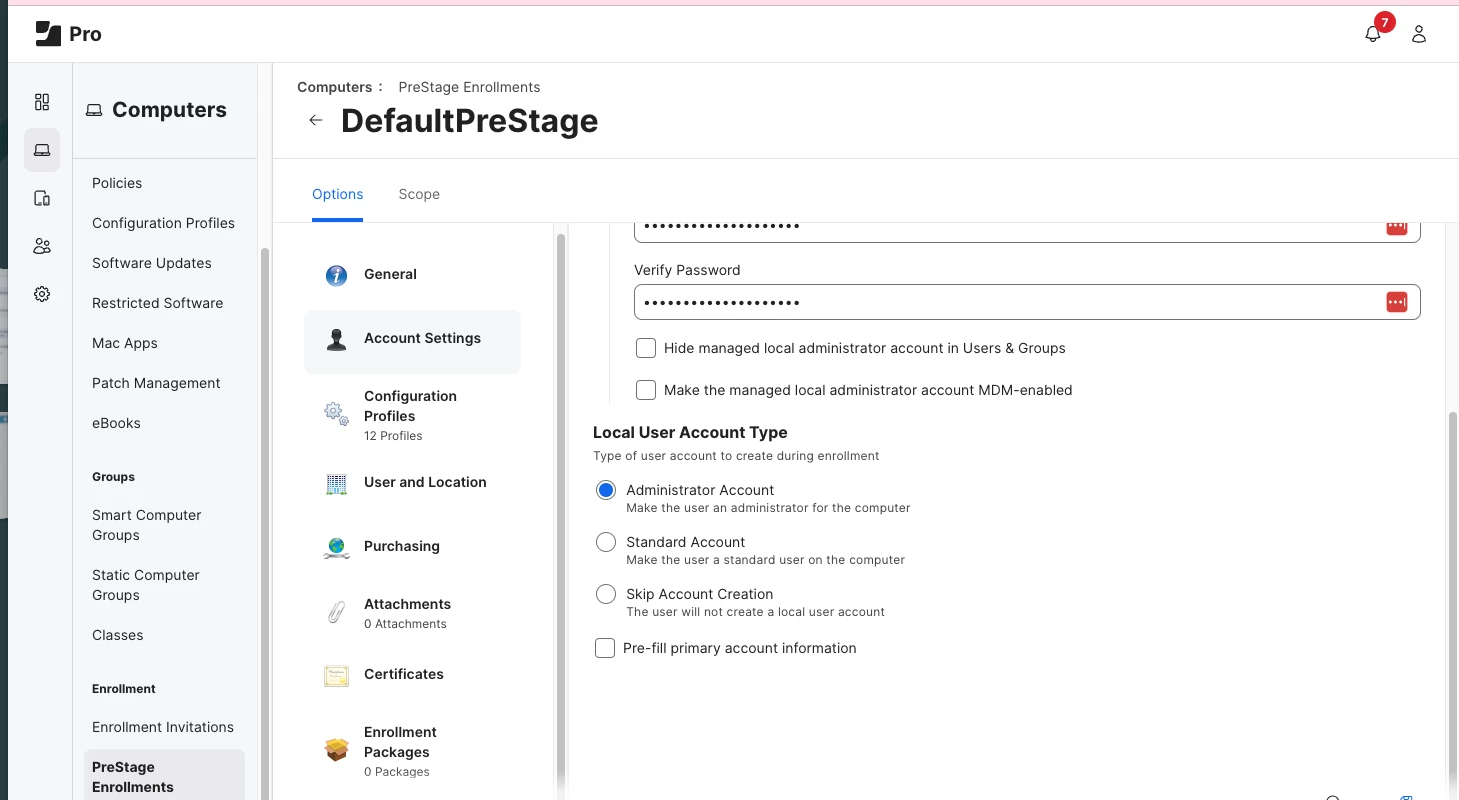
PreStage Enrollments>Account Settings>Make the managed local administrator account for MDM-enabled was enabled by the previous manager from the set up process. I do not know why. This being turned on generated false reports to these Smart Groups: "the criteria is Password Type>is>Simple" and "Password Type>is>Alphanumeric". To push out the change for the passwords from Simple Type to Alphanumeric Type is the goal using the commands mentioned above. The Simple Type reports all staff have only 4 characters; the Alphanumeric shows only 14 staff members have 14 characters or more. 14 staff members is correct as these were manually completed by me.  We have a JAMF Password Policy that all staff must have 14 characters or more. Some users are showing up in both Smart Groups. I need all staff to switch to the new password policy which enables Simple type to Alphanumeric Type using the commands provided by JAMF. When it is all said and done, all staff will show up on the Alphanumeric Type Smart Group. This is the report I need to run in to Security for an audit. Trying to find a quicker was of doing this instead reaching out to each one and manually change this. 10 down, many to go. 


Forum|alt.badge.img+5
  • Author
  • Contributor
  • August 14, 2024

removing jamf framework and re-enrolling seems over the top for a password policy issue. 

Once you remove framework, the device is not longer managed.. you could possibly do this with a script sent to a background task.. but re-enrolling seems wrong.


I've added more details that should clear up what I'm trying to accomplish. I do appreciate the warning so I may have to do gthis manually on each device. Thoughts? 


AJPinto
Forum|alt.badge.img+26
  • Legendary Contributor
  • Answer
  • August 15, 2024

If you remove the framework, you can never run the second command as the framework runs commands. There is no way to perform an enrollment without user interaction, there WILL be a popup from macOS and the user MUST DO THE THING manually.


As others have said, removing the framework is extreme for troubleshooting a PW issue. Have you tried running sudo jamf manage to update the framework instead?


jamf-42
Forum|alt.badge.img+17
  • Esteemed Contributor
  • August 15, 2024

I want to add more detail for clarification of what I'm trying to accomplish: 

PreStage Enrollments>Account Settings>Make the managed local administrator account for MDM-enabled was enabled by the previous manager from the set up process. I do not know why. This being turned on generated false reports to these Smart Groups: "the criteria is Password Type>is>Simple" and "Password Type>is>Alphanumeric". To push out the change for the passwords from Simple Type to Alphanumeric Type is the goal using the commands mentioned above. The Simple Type reports all staff have only 4 characters; the Alphanumeric shows only 14 staff members have 14 characters or more. 14 staff members is correct as these were manually completed by me.  We have a JAMF Password Policy that all staff must have 14 characters or more. Some users are showing up in both Smart Groups. I need all staff to switch to the new password policy which enables Simple type to Alphanumeric Type using the commands provided by JAMF. When it is all said and done, all staff will show up on the Alphanumeric Type Smart Group. This is the report I need to run in to Security for an audit. Trying to find a quicker was of doing this instead reaching out to each one and manually change this. 10 down, many to go. 


scope out the managed admin account from the smart group if that is causing an issue.

if you apply the password payload config profile with revised setup, the user gets a popup telling them they need to log out and update their password to match the new requirements. (on macOS 14.. possibly on others) 

test test test.. 


Forum|alt.badge.img+5
  • Author
  • Contributor
  • August 15, 2024

If you remove the framework, you can never run the second command as the framework runs commands. There is no way to perform an enrollment without user interaction, there WILL be a popup from macOS and the user MUST DO THE THING manually.


As others have said, removing the framework is extreme for troubleshooting a PW issue. Have you tried running sudo jamf manage to update the framework instead?


So just by running sudo jamf manage this will aid in correcting the Pre-Stage Enrollment new setting? I wouldn't have to run those commands? This is the new setting I'm trying to apply to all devices. ss. The new setting is the unchecked "Make the managed local administrator account MDM-enabled".  


jamf-42
Forum|alt.badge.img+17
  • Esteemed Contributor
  • August 15, 2024

So just by running sudo jamf manage this will aid in correcting the Pre-Stage Enrollment new setting? I wouldn't have to run those commands? This is the new setting I'm trying to apply to all devices. ss. The new setting is the unchecked "Make the managed local administrator account MDM-enabled".  


are you using Classes ?.. random info via googlfu.. maybe you need this? 


MDM-enabled local user accounts allow you to manage the following user-specific settings on computers:


Forum|alt.badge.img+5
  • Author
  • Contributor
  • August 15, 2024

are you using Classes ?.. random info via googlfu.. maybe you need this? 


MDM-enabled local user accounts allow you to manage the following user-specific settings on computers:


Using JAMF Pro


AJPinto
Forum|alt.badge.img+26
  • Legendary Contributor
  • August 16, 2024

So just by running sudo jamf manage this will aid in correcting the Pre-Stage Enrollment new setting? I wouldn't have to run those commands? This is the new setting I'm trying to apply to all devices. ss. The new setting is the unchecked "Make the managed local administrator account MDM-enabled".  


What is the purpose of making the accounts MDM enabled? As @jamf-42 pointed out, there is not a lot of reasons for having an MDM enabled account on macOS.


Forum|alt.badge.img+5
  • Author
  • Contributor
  • August 16, 2024

What is the purpose of making the accounts MDM enabled? As @jamf-42 pointed out, there is not a lot of reasons for having an MDM enabled account on macOS.


I have no idea. Mine was checked by previous JAMF manager.