Question

Push Proxy Certificate is not renewing

  • January 13, 2016
  • 11 replies
  • 73 views

Forum|alt.badge.img+3

Hello, I am new to CasperSuite and JAMF world so any help is appreciated.

We recently migrated our JSS server from one Linux box to another. New instance was working but now I am seeing that our push proxy certificate is expired. I understand this should auto renew but that is not happening.Manually pressing the renew button also doesn't do anything.

Below is the error I see in server log. We still have the old instance of JSS server running so I can see that certificate is being renewed there correctly which makes me think issue has something to do with migration.

2016-01-12 14:08:23,787 [WARN ] [Tomcat-10 ] [PushProxySettingsHelper ] - Unable to fetch push token from JAMF Nation
2016-01-12 14:08:26,482 [ERROR] [Tomcat-2 ] [PushProxySettingsHelper ] - Unable to get authorization token from JAMF Nation
javax.net.ssl.SSLHandshakeException: sun.security.validator.ValidatorException: PKIX path building failed: sun.security.provider.certpath.SunCertPathBuilderException: unable to find valid certification path to requested target at sun.security.ssl.Alerts.getSSLException(Alerts.java:192) at sun.security.ssl.SSLSocketImpl.fatal(SSLSocketImpl.java:1949) at sun.security.ssl.Handshaker.fatalSE(Handshaker.java:302) at sun.security.ssl.Handshaker.fatalSE(Handshaker.java:296) at sun.security.ssl.ClientHandshaker.serverCertificate(ClientHandshaker.java:1509) at sun.security.ssl.ClientHandshaker.processMessage(ClientHandshaker.java:216) at sun.security.ssl.Handshaker.processLoop(Handshaker.java:979) at sun.security.ssl.Handshaker.process_record(Handshaker.java:914) at sun.security.ssl.SSLSocketImpl.readRecord(SSLSocketImpl.java:1062)

11 replies

Forum|alt.badge.img
  • New Contributor
  • January 14, 2016

By any chance changed your JAMF password recently? Just had the same issue and the Proxy Cert renew requires the JAMF logon details to grab the certs from the JAMF Server.
We deleted the entry and re-added with the new correct details and voila it worked.
Same error message as yours, so hope this may be of assistance.

A.


Forum|alt.badge.img+3
  • Author
  • New Contributor
  • January 14, 2016

I guess you mean JSS user's password. it's not changed and is same for old and new instance of JSS server.
As I mentioned the certificate is getting renewed on old instance. Only on new instance of JSS we see above error in server logs when I hit the renew button.


Forum|alt.badge.img+4

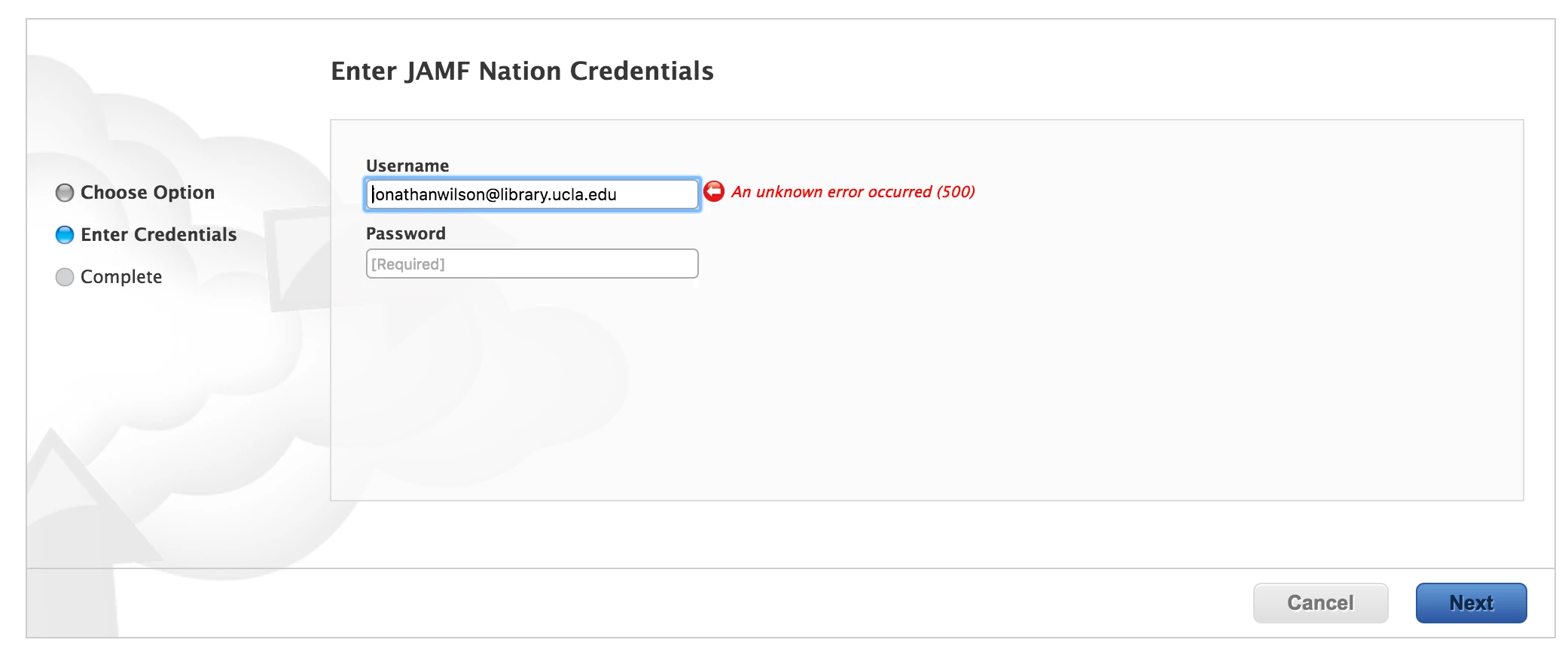
MbroCollAR's response seemed to be what my issue was, because I did, indeed, change my credentials recently, and it was my account that signed the cert originally. So, I deleted, and attempted to re-add, and this is what I get:
Any thoughts? I'll contact support, but figured I'd throw it out there.


Forum|alt.badge.img+6
  • Contributor
  • October 24, 2017

I have the same issue and error message that jonathanwilson had. What is the cause and fix for the "an unknown error occurred (500)"


Forum|alt.badge.img+6
  • Contributor
  • July 25, 2019

I just got the same thing happening , ive logged a jamf support ticket . will post the fix in here


Forum|alt.badge.img+1
  • New Contributor
  • July 25, 2019

I have the same issue today and logged a ticket with Jamf


Forum|alt.badge.img+15
  • Contributor
  • July 25, 2019

Add me as a third one to have this issue all of a sudden this week. Our token expired yesterday, I tried to manually renew it each time and the page would just refresh without doing anything. Jamf support recommended deleting the token and then requesting a new one, but as soon as I did that I got the same error message as @jonathanwilson posted above. Jamf support is now "investigating the issue" and will contact me once they have a fix.


Forum|alt.badge.img+5
  • New Contributor
  • July 25, 2019

This was a firewall issue for us. had to not encrypt/decrypt the traffic.


Forum|alt.badge.img+1
  • New Contributor
  • July 26, 2019

Jamf has raised a PI-007252

If you're using Java 1.8.0_66 through 1.8.0_140, hit this issue. Workaround is to upgrade to Java 1.8.0_141 or above. I have upgraded ours to latest version of Java and the issue is now fixed.


Forum|alt.badge.img+7

@Abishek is correct. Please head to this discussion thread for a consolidated update & resolution to this issue: https://www.jamf.com/jamf-nation/discussions/32762/assessing-resolving-notification-in-jamf-pro-for-push-proxy-server-token-has-expired


Forum|alt.badge.img+1
  • New Contributor
  • July 30, 2019

Happened here this morning. I will check Java versions on the server.