Hi JAMF-ers.
I posted the following back in May in an old feature request thread regarding having remote access to machines through Casper even when off network. I'm not certain that anyone has looked at the thread since, and it occurs to me that a greater range of people might be interested who have not found that thread... and really, I'm looking for help making this a better service and would love some input from people more talented with SSH and bash scripting in general than am I. There are certainly dozens of ways I've overlooked to make this service more secure and better. Please give me suggestions if you have any.
The following policy has come in very handy on more than a few occasions when TeamViewer was connecting, but just giving me a black window, and users were having difficulty with VPN configurations for one reason or another.
It involves a go-between host, available to the internet (on your DMZ, like mine, but it will even work on your home computer if you set up NAT'ing on your router) with SSH access. Optimally you've created a chrooted, non-shell account on that host for optimal security, and generate a public/private ssh key for it. (I'll call the account 'Ernestine' for purposes of sharing with you all, after Lily Tomlin's Laugh-In switch board operator) You don't need the private on your go-between host, only the public key. The private key is referenced in both the Self Service Policy, and in the administrators app.
It also assumes that you have a JSS proxy on your DMZ, so that people can execute Self Service Policies from home. If you don't, find some way to roll the following up into an executable on the end user's system. The "Remote Support" Policy goes like this:
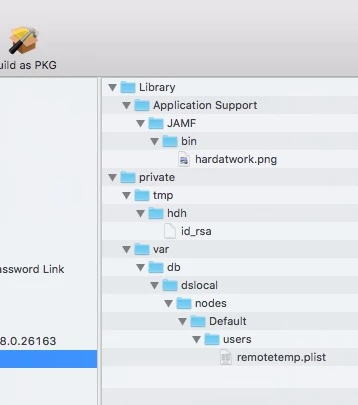
- A package places Ernestine's private key in a /private/tmp/ folder.
- Runs the following script:
#!/bin/bash
######################################
# Script generates random number to use as password and seed
# unused forward ports in the unregistered range for RemoteARD.app
######################################
# Customize for your location

adminName=""     # add the name of the administrator account you use on your end users' systems
adminAddy=""     # add the email address to either a support admin, or a Distribution List
telcoAddy=""     # add the URL to your DMZ'd server acting as the switchboard operator
operatorName=""  # the go-between account. For my example, 'ernestine'

######################################
# Get information for email

useris=$(ls -l /dev/console | awk -F"1 " '{print $2}' | awk -F"  " '{print $1}')
hname=$(hostname)

######################################
# Generates potential integer for use both as password and seeding forwarding ports

function genPorts ()
{
 passPort=`jot -r 1 10000 14409`
 vport=$((5900 + $passPort))
 sport=$((22 + $passPort))
}

######################################
# Given a port number, returns "" if available, "False" if not

function isportavail()
{
 local portsiu=`netstat -nat | egrep 'udp|tcp' | awk '{print $4}' | egrep -o 'w+$' | sort -n | uniq`
 local isitinuse=`echo "$portsiu" | egrep -o "$1" 2> /dev/null`
if [ -z "$isitinuse" ];
 then
  echo ""
 else
  echo "False"
 fi
}

genPorts

######################################
# Keep generating seeds until a range of unused ports are found

until [ -z "$(isportavail "$vport")" ] && [ -z "$(isportavail "$sport")" ]
do
 genPorts
done

######################################
# Send email to administrator with connection specifics

/usr/bin/mail -s "User is requesting assistance" $adminAddy<<EOF
User, $useris on system, $hname
is requesting remote assistance with their computer.

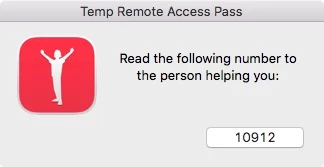
Launch the RemoteSupportAdmin app, and type: ${passPort} when prompted.

To connect manually over ssh, use:  ssh $adminName@127.0.0.1 -p ${sport}
To connect manually over ARD, use:  open -a /Applications/Remote Desktop.app vnc://$adminName@127.0.0.1:${vport}
EOF

######################################
# Turn on services

/usr/sbin/systemsetup -setremotelogin on &  > /dev/null 2>&1

/System/Library/CoreServices/RemoteManagement/ARDAgent.app/Contents/Resources/kickstart -configure -allowAccessFor -allUsers -privs -all -restart -agent -menu

######################################
# Set up tunnel to go-between server

nohup /usr/bin/ssh -f -N -T -o UserKnownHostsFile=/dev/null -o StrictHostKeyChecking=no -R $vport:localhost:5900 -R $sport:localhost:22 $operatorName@$telcoAddy -i /tmp/Resources/id_rsa & > /dev/null 2>&1

sleep 20
That's it. The end user fires off this policy. It chooses a random port to seed the port forwarding, it sets up port forwarded services to the go-between host, and it emails the admin with the key random seed number that s/he then uses with an app on the support end to set up a port forwarding session with the same go-between that forwards the active ports from the end user's system to the admin's system.
The admin's application is created in Xcode as an Applescript GUI application called RemoteSupportAdmin.app. Its RemoteSupportAdmin.app/Contents/Resources directory contains two important files, Ernestine's private key, and connect.sh, which handles the bulk of the work.
The Applescript copies the app's own Resources directory to a local tmp folder, prompts the admin for the random seed from the email, and feeds that to the script, now located under /private/tmp/Resources.
The Applescript:
property passPort : ""

set path_to_me to the POSIX path of (path to me)
do shell script "cp -R " & path_to_me & "Contents/Resources /tmp/" with administrator privileges

display dialog "Enter the client's connection number:" default answer passPort
set the passPort to text returned of the result

do shell script "sh /tmp/Resources/connect.sh " & passPort with administrator privileges
end
The connect.sh script:
#!/bin/bash
######################################
# Customize for your location

adminName=""     # the name of the administrator account you use on your end users' systems
telcoAddy=""     # add the URL to your DMZ'd server acting as the switchboard operator
operatorName=""  # the go-between account. For my example, 'ernestine'

######################################
# Do math to arrive at the proper ports from the random seed handed over by the applescript

vport=$((5900 + $1))
sport=$((22 + $1))

######################################
# Forward the end user's forwarded ports to yourself

nohup /usr/bin/ssh -C -c blowfish -N -o UserKnownHostsFile=/dev/null -o StrictHostKeyChecking=no -L $vport:localhost:$vport -L $sport:localhost:$sport $operatorName@$telcoAddy -i /tmp/Resources/id_rsa & > /dev/null 2>&1
sleep 3

######################################
# Launch the appropriate programs to take advantage of the forwarded ports
open -a /Applications/Remote Desktop.app vnc://$adminName@127.0.0.1:$vport
echo "ssh $adminName@localhost -p ${sport} -o StrictHostKeyChecking=no" > /tmp/rsadmin.command; chmod +x /tmp/rsadmin.command; open /tmp/rsadmin.command
exit
Room for improvement: Again, some things are still rough.
- I took the shortcut of incorporating a pkg on the Policy end to install ernestine's private key, but I suppose you could avoid that by writing out in the connection bash script the key to a file, and setting permissions.
- I experienced a lot of frustration referring to the RemoteSupportAdmin app's internally contained Resources directory, taking into account the fact that it could be run from different paths on the file system depending on the admin's preferences, so I took the easy way out and copied the Resources directory to a predictable path.
- I'm sure someone out there knows how to make the ssh connections more secure and reliable. Please, by all means pitch in.
Thank you all you wonderful people for any contributions in advance.
Mac