Solved

Rename Computers

  • July 4, 2024
  • 5 replies
  • 30 views

Ferran_Sogas
Forum|alt.badge.img+2

Hello,
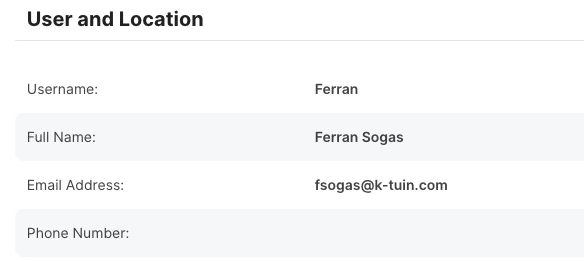
I need to rename the computers using the Full Name that is set in User and Location.
I have a script that renames using the login user but the name I need is the Full Name in Jamf.

Any idea how to retrieve the Full Name ?

thanks for your help.

Best answer by Jordy-Thery

If you really want to do it you could use the API to retrieve that info. :-)

Not the cleanest script but anyway:

#!/bin/zsh # Bearer token for API user # server and credential information jamfProURL="jamfurl" username="apiuser" password="apipassword" # request auth token authToken=$( /usr/bin/curl \\ --request POST \\ --silent \\ --url "$jamfProURL/api/v1/auth/token" \\ --user "$username:$password" ) # parse auth token token=$( /usr/bin/plutil \\ -extract token raw - <<< "$authToken" ) tokenExpiration=$( /usr/bin/plutil \\ -extract expires raw - <<< "$authToken" ) localTokenExpirationEpoch=$( TZ=GMT /bin/date -j \\ -f "%Y-%m-%dT%T" "$tokenExpiration" \\ +"%s" 2> /dev/null ) echo "Got bearer token successfully." # Script for name chamging. # Get serial number. serial=$(system_profiler SPHardwareDataType | awk '/Serial/ {print $4}') # Get user info from Jamf via API. response=$(curl -k $jamfProURL/JSSResource/computers/serialnumber/$serial/subset/location --header "Authorization: Bearer $token") # Get the Real Name. real_name=$(echo $response | /usr/bin/awk -F'<real_name>|</real_name>' '{print $2}'); echo Real name is $real_name. # Shorten real name for hostname. host_name=$(echo $real_name | awk '{gsub(" ","-"); print}') # Run commands to change name. scutil --set ComputerName "Mac van $real_name" scutil --set HostName "$host_name" scutil --set LocalHostName "Lab9-Pro-$host_name" echo "Name is successfully changed." # Expire bearer token for API user /usr/bin/curl \\ --header "Authorization: Bearer $token" \\ --request POST \\ --silent \\ --url "$jamfProURL/api/v1/auth/invalidate-token" echo "Invalidated bearer token successfully." exit

5 replies

jamf-42
Forum|alt.badge.img+17
  • Esteemed Contributor
  • July 4, 2024

Thats not recommended... as that is broadcast information, same as not using a serial number. 

Check this video for some inspiration

https://www.youtube.com/watch?v=u3EpxeHIATw


Jordy-Thery
Forum|alt.badge.img+11
  • Valued Contributor
  • Answer
  • July 4, 2024

If you really want to do it you could use the API to retrieve that info. :-)

Not the cleanest script but anyway:

#!/bin/zsh # Bearer token for API user # server and credential information jamfProURL="jamfurl" username="apiuser" password="apipassword" # request auth token authToken=$( /usr/bin/curl \\ --request POST \\ --silent \\ --url "$jamfProURL/api/v1/auth/token" \\ --user "$username:$password" ) # parse auth token token=$( /usr/bin/plutil \\ -extract token raw - <<< "$authToken" ) tokenExpiration=$( /usr/bin/plutil \\ -extract expires raw - <<< "$authToken" ) localTokenExpirationEpoch=$( TZ=GMT /bin/date -j \\ -f "%Y-%m-%dT%T" "$tokenExpiration" \\ +"%s" 2> /dev/null ) echo "Got bearer token successfully." # Script for name chamging. # Get serial number. serial=$(system_profiler SPHardwareDataType | awk '/Serial/ {print $4}') # Get user info from Jamf via API. response=$(curl -k $jamfProURL/JSSResource/computers/serialnumber/$serial/subset/location --header "Authorization: Bearer $token") # Get the Real Name. real_name=$(echo $response | /usr/bin/awk -F'<real_name>|</real_name>' '{print $2}'); echo Real name is $real_name. # Shorten real name for hostname. host_name=$(echo $real_name | awk '{gsub(" ","-"); print}') # Run commands to change name. scutil --set ComputerName "Mac van $real_name" scutil --set HostName "$host_name" scutil --set LocalHostName "Lab9-Pro-$host_name" echo "Name is successfully changed." # Expire bearer token for API user /usr/bin/curl \\ --header "Authorization: Bearer $token" \\ --request POST \\ --silent \\ --url "$jamfProURL/api/v1/auth/invalidate-token" echo "Invalidated bearer token successfully." exit

talkingmoose
Forum|alt.badge.img+36
  • Community Manager
  • July 4, 2024

You may be interested in my JNUC 2021 presentation:

How to collect user information and apply it throughout Jamf Pro


AJPinto
Forum|alt.badge.img+26
  • Legendary Contributor
  • July 5, 2024

I will second @jamf-42 , you don't want to go broadcasting PII (Personally Identifiable Information). A hostname is visible to anyone on the same network as the device, and can be seen in many other ways OTA.


Ferran_Sogas
Forum|alt.badge.img+2
  • Author
  • New Contributor
  • July 5, 2024

If you really want to do it you could use the API to retrieve that info. :-)

Not the cleanest script but anyway:

#!/bin/zsh # Bearer token for API user # server and credential information jamfProURL="jamfurl" username="apiuser" password="apipassword" # request auth token authToken=$( /usr/bin/curl \\ --request POST \\ --silent \\ --url "$jamfProURL/api/v1/auth/token" \\ --user "$username:$password" ) # parse auth token token=$( /usr/bin/plutil \\ -extract token raw - <<< "$authToken" ) tokenExpiration=$( /usr/bin/plutil \\ -extract expires raw - <<< "$authToken" ) localTokenExpirationEpoch=$( TZ=GMT /bin/date -j \\ -f "%Y-%m-%dT%T" "$tokenExpiration" \\ +"%s" 2> /dev/null ) echo "Got bearer token successfully." # Script for name chamging. # Get serial number. serial=$(system_profiler SPHardwareDataType | awk '/Serial/ {print $4}') # Get user info from Jamf via API. response=$(curl -k $jamfProURL/JSSResource/computers/serialnumber/$serial/subset/location --header "Authorization: Bearer $token") # Get the Real Name. real_name=$(echo $response | /usr/bin/awk -F'<real_name>|</real_name>' '{print $2}'); echo Real name is $real_name. # Shorten real name for hostname. host_name=$(echo $real_name | awk '{gsub(" ","-"); print}') # Run commands to change name. scutil --set ComputerName "Mac van $real_name" scutil --set HostName "$host_name" scutil --set LocalHostName "Lab9-Pro-$host_name" echo "Name is successfully changed." # Expire bearer token for API user /usr/bin/curl \\ --header "Authorization: Bearer $token" \\ --request POST \\ --silent \\ --url "$jamfProURL/api/v1/auth/invalidate-token" echo "Invalidated bearer token successfully." exit

thank you very much, it works perfectly