Question

Restrictions to settings

  • August 27, 2018
  • 10 replies
  • 50 views

Forum|alt.badge.img+3

Is there a way to lock an iPad so that a student can't get into the settings?

10 replies

Forum|alt.badge.img+19
  • Contributor
  • August 27, 2018

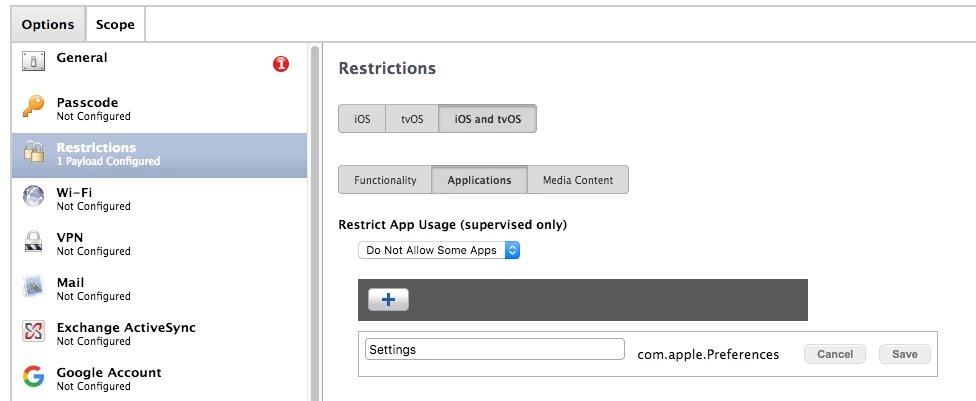
This might work:


Forum|alt.badge.img+3
  • Author
  • New Contributor
  • August 27, 2018

There isn't anything there @ryan.ball


Forum|alt.badge.img+3
  • Author
  • New Contributor
  • August 27, 2018

Sorry it just popped up!


Forum|alt.badge.img+3
  • Author
  • New Contributor
  • August 27, 2018

I tried, it is not loading the configuration because the bundle ID isn't valid. At least that is what the error says.


Forum|alt.badge.img+19
  • Contributor
  • August 27, 2018

When you go back to the profile do you see the com.apple.Preferences still in the list?


Forum|alt.badge.img+3
  • Author
  • New Contributor
  • August 27, 2018

Yes, I can still get into settings.


Forum|alt.badge.img+23
  • Employee
  • August 27, 2018
With the release of Casper Suite 9.9 we introduced support for Apple's new "App Usage Restrictions" within the Restrictions payload. This restriction will allow us to show or hide specific apps on supervised devices with iOS 9.3+. The only system apps that can never been hidden are Settings and Phone (iPhone only).

There's a lot that you can block within the Settings app, but for many reasons, the Settings app itself can not be restricted.


Forum|alt.badge.img+3
  • Author
  • New Contributor
  • August 27, 2018

Ok, this makes it difficult when I have a student that wont work and just plays with his settings all day. Any suggestions?


Forum|alt.badge.img+19
  • Contributor
  • August 27, 2018

I work in education as well. This is a classroom management issue, not a technical shortcoming in my opinion.


Forum|alt.badge.img+23
  • Employee
  • August 27, 2018

@klongfellow I understand how frustrating that can be and to solve it, I would recommend Apple's Classroom App. This will allow a teacher to monitor and lock a student in a particular app from their iPad (and soon, Mac!).

This will let you guide the student into the work that needs to be completed rather than playing with settings. You can set this up via Jamf with MDM, or simply create an unmanaged class. Here's all the Apple Documentation , here's a video from JNUC 2017, and here's a really easy to understand video on it from 9to5Mac