Question

Rosetta install Script for M1

  • November 7, 2022
  • 3 replies
  • 71 views

Forum|alt.badge.img+2

Hello everyone, I'm new to this community so please bare with me if this has been asked before.  I'd like to deploy a script that can check what chip is installed on my Mac mini fleet and if needed, install it. Thanks in advance. 

3 replies

karthikeyan_mac
Forum|alt.badge.img+18
  • Honored Contributor
  • November 8, 2022

@TJimenez 

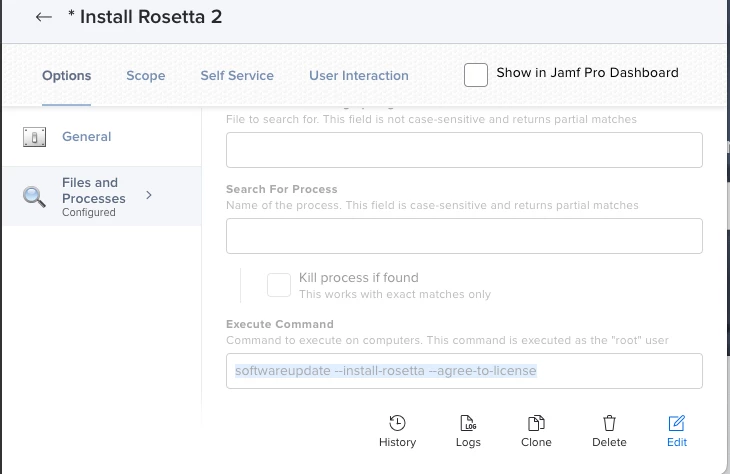
1. If you are deploying via Jamf, you can create a smart group with Architecture Type criteria as arm64 and create a policy with File and Process payload to execute command "softwareupdate --install-rosetta --agree-to-license". 


2. You can replace the command inpolicy as below to check the processor arch and install rosetta only for apple silicon devices..

[ $( /usr/bin/arch ) = "arm64" ] && /usr/sbin/softwareupdate --install-rosetta --agree-to-license

Hope this helps.

Thanks.


Forum|alt.badge.img+2
  • Author
  • New Contributor
  • November 8, 2022

@karthikeyan_mac  I'll give this a try.  I plan on setting up my lab today so I'll keep you posted.  Thank you.


vickih
Forum|alt.badge.img+5
  • Contributor
  • November 8, 2022

@karthikeyan_mac  I'll give this a try.  I plan on setting up my lab today so I'll keep you posted.  Thank you.


@TJimenez Also here's the script, I place it in our App Store, but I like @karthikeyan_mac idea better. :-) 


#!/bin/bash

arch=$(/usr/bin/arch)
if [ "$arch" == "arm64" ]; then
echo "Apple Silicon - Installing Rosetta"
/usr/sbin/softwareupdate --install-rosetta --agree-to-license
elif [ "$arch" == "i386" ]; then
echo "Intel - Skipping Rosetta"
else
echo "Unknown Architecture"
fi