Question

Run Full Finder in Casper Imaging

  • November 19, 2015
  • 5 replies
  • 25 views

Forum|alt.badge.img+4

I am trying to find a way to run Full Finder in Casper Imaging.

I built a 10.11.1 NBI using AutoCasperNBI 1.3.0 (2) and Casper Imaging 9.81 and have Simple Finder enabled. When I boot to Casper Imaging I used to be able to Run Full Finder from the Simple Finder menu, but now when I click the option, nothing happens.

Has anyone else experienced this issue? It seems like it should work . . .

5 replies

Forum|alt.badge.img+14
  • Contributor
  • November 19, 2015

Known bug, more info here. @bentoms has filed a bug with Apple.

https://github.com/macmule/AutoCasperNBI/issues/67


Forum|alt.badge.img+4
  • Author
  • Contributor
  • November 19, 2015

Thank you! I'm not surprised by this. Maybe 10.11.2 will fix it.


Forum|alt.badge.img+16
  • Valued Contributor
  • November 19, 2015

If you create an NBI with full Finder however this seems to work fine (at least on our NBI), clearly not a fix but if you need the full finder functionality...


bentoms
Forum|alt.badge.img+35
  • Hall of Fame
  • November 21, 2015

@lisamcray As @Abdiaziz pointed out, this is an issue with Apple at the moment.

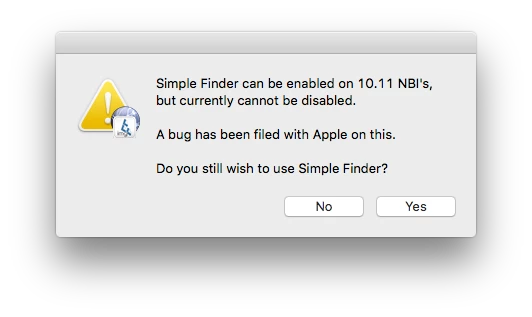
AutoCasperNBI 1.3.1 is being released later today, & some dialog boxes have been added to warn when either a 10.11 OS.dmg is selected & Simple Finder enabled & when a 10.11 NBI is attempted to be built with Simple Finder enabled.

You can proceed with enabling Simple Finder or not set Simple Finder from the prompt. More to come when Apple resolves.


Forum|alt.badge.img+4
  • Author
  • Contributor
  • January 7, 2016

Has there been any update on this? We've been continuing to use a 10.10.5 boot image. So far it works fine with 10.11.x imaging but . . .