
Solved

run policy after a specific user logs in on a specific Mac

  • March 23, 2022
  • 3 replies
  • 30 views

Forum|alt.badge.img+6

Apologies but I am a little confused on how I can trigger a policy, after a specific user (local account) logs onto a specific Mac.  I see the the triggers "once per user"  and when I try and scope it to that specific user, I don't see that local account listed.  

Thank You.
Best answer by jttavares

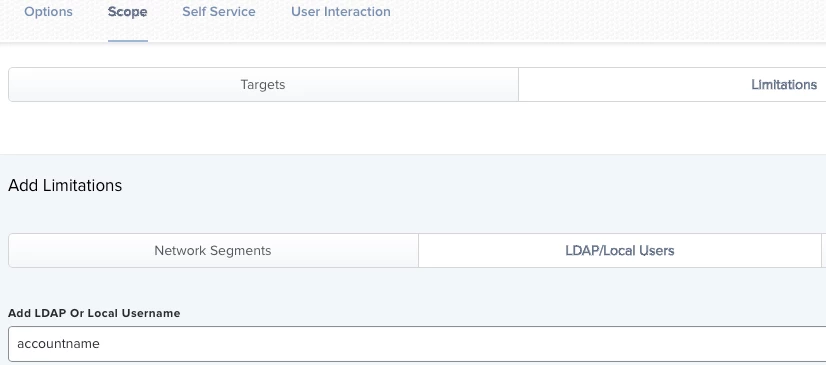
You have to use the Limitations tab to specify which user account it should be limited to. Once on that tab, click on LDAP/Local Users, then add the name of the account in the field and click Add.


@mm2270    Ok so scope it to the workstation, the trigger being "Login" and as you stated specify the specific account in the "Limitations" tab.  Frequency would be "Once per user, per computer".  see pic below.  

3 replies

mm2270
Forum|alt.badge.img+24
  • Legendary Contributor
  • March 23, 2022

You have to use the Limitations tab to specify which user account it should be limited to. Once on that tab, click on LDAP/Local Users, then add the name of the account in the field and click Add.


Forum|alt.badge.img+6
  • Author
  • Contributor
  • Answer
  • March 23, 2022

You have to use the Limitations tab to specify which user account it should be limited to. Once on that tab, click on LDAP/Local Users, then add the name of the account in the field and click Add.


@mm2270    Ok so scope it to the workstation, the trigger being "Login" and as you stated specify the specific account in the "Limitations" tab.  Frequency would be "Once per user, per computer".  see pic below.  


mm2270
Forum|alt.badge.img+24
  • Legendary Contributor
  • March 23, 2022

@mm2270    Ok so scope it to the workstation, the trigger being "Login" and as you stated specify the specific account in the "Limitations" tab.  Frequency would be "Once per user, per computer".  see pic below.  


Yes that should be it. I very rarely ever use the login trigger or scope to a specific user so it’s been a while now since I’ve done it, but I think that should do it.
