Question

Safari 12 hates plugins and extensions

  • September 18, 2018
  • 14 replies
  • 36 views

AVmcclint
Forum|alt.badge.img+21

Safari 12 seems to have broken the launching of pre-installed Zoom clients when clicking on a zoom meeting URL. Now when we click a zoom meeting link, it downloads a client for users to install - even though we already have it deployed on every Mac. I am reaching out to Zoom support, but while I await their response, has anyone here been able to get back to the desired behavior of asking the user if they want to open the link in the Zoom app?

14 replies

dsavageED
Forum|alt.badge.img+8
  • New Contributor
  • 173 replies
  • September 18, 2018

You might need a config profile, we had to create one for the java plug-in... This is a custom setting for com.apple.Safari and looks something like...

<?xml version="1.0" encoding="UTF-8"?>
<!DOCTYPE plist PUBLIC "-//Apple//DTD PLIST 1.0//EN" "http://www.apple.com/DTDs/PropertyList-1.0.dtd">
<plist version="1.0">
<dict>
    <key>ManagedPlugInPolicies</key>
    <dict>
        <key>com.oracle.java.JavaAppletPlugin</key>
        <dict>
            <key>PlugInDisallowPromptBeforeUseDialog</key>
            <true/>
            <key>PlugInFirstVisitPolicy</key>
            <string>PlugInPolicyBlock</string>
            <key>PlugInHostnamePolicies</key>
            <array>
                <dict>
                    <key>PlugInHostname</key>
                    <string>www.example.com</string>
                    <key>PlugInPageURL</key>
                    <string>https://www.example.com/Login.jsp</string>
                    <key>PlugInPolicy</key>
                    <string>PlugInPolicyAllowWithSecurityRestrictions</string>
                    <key>PlugInRunUnsandboxed</key>
                    <true/>
                </dict>
            </array>
        </dict>
    </dict>
</dict>
</plist>

AVmcclint
Forum|alt.badge.img+21
  • Author
  • Esteemed Contributor
  • 1043 replies
  • September 18, 2018

I poked around and discovered if I do these steps in order it works as expected:
1. upgrade to Safari 12
2. launch Safari
3. launch the Zoom app
4. click on a zoom meeting URL from email
5. it opens the meeting in the Zoom app without downloading anything
6. Quit the Zoom app
7. Click a zoom meeting url without Zoom already running
8. it opens in the Zoom app.

My guess is that the Safari 12 upgrade did something to the Zoom plugin that made it forget the app was already installed.


Forum|alt.badge.img+3
  • New Contributor
  • 3 replies
  • September 19, 2018

Hello @dsavageED ,

First off thanks for helping out with this, however I still cannot get your method to work. I know that Safari 12 has stopped supporting all NPAPI plugins (which Java is one of) and so even when I enter in all of my custom details the plugin still doesn't show in Safari. Also after I enter all of the settings and save it, the next time I open Safari it overwrites all of the settings in the plist.

Any help you can give is appreciated, we use Java for our VPN client and currently we see this being a big problem, fairly quickly.

Thank you,
Austin


jamesandre
Forum|alt.badge.img+7
  • Contributor
  • 59 replies
  • September 19, 2018

Looks like Adobe PDF Viewer plug-in is in the same NPAPI boat. I'd say the only way around this is an update from Adobe that uses a compliant Safari extension.

Does anyone know of a way to email a PDF opened within Safari (Preview)? This would preferably use a one-click button.


AVmcclint
Forum|alt.badge.img+21
  • Author
  • Esteemed Contributor
  • 1043 replies
  • September 19, 2018

I've been reading up on the new Safari Extension variants of plugins and I have concerns. If the only way to add functionality of any kind to Safari is via downloading them through the Mac App Store, are we supposed to manage those through VPP?


dsavageED
Forum|alt.badge.img+8
  • New Contributor
  • 173 replies
  • September 19, 2018

For PDF files setting the default handler should cause it to download and open in Acrobat, code along the lines of:

#!/bin/bash

NetUser=`python -c 'from SystemConfiguration import SCDynamicStoreCopyConsoleUser; import sys; username = (SCDynamicStoreCopyConsoleUser(None, None, None) or [None])[0]; username = [username,""][username in [u"loginwindow", None, u""]]; sys.stdout.write(username + "
");'`

if [ -d /Applications/Adobe Acrobat DC/Adobe Acrobat.app ]; then
    # Used to use duti, however this doesn't seem to play well on 10.13 /usr/local/bin/duti -s com.adobe.Acrobat.Pro pdf all
    sudo -u ${NetUser} python -c 'from LaunchServices import LSSetDefaultRoleHandlerForContentType; LSSetDefaultRoleHandlerForContentType("com.adobe.pdf", 0x00000002, "com.adobe.Acrobat.Pro")'
fi

On the java front if the config profile no longer works then it might be game over without switching to using something like java web start to take the browser out of the equation...


Forum|alt.badge.img+13
  • Honored Contributor
  • 550 replies
  • September 19, 2018

Hi JNers

Just had to help a friend with this. In His case we downgraded back to 11.1.2 on the few High Sierra and Sierra machines in the test group. Just posting as an option that may help some ( He has a SUS, so we were able to grab the pkgs)


jconte
Forum|alt.badge.img+12
  • Valued Contributor
  • 131 replies
  • September 19, 2018

We noticed this during our initial testing of Mojave, they summed it up in the last line of this article.

https://developer.apple.com/safari/whats-new/


Forum|alt.badge.img+18
  • Honored Contributor
  • 645 replies
  • September 19, 2018

Yep... seems Apple has decided that Java is no longer a thing. Clearly they don't exist in the real world...


Forum|alt.badge.img+1
  • New Contributor
  • 2 replies
  • September 20, 2018

Nix4Life How did you down Grade? I contacted apple support and they told me they did not know of a way to down grade, which isn't too surprising.

Thanks


Forum|alt.badge.img+17
  • Valued Contributor
  • 404 replies
  • September 20, 2018

Seems that Safari no longer works with Aspera Connect 3.8.0 or Cisco WebEx too. 🤔


AVmcclint
Forum|alt.badge.img+21
  • Author
  • Esteemed Contributor
  • 1043 replies
  • October 1, 2018

Forum|alt.badge.img+17
  • Valued Contributor
  • 404 replies
  • October 30, 2018

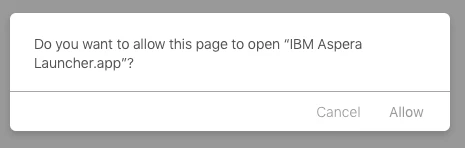
For Aspera (3.8.1 now) you have to reinstall Aspera for Safari to register that the helper app is available. I believe Safari has to be running during the reinstall, but probably not. Then when a site calls on the Aspera helper you'll get this message...

This assumes you're connecting to a more modern Aspera server that uses the helper app call and not the Aspera NPAPI plugin. If you need the plugin you're out of luck.


Forum|alt.badge.img+8
  • Contributor
  • 65 replies
  • October 30, 2018

@AVmcclint For us and Citrix: click on the normal workflow which downloads the .jsp file now. Use Finder - Get Info - to associate the downloaded .jsp file with Citrix Receiver (the new Workspace App has been a giant epic fail for us), and then open the file to open Receiver.