Solved

Scheduled Restart

  • September 30, 2015
  • 9 replies
  • 29 views

Forum|alt.badge.img+7

Hi All,

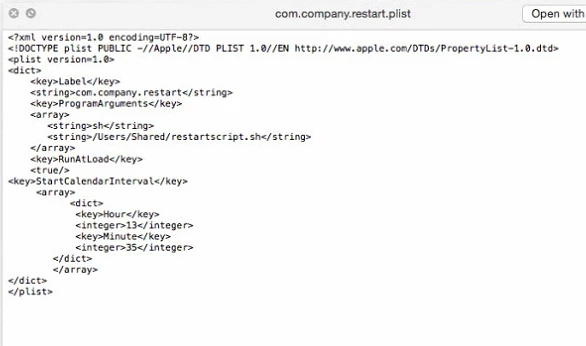
Here's my plist for a scheduled restart:

When I loaded this to one of my test machine it went on a restart loop. I want my kiosk machines to restart everyday on a specific time. Do I need to put in the Weekday key? How can I achieve this?

Thank you
Erwin

Best answer by Aziz

Something like this should work ( This restarts it at 10 PM, I also haven't tested this).

*Can you edit your script so it looks better, it's pretty cluttered and hard to look at right now

<?xml version="1.0" encoding="UTF-8"?>
<!DOCTYPE plist PUBLIC "-//Apple//DTD PLIST 1.0//EN" "http://www.apple.com/DTDs/PropertyList-1.0.dtd">
<plist version="1.0">
<dict>
    <key>Label</key>
<string>com.org.shutdown</string>
<key>UserName</key>
<string>root</string>
<key>Program</key>
<string>/sbin/shutdown</string>
<key>ProgramArguments</key>
<array>
    <string>/sbin/shutdown</string>
    <string>-r</string>
    <string>now</string>
</array>
<key>StartCalendarInterval</key>
<dict>
    <key>Hour</key>
    <integer>22</integer>
    <key>Minute</key>
    <integer>00</integer>
</dict>
</dict>
</plist>

9 replies

Forum|alt.badge.img+14
  • Contributor
  • 388 replies
  • Answer
  • September 30, 2015

Something like this should work ( This restarts it at 10 PM, I also haven't tested this).

*Can you edit your script so it looks better, it's pretty cluttered and hard to look at right now

<?xml version="1.0" encoding="UTF-8"?>
<!DOCTYPE plist PUBLIC "-//Apple//DTD PLIST 1.0//EN" "http://www.apple.com/DTDs/PropertyList-1.0.dtd">
<plist version="1.0">
<dict>
    <key>Label</key>
<string>com.org.shutdown</string>
<key>UserName</key>
<string>root</string>
<key>Program</key>
<string>/sbin/shutdown</string>
<key>ProgramArguments</key>
<array>
    <string>/sbin/shutdown</string>
    <string>-r</string>
    <string>now</string>
</array>
<key>StartCalendarInterval</key>
<dict>
    <key>Hour</key>
    <integer>22</integer>
    <key>Minute</key>
    <integer>00</integer>
</dict>
</dict>
</plist>
Forum|alt.badge.img+7
  • Author
  • Contributor
  • 58 replies
  • September 30, 2015

Thanks @Abdiaziz ! :) Will try this now and give you an update.


Forum|alt.badge.img+14
  • Contributor
  • 388 replies
  • September 30, 2015

@Araneta No problem! Looking at your script, it restarts at 1:35 PM (using the 24 hour format). Are you sure you want it to restart during the day?

01:35 = 1:35 AM


Forum|alt.badge.img+7
  • Author
  • Contributor
  • 58 replies
  • September 30, 2015

Yup, I'm just testing the script with that time :) (NZ time) I'll change it once I got it working properly.


Forum|alt.badge.img+7
  • Author
  • Contributor
  • 58 replies
  • September 30, 2015

Here's the updated script, tested it and it ran perfectly :) Thanks @Abdiaziz. So I don't need to include RunAtLoad?

echo "<?xml version="1.0" encoding="UTF-8"?>
<!DOCTYPE plist PUBLIC "-//Apple//DTD PLIST 1.0//EN" "http://www.apple.com/DTDs/PropertyList-1.0.dtd">
<plist version="1.0">
<dict>
   <key>Label</key>
   <string>com.org.shutdown</string>
   <key>UserName</key>
   <string>root</string>
<key>Program</key>
<string>/sbin/shutdown</string>
<key>ProgramArguments</key>
<array>
    <string>/sbin/shutdown</string>
    <string>-r</string>
    <string>now</string>
</array>
<key>StartCalendarInterval</key>
<dict>
    <key>Hour</key>
    <integer>14</integer>
    <key>Minute</key>
    <integer>35</integer>
</dict>
</dict>
</plist>" > /Library/LaunchDaemons/com.company.restart.plist

Forum|alt.badge.img+14
  • Contributor
  • 388 replies
  • September 30, 2015

I don't, I put the .plist in /Library/LaunchDaemons. Give that a try @Araneta


Forum|alt.badge.img+7
  • Author
  • Contributor
  • 58 replies
  • September 30, 2015

Yup, it is already saved on that path :)
Thank you so much again @Abdiaziz . I can sleep soundly tonight. :)


Forum|alt.badge.img+14
  • Contributor
  • 388 replies
  • September 30, 2015

@Araneta

You're welcome! A heads up, a restart will be needed to start the daemon.

This will work as well

#!/bin/bash
chown root "/Library/LaunchDaemons/nameof.plist"
chmod 644 "/Library/LaunchDaemons/nameof.plist"
launchctl load -w "/Library/LaunchDaemons/nameof.plist"

Forum|alt.badge.img+7
  • Author
  • Contributor
  • 58 replies
  • September 30, 2015

Did those too as well :)