
Solved

screen saver settings

  • October 25, 2021
  • 4 replies
  • 39 views

mickl089
Forum|alt.badge.img+11

hey there,

in the config profiles there is the option to activate the screensaver after x minutes. however, is there also the option that the user is then no longer able to change the time until the screensaver is activated? in my tests it is now the case that the screensaver is active, but the user can still change the 5 minutes, for example, as he wishes. this should be blocked. how can i change this?
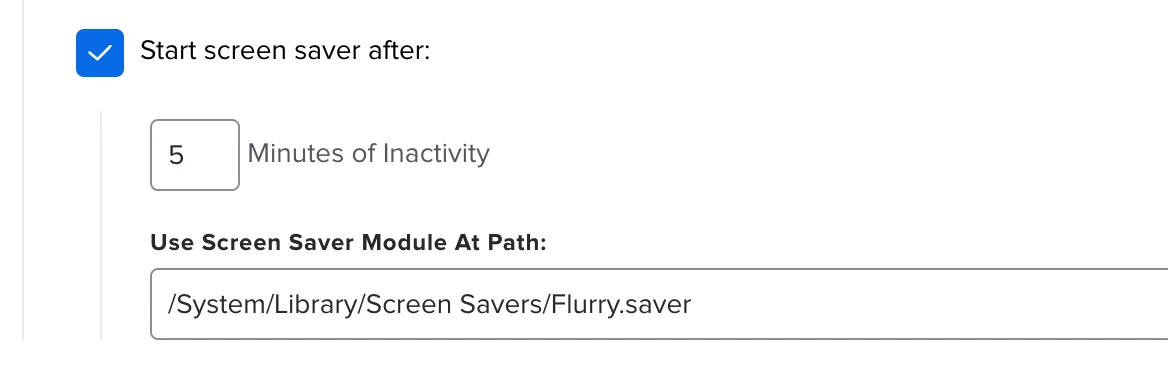
Best answer by lawinski

While you are able to change the values in the macOS settings pane it should not affect the settings.

Try closing the settings window after changing the value and open it again. It should be back to the value you defined.

4 replies

Forum|alt.badge.img+6
  • Contributor
  • Answer
  • October 25, 2021

While you are able to change the values in the macOS settings pane it should not affect the settings.

Try closing the settings window after changing the value and open it again. It should be back to the value you defined.


mickl089
Forum|alt.badge.img+11
  • Author
  • Valued Contributor
  • October 25, 2021

Thank you @lawinski you´re right! 🙂


mickl089
Forum|alt.badge.img+11
  • Author
  • Valued Contributor
  • October 26, 2021

despite the correct settings, on all test devices that have received the config profile, the screen only locks and goes black, the screen saver does not start. can anyone help here?


NisarAhamed
Forum|alt.badge.img
  • New Contributor
  • March 3, 2022

try this as script and set parameter to 1 or 2,

#!/bin/sh
## get current user
op=${4} #op=1 then photo , op=2 then Custom
user=`ls -l /dev/console | cut -d " " -f 4`

## get macOS version(s)
osMajor=$(/usr/bin/sw_vers -productVersion | /usr/bin/awk -F"." '{print $2}')
osMinor=$(/usr/bin/sw_vers -productVersion | /usr/bin/awk -F"." '{print $3}')

## set key items for screensaver
/usr/bin/sudo -u $user /usr/bin/defaults -currentHost write com.apple.screensaver CleanExit -string "YES"
/usr/bin/sudo -u $user /usr/bin/defaults -currentHost write com.apple.screensaver PrefsVersion -int 100
/usr/bin/sudo -u $user /usr/bin/defaults -currentHost write com.apple.screensaver showClock -string "NO"
/usr/bin/sudo -u $user /usr/bin/defaults -currentHost write com.apple.screensaver idleTime -int 300 # wait time before start Screen saver in seconds

function iLifeSlideShows_config() {
/usr/bin/sudo -u $user /usr/bin/defaults -currentHost write com.apple.screensaver tokenRemovalAction -int 0
/usr/bin/sudo -u $user /usr/bin/defaults -currentHost write com.apple.ScreenSaverPhotoChooser LastViewedPhotoPath -string ""
/usr/bin/sudo -u $user /usr/bin/defaults -currentHost write com.apple.ScreenSaverPhotoChooser SelectedFolderPath -string "/Library/Application Support/JAMF/bin/Foldername"
/usr/bin/sudo -u $user /usr/bin/defaults -currentHost write com.apple.ScreenSaverPhotoChooser SelectedSource -int 3
/usr/bin/sudo -u $user /usr/bin/defaults -currentHost write com.apple.ScreenSaverPhotoChooser ShufflesPhotos -bool "false"
#Name of screenshot neet to mention in styleKey -string
#/usr/bin/sudo -u $user /usr/bin/defaults -currentHost write com.apple.ScreenSaver.iLifeSlideShows styleKey -string "Custom"
/usr/bin/sudo -u $user /usr/bin/defaults -currentHost write com.apple.ScreenSaver.iLifeSlideShows styleKey -string "Classic"
/usr/bin/sudo /usr/bin/killall -hup cfprefsd

}

if [[ "$op" == "1" ]]; then
/usr/bin/sudo -u $user /usr/bin/defaults -currentHost write com.apple.screensaver moduleDict -dict moduleName -string "iLifeSlideshows" path -string "/System/Library/Frameworks/ScreenSaver.framework/Resources/iLifeSlideshows.saver" type -int 0
iLifeSlideShows_config
elif [[ "$op" == "2" ]]; then
/usr/bin/sudo -u $user /usr/bin/defaults -currentHost write com.apple.screensaver moduleDict -dict moduleName -string "Customfile" path -string "/Library/Screen Savers/file.saver" type -int 0
fi


sudo killall -hup cfprefsd
exit 0