
Question

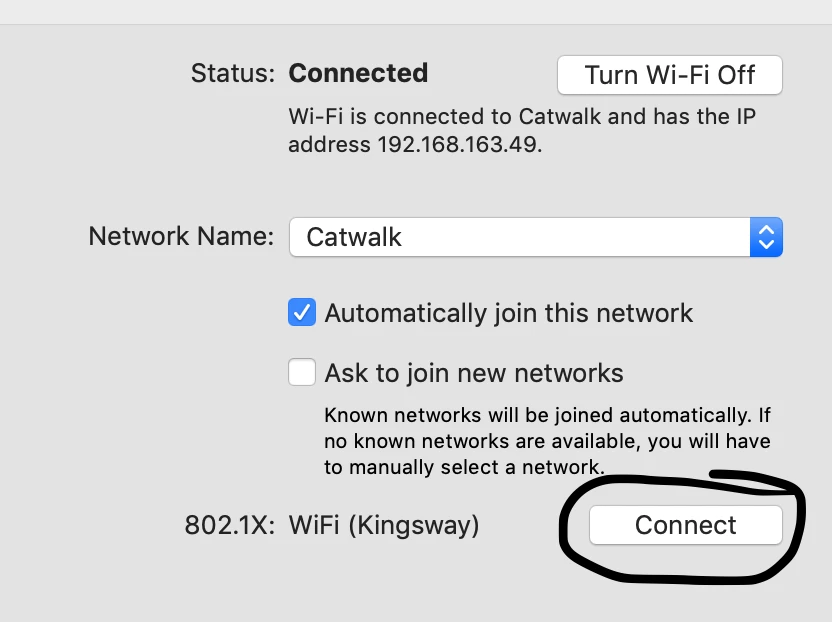
script "connect" button in network preferences

  • January 31, 2020
  • 3 replies
  • 28 views

Forum|alt.badge.img+7

I'm hoping this is really easy and someone will know, but I've searched high and low and can't find a command to automate the "connect" button in network preferences.
Does anyone know the command to control it?
I'm basically switching networks with;
networksetup -setairportnetwork en0 MYNETWORK
but then it needs someone to click on "connect" or it just sits there doing nothing.
3 replies

Forum|alt.badge.img+7
  • Author
  • Contributor
  • February 7, 2020

Anyone?


Forum|alt.badge.img+8
  • Contributor
  • February 7, 2020

depending on the network, you may have to give consent to use the computer certificate (in my case) for 802.1x access.
That is hard (or impossible?) to script. I have my users approve to use this cert once (part of onboarding manual) and afterwards the wifi auto-connect settings take care of automatically connecting to the 802.1x network.


Forum|alt.badge.img+7
  • Author
  • Contributor
  • February 10, 2020

Thanks for the reply @maurits

We have the same set up, once it's approved it just works. So if the user manually selects different wifi and then comes back to the domain wifi it just switches no problems. It's when I use a script to switch the network that it seems to require this connect button to be clicked.

Driving me mad!!!