Question

Script to Install & Update Zoom

  • September 28, 2018
  • 142 replies
  • 770 views

Show first post

142 replies

Forum|alt.badge.img+3
  • New Contributor
  • October 19, 2020

@msw-sa, thanks for the heads up. Something I noticed is on my test box(new build in this case), the box isn't greyed out with the same deployment package(the one I've been messing with), but with my daily driver, it is staying greyed out. Even some users that are nice enough to help me test are finding the same thing.

Is there cached files sticking around somewhere that need to be cleared out to act like a new deployment for this change?


Forum|alt.badge.img+5
  • Contributor
  • November 2, 2020

@kwoodard looks fine to me. If a policy with this script is scoped to run on machines where Zoom is out-of-date, I think you're good to go.

@KCouture It turns out there are other files that cache some settings. This Zoom kbase suggests that you should go to the Zoom menu and select Uninstall to cleanly remove all files; to do so manually, I believe you will need to remove the following:
- ~/Library/Application Support/zoom.us
- /Library/Preferences/us.zoom.config.plist
- any temporary locations you have have created us.zoom.config.plist during installation, if you aren't removing that copy as part of the script
- Zoom app itself

The one I was missing was the Application Support folder, which appears to cache some of the settings. I didn't test this myself bc I was done testing by the time I got a response, but Zoom support advised me the Uninstall menu item removes everything.


Forum|alt.badge.img+3
  • New Contributor
  • December 18, 2020

Is anyone experiencing issues with this script on Big Sur, Apple M1 and using it during the DEPNotify provisioning process? It seems very random but sometimes during the DEPNotify provision process for some reason the laptop restarts out of nowhere typically during or right after this script finishes, other times it installs without an issue.


Forum|alt.badge.img+15
  • Esteemed Contributor
  • December 18, 2020

@nateee The script at the top of this post looks for Intel architecture. Start with something like what @kwoodard posted and add to it as you need. My only recommendation there would be to use a temp dir created by mktemp and not just use /tmp. You could also add some logic to check if Zoom is already running (pgrep) before blindly triggering an install.

Edit: Feel free to use or take ideas from my Zoom install script.

https://github.com/cwmcbrewster/Jamf_Scripts/blob/master/Install_Zoom.sh


Forum|alt.badge.img+9
  • Valued Contributor
  • December 22, 2020

a couple of questions regarding this script:

• Does anyone know if this script or the latest update 5.4.59780.1220 is M1 / Apple Silicon compatible? or do you need separate installers for both? I see zoom has a separate M1 pkg on their site..

• and to keep it updated in a Jamf smart group scope, what variables would I need to keep updated? so far it seems to be finding the latest version but I am still trying to better understand the regex logic:

- Application title - is - Zoom.app
and - Application version - matches regex - ^0-4].
or - Application Version - matches regex - ^5.[0-3].
or - Application Version - matches regex - ^5.3.0.

no paratheses are used in the criteria


Forum|alt.badge.img+15
  • Esteemed Contributor
  • December 22, 2020

@walt

I think there are 2 5.4.7 installers right now. Hopefully they make a single universal in the future.

@talkingmoose has a script that makes it really easy to generate the regex needed.

https://gist.github.com/talkingmoose/2cf20236e665fcd7ec41311d50c89c0e


Forum|alt.badge.img+9
  • Valued Contributor
  • December 23, 2020

@cbrewer sorry for the edits, trying again with both 5.4.59780.1220 and 5.4.7 (59780.1220), since zoom seems to have various identifieres. the first one I found in the "install and update latest zoom" script policy log and the other referenced from the regex script.

the regex script it outputs:

Version string is 
Adjusted version string for parsing is ""
Number of sequences is 0
Replacing digits in sequences to get the sequence dividers ""

Adding original version string to end of regex as a potential match.


Regex for "" or higher (8 characters):

^(|.*)$

Forum|alt.badge.img+9
  • Valued Contributor
  • January 6, 2021

any recommendations on updating these regex settings to ensure it downloads the latest zoom? I am still trying to better understand regex configurations and settings;

  • Application title - is - Zoom.app and - Application version - matches regex - ^0-4]. or - Application Version - matches regex - ^5.[0-3]. or - Application Version - matches regex - ^5.3.0.

no paratheses are used in the criteria

thanks


atomczynski11
Forum|alt.badge.img+18
  • Jamf Heroes
  • January 11, 2021

In version 1.1 of the script in this thread I have noticed that the log shows the following:

Script result: Latest Version is: 5.4.59780.1220
Current installed version is: 5.4.59780.1220
Zoom is current. Exiting

However the up to date version is installed.


Forum|alt.badge.img+4
  • Contributor
  • March 2, 2021

@omatsei Does this script live in github anywhere? I'm working on compatibility with a mixed environment of intel/M1s and would like the latest version (if its not the one posted above in this thread)


Forum|alt.badge.img+4
  • Contributor
  • March 4, 2021

it does now. I'll update this thread when i test on an M1, but this installs the universal pkg, no matter the architecture, on an intel machine. I'll merge to main when i test to make sure this works on an M1, should be tomorrow


Forum|alt.badge.img+4
  • Contributor
  • March 5, 2021

tested on a few m1s and t2s, and this script installs universal binary on both https://github.com/lukasindre/jamf_stuff/blob/master/zoominstall.sh, thanks @omatsei for the huge foundation!


Forum|alt.badge.img+5
  • Contributor
  • March 8, 2021

A quick note about my script, which was based on the OP. I didn't check this, but it turns out the first test, which is supposed to check the processor and evaluate as false if not i386 or x86_64, always evaluates as true, even on M1 hardware. I just tested the script on an M1 MBA, and it installed Zoom even though /usr/bin/uname -p returns arm, so should cause it to echo "ERROR: This script is for Intel Macs only." and do nothing else.

This is the line I'm talking about:

if [ '`/usr/bin/uname -p`'="i386" -o '`/usr/bin/uname -p`'="x86_64" ]; then

Since Zoom is distributing a universal version of the app now anyway, I didn't bother spending time to figure out why this test isn't working and just removed it. The script works on both Intel and M1 hardware either way (since the first test, incorrectly, always evaluates as true), but I removed it since there's no reason to have a bad test condition in the script.


kwoodard
Forum|alt.badge.img+12
  • Valued Contributor
  • March 8, 2021

@msw-sa I was just about to come and ask about needing that line of code now that they are using a universal binary. Nice thing that I don't have to alter my basic script to accomodate the new M1's...


Forum|alt.badge.img+12
  • Valued Contributor
  • March 9, 2021

@msw-sa You could have used

if [ `/usr/bin/uname -p` = "i386" -o `/usr/bin/uname -p` = "x86_64" ]; then

or test for 'arm' and simply turn around the if and else part.


Forum|alt.badge.img+5
  • Contributor
  • March 9, 2021

Agreed, but since knowing the processor architecture is no longer relevant for a Zoom install, I just removed that part of the script completely. Thanks


Forum|alt.badge.img+3
  • New Contributor
  • April 8, 2021

Hello All, hope you are well.
I am trying to update Zoom on all MacBook's with no user interaction.
When I use this script

#!/bin/bash

# this is the full URL
url="https://zoom.us/client/latest/ZoomInstallerIT.pkg"

# change directory to /private/tmp to make this the working directory
cd /private/tmp/

# download the installer package and name it for the linkID
/usr/bin/curl -JL "$url" -o "ZoomInstallerIT.pkg"

# install the package
/usr/sbin/installer -pkg "ZoomInstallerIT.pkg" -target /

# remove the installer package when done
/bin/rm -f "ZoomInstallerIT.pkg"

exit 0

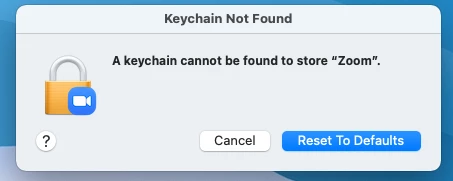
I get this error.

Or when I use Jamf patch management I get this pop after the install.

Have I missed something?
Ideally I would like to use the script as it would keep Zoom up to date.

Any help would be great.
Thank you
Harry

Edited.......
Solved issue. Found that someone else created an patch update so both was running at the same time.
Thanks.


Forum|alt.badge.img+4
  • New Contributor
  • April 8, 2021

Hi @Colezy , I might be oversimplifying it but could you set the policy/script to run once per month per computer? That's how we have it set up anyway.


kwoodard
Forum|alt.badge.img+12
  • Valued Contributor
  • April 8, 2021

Hey @Colezy like @jpuebs said, I have the script/policy run once per month, per computer. I never see those errors you are seeing.


Forum|alt.badge.img+7
  • Contributor
  • April 12, 2021

this was a bug in 5.6.0 @Colezy it was solved in 5.6.1. Have you tried again?


Forum|alt.badge.img+1
  • New Contributor
  • August 10, 2021

I have just fond this and used one of the early versions and just removed the plist parameters and the set preferences and it seems work fine for me still so just wanted to say thank you it has saved me a lot of headache and time 


Forum|alt.badge.img+3
  • New Contributor
  • January 10, 2022

I created a much less thorough script that just installs the latest ZoomInstallerIT package, as well as a script for an extension to check if Zoom is up to date.

Installer:

#!/bin/bash mkdir /tmp/downloads cd /tmp/downloads #Installing Zoom # Download Zoom PKG sudo /usr/bin/curl -L -o ./ZoomInstallerIT.pkg https://zoom.us/client/latest/ZoomInstallerIT.pkg # Install Zoom sudo /usr/sbin/installer -allowUntrusted -pkg ./ZoomInstallerIT.pkg -target / /bin/sleep 20 rm -rf /tmp/downloads*

Extension:

#!/bin/bash # Get OS version and adjust for use with the URL string OSvers_URL=$( sw_vers -productVersion | sed 's/[.]/_/g' ) # Set the User Agent string for use with curl userAgent="Mozilla/5.0 (Macintosh; Intel Mac OS X ${OSvers_URL}) AppleWebKit/535.6.2 (KHTML, like Gecko) Version/5.2 Safari/535.6.2" # Get the latest version of Reader available from Zoom page. CurrentZoom=`/usr/bin/curl -s -A "$userAgent" https://zoom.us/download | grep 'ZoomInstallerIT.pkg' | awk -F'/' '{print $3}'` if [ -d /Applications/zoom.us.app ]; then ZoomVersion=$( /usr/bin/defaults read /Applications/zoom.us.app/Contents/Info CFBundleShortVersionString | tr -d ' ,)' | tr -s '(' '.') ZoomCheck=$ZoomVersion else ZoomCheck="Notinstalled" fi if [ "$ZoomCheck" == "$CurrentZoom" ]; then #Is Zoom up to date? result="ZoomUpToDate" else result="ZoomNotUpToDate" fi echo "<result>$result</result>"

Forum|alt.badge.img+3
  • New Contributor
  • January 10, 2022

I created a much less thorough script that just installs the latest ZoomInstallerIT package, as well as a script for an extension to check if Zoom is up to date.

Installer:

#!/bin/bash mkdir /tmp/downloads cd /tmp/downloads #Installing Zoom # Download Zoom PKG sudo /usr/bin/curl -L -o ./ZoomInstallerIT.pkg https://zoom.us/client/latest/ZoomInstallerIT.pkg # Install Zoom sudo /usr/sbin/installer -allowUntrusted -pkg ./ZoomInstallerIT.pkg -target / /bin/sleep 20 rm -rf /tmp/downloads*

Extension:

#!/bin/bash # Get OS version and adjust for use with the URL string OSvers_URL=$( sw_vers -productVersion | sed 's/[.]/_/g' ) # Set the User Agent string for use with curl userAgent="Mozilla/5.0 (Macintosh; Intel Mac OS X ${OSvers_URL}) AppleWebKit/535.6.2 (KHTML, like Gecko) Version/5.2 Safari/535.6.2" # Get the latest version of Reader available from Zoom page. CurrentZoom=`/usr/bin/curl -s -A "$userAgent" https://zoom.us/download | grep 'ZoomInstallerIT.pkg' | awk -F'/' '{print $3}'` if [ -d /Applications/zoom.us.app ]; then ZoomVersion=$( /usr/bin/defaults read /Applications/zoom.us.app/Contents/Info CFBundleShortVersionString | tr -d ' ,)' | tr -s '(' '.') ZoomCheck=$ZoomVersion else ZoomCheck="Notinstalled" fi if [ "$ZoomCheck" == "$CurrentZoom" ]; then #Is Zoom up to date? result="ZoomUpToDate" else result="ZoomNotUpToDate" fi echo "<result>$result</result>"

I then created Smart Groups and Policies to run the script on computers that were not up to date.

I pulled inspiration from several scripts on Jamf Nation, starting with: https://community.jamf.com/t5/jamf-pro/install-update-vlc/m-p/254031#M235945


Forum|alt.badge.img+4
  • Contributor
  • September 2, 2022

Hi everyone

It seems that the script can't get the latest version hosted by https://zoom.us/download anymore
Any idea, please ?


Forum|alt.badge.img+1
  • New Contributor
  • September 2, 2022

Hi everyone

It seems that the script can't get the latest version hosted by https://zoom.us/download anymore
Any idea, please ?


Hey Loic,

Lee R in the MacAdmins Slack recently shared this updated one with me that works:

#!/bin/bash
# This script runs within a policy is scoped to devices listed as 'Old' in the Extension Attribute.
OSvers_URL=$( sw_vers -productVersion | sed 's/[.]/_/g' )

userAgent="Mozilla/5.0 (Macintosh; Intel Mac OS X ${OSvers_URL}) AppleWebKit/535.6.2 (KHTML, like Gecko) Version/5.2 Safari/535.6.2"

# Get the latest version of Reader available from Zoom page.
latestver=`/usr/bin/curl -s -A "$userAgent" https://zoom.us/download | grep 'ZoomInstallerIT.pkg' | awk -F'/' '{print $3}'`
ulatestver=`/usr/bin/curl -s -A "$userAgent" https://support.zoom.us/hc/en-us/articles/201361963-Release-notes-for-macOS | grep 'version 5.' | head -1 | sed 's/^.*5./5./' | tr -d ' ' | sed -r 's/[(]+/./g' | cut -f1 -d")"`

echo "$latestver"
echo "$ulatestver"
echo "Installing version ${latestver}";

url="https://zoom.us/client/${ulatestver}/ZoomInstallerIT.pkg"

/usr/bin/curl -L -o /var/tmp/ZoomInstallerIT.pkg ${url};
res=$?
echo "$res"
if test "$res" != "0"; then
echo "the curl command failed with: $res"
exit 1
else
/usr/sbin/installer -pkg /var/tmp/ZoomInstallerIT.pkg -target /;
exit 0
fi