I know there's a number of discussion on it but haven't quite found the correct one. I'm trying to have a policy that will call a script to change computer name based upon users first letter and last name. Here's the workflow:
-User will enroll via DEP. Enter in John Smith -DEP will look for SplashBuddy (SB) to run. -SB will do it's thing and will trigger all install packages. -one of the policies to kick off is to take the information set for the User name and change computer name to jsmith-mbp on the local macbook.
Any help would be appreciated. Thank you
Best answer by boberito
So you'd have to write a script that does that. You could put that script potentially in a payload-free package or a script that runs with a policy.
#!/bin/sh

#gets current logged in user
getUser=$(ls -l /dev/console | awk '{ print $3 }')

#gets named
firstInitial=$(finger -s $getUser | head -2 | tail -n 1 | awk '{print tolower($2)}' | cut -c 1)
lastName=$(finger -s $getUser | head -2 | tail -n 1 | awk '{print tolower($3)}')
computerName=$firstInitial$lastName"+mbp"

#set all the name in all the places
scutil --set ComputerName "$computerName"
scutil --set LocalHostName "$computerName"
scutil --set HostName "$computerName"
This should work. I used the Jamf "setComputerName" command to set the computer name. Below it are the scutil commands to set the computer name. I commented out those lines. They are only needed if you're not using the Jamf command to name the computer. If you use scutil, you would want to comment out the line that uses the Jamf command.
#!/bin/zsh

jamfBinary="/usr/local/jamf/bin/jamf"

# Get last 7 of serial number
serial=$(system_profiler SPHardwareDataType | grep Serial | /usr/bin/awk '{ print $4 }' | tail -c 8 )

# Current logged in user
currentUser=$(/bin/ls -l /dev/console | /usr/bin/awk '{ print $3 }')
# First Name
firstName=$(dscl . -read /Users/$currentUser RealName | cut -d: -f2 | sed -e 's/^[ \\t]*//' | grep -v "^$" | /usr/bin/awk '{ print $1 }')
# Last Name
lastName=$(dscl . -read /Users/$currentUser RealName | cut -d: -f2 | sed -e 's/^[ \\t]*//' | grep -v "^$" | /usr/bin/awk '{ print $2 }')
# Get first initial
firstInitial=$(finger -s $currentUser | head -2 | tail -n 1 | awk '{print toupper ($2)}' | cut -c 1)
# Get last initial
lastInitial=$(finger -s $currentUser | head -2 | tail -n 1 | awk '{print toupper ($3)}' | cut -c 1)

# Generate computer name
computerName="${firstInitial}""${lastName}"-"${serial}"

# Run Jamf command to name the computer
"$jamfBinary" setComputerName "$computerName"

# Use scutil to set computer name - comment out if using 'jamf setComputerName'
#scutil --set ComputerName "$computerName"
#scutil --set LocalHostName "$computerName"
#scutil --set HostName "$computerName"
Thanks, will give this a try. How does your script know to skip middle names (e.g., full name is "Mary Elizabeth Winstead" and I want the computer name to be "mwinstead-XXXXXXX"; wouldn't "print $2" on the dscl command return elizabeth, not winstead)?
Thanks, will give this a try. How does your script know to skip middle names (e.g., full name is "Mary Elizabeth Winstead" and I want the computer name to be "mwinstead-XXXXXXX"; wouldn't "print $2" on the dscl command return elizabeth, not winstead)?
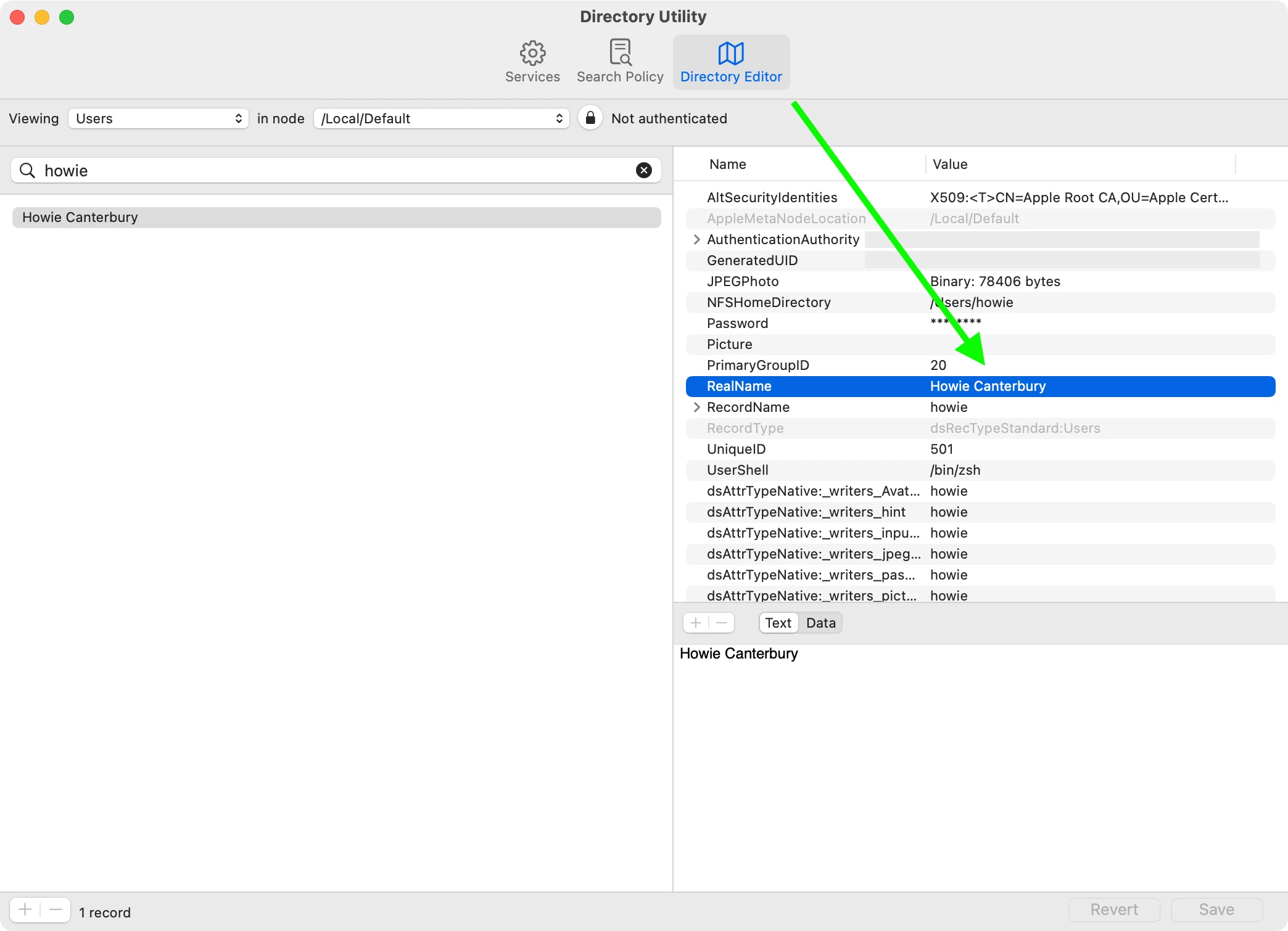
It doesn't know to do that. It's querying the first and last name that is in the user's local directory record. My script is looking at the "RealName" attribute. Here's a screenshot from my personal MacBook Pro. You could experiment with using awk or some other method of parsing output to remove a middle name from the output.