Solved

Self Service complaints it's not linked to Jamf

  • November 15, 2023
  • 35 replies
  • 193 views

Forum|alt.badge.img+6

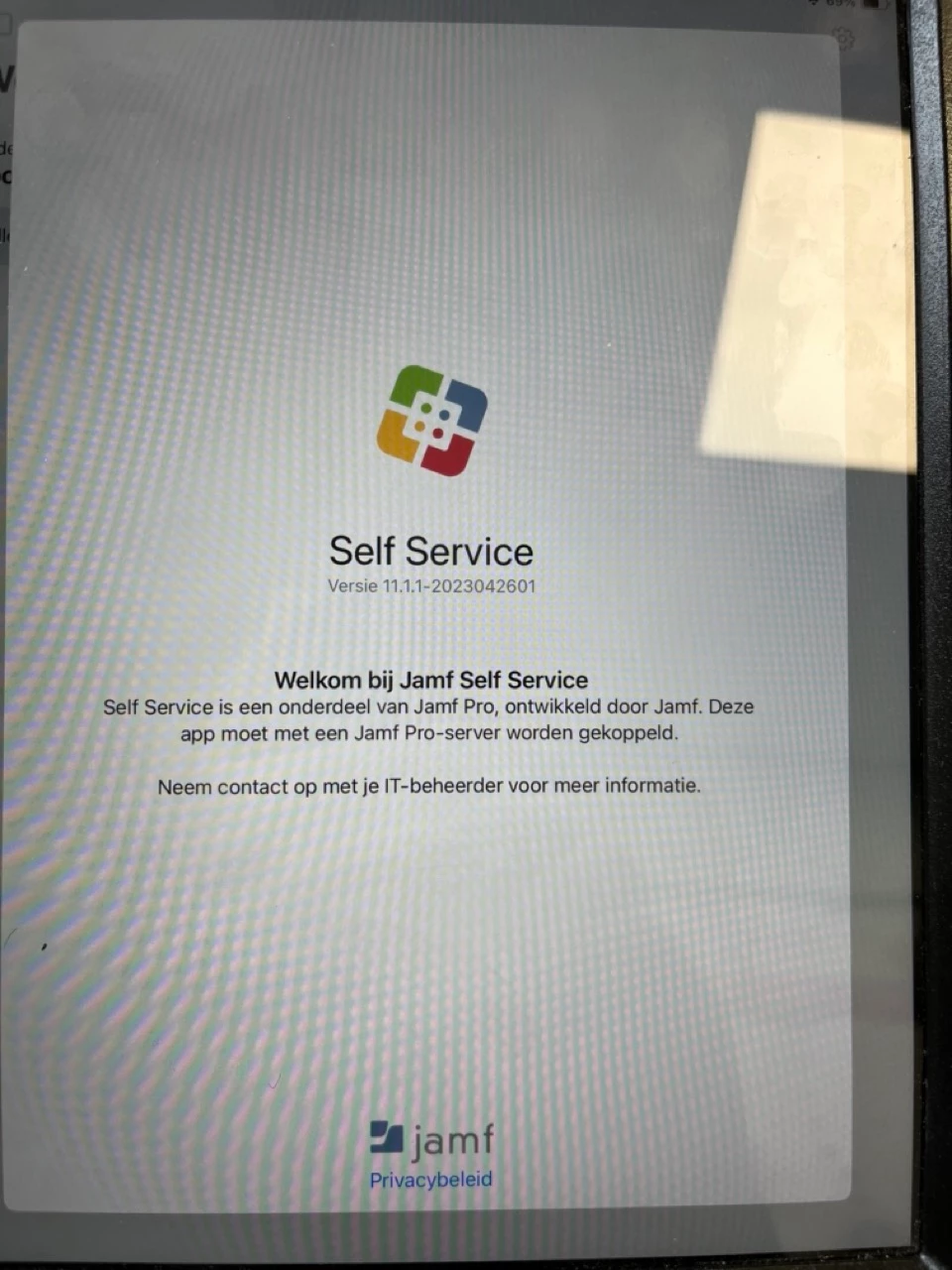
When a user with a managed iPad starts Self Service, the app complaints it should be linked to a Jamf Pro-server. And you can't do anything with the app. See screenshot (Dutch localization):

This is weird, because the iPad is listed between the devices in Jamf Pro.

I do notice two pending commands from yesterday and the day before yesterday (inventory update and a time zone settings update).

I tried to quit self service and relaunch: did not work. I also switched the iPad off and back on.

What could be wrong? 

Edit: could it have to do with the license? I get this notification now (I'll ask my boss about this):

Device count exceeded
Purchase additional licenses.

Best answer by matteo_bolognin

Just an update on this to regroup thoughts.
Starting with Self Service 11.2 (released 14 November) both MANAGEMENT_ID and UDID key in the app config are required

Verify the self service app config matches this:

<dict>
<key>INVITATION_STRING</key>
<string>$MOBILEDEVICEAPPINVITE</string>
<key>JSS_ID</key>
<string>$JSSID</string>
<key>SERIAL_NUMBER</key>
<string>$SERIALNUMBER</string>
<key>DEVICE_NAME</key>
<string>$DEVICENAME</string>
<key>MAC_ADDRESS</key>
<string>$MACADDRESS</string>
<key>MANAGEMENT_ID</key>
<string>$MANAGEMENTID</string>
<key>UDID</key>
<string>$UDID</string>
<key>JSS_URL</key>
<string>$JPS_URL</string>
</dict>

Once saved a "Settings - Managed App Configuration" command will be sent to all devices in scope.
This may take some time since it relies on MDM communication.

35 replies

matteo_bolognin
Forum|alt.badge.img+8

@doekman check for Self Service app > App Config > in the plist if the below key pair is missing:
<key>MANAGEMENT_ID</key>
<string>$MANAGEMENTID</string>

If it's not present, add it and save. Then quit and re-open Self Service.


m_ruehl
Forum|alt.badge.img+3
  • New Contributor
  • November 15, 2023

We have the same Problem.


matteo_bolognin
Forum|alt.badge.img+8

We have the same Problem.


I'd recommend to check the same.
Editing the app with the key pair should be all what's needed.
Upon saving, you should see MDM commands called "Settings - Managed App Configuration" starting to be sent to devices that will pull down the new config and let Self Service re-connect (needs to be quit/re-open).


m_ruehl
Forum|alt.badge.img+3
  • New Contributor
  • November 15, 2023

I'd recommend to check the same.
Editing the app with the key pair should be all what's needed.
Upon saving, you should see MDM commands called "Settings - Managed App Configuration" starting to be sent to devices that will pull down the new config and let Self Service re-connect (needs to be quit/re-open).


Is this requirement new? The self-service app entries in my MDM only have the UDID entered and not the MANAGEMENT_ID. In the product documentation for Jamf Pro, only the MANAGEMENT_ID is entered and not the UDID.

Please refer: https://learn.jamf.com/bundle/jamf-pro-documentation-current/page/Jamf_Self_Service_for_iOS.html

Which configuration is the right one now?


Forum|alt.badge.img+6
  • Author
  • Contributor
  • November 15, 2023

@doekman check for Self Service app > App Config > in the plist if the below key pair is missing:
<key>MANAGEMENT_ID</key>
<string>$MANAGEMENTID</string>

If it's not present, add it and save. Then quit and re-open Self Service.


The Preferences-textarea is empty. Is this a new thing, since in the past Jamf Self Service worked.

Also: because it's empty do I need to enclose the xml in a dict-tag? So like:

<dict>
<key>MANAGEMENT_ID</key>

  <string>$MANAGEMENTID</string>
</dict>


matteo_bolognin
Forum|alt.badge.img+8

The Preferences-textarea is empty. Is this a new thing, since in the past Jamf Self Service worked.

Also: because it's empty do I need to enclose the xml in a dict-tag? So like:

<dict>
<key>MANAGEMENT_ID</key>

  <string>$MANAGEMENTID</string>
</dict>


Depending on how you're deploying Self Service (Apps&Books, manual install etc), there's example plist config here: https://learn.jamf.com/bundle/jamf-pro-documentation-current/page/Jamf_Self_Service_for_iOS.html


matteo_bolognin
Forum|alt.badge.img+8

Is this requirement new? The self-service app entries in my MDM only have the UDID entered and not the MANAGEMENT_ID. In the product documentation for Jamf Pro, only the MANAGEMENT_ID is entered and not the UDID.

Please refer: https://learn.jamf.com/bundle/jamf-pro-documentation-current/page/Jamf_Self_Service_for_iOS.html

Which configuration is the right one now?


The MANAGEMENT_ID have always been optional.
With the latest release of Self Service, it looks like it's mandatory now.


Forum|alt.badge.img+3
  • New Contributor
  • November 15, 2023

The MANAGEMENT_ID have always been optional.
With the latest release of Self Service, it looks like it's mandatory now.


I am having the same issue with Self Sevice, it seems to be the 11.2 update of Self Service.

I was ok until it updated.


Forum|alt.badge.img+13
  • Contributor
  • November 15, 2023

I haven't had that MANAGEMENT_ID key in my App Configuration ever and our Self Service broke with this 11.2 update. Not sure if I missed something but adding it in seems to resolve the issue.


m_ruehl
Forum|alt.badge.img+3
  • New Contributor
  • November 15, 2023

The MANAGEMENT_ID have always been optional.
With the latest release of Self Service, it looks like it's mandatory now.


Is this official, are there any release notes for Jamf Self Service that contain this information?


vickih
Forum|alt.badge.img+5
  • Contributor
  • November 15, 2023

Good Morning, 


I started having the issue when the iPadOS updated to version 17.1.1.  Prior to this everything was happy.  


VickiH


Forum|alt.badge.img+3
  • New Contributor
  • November 15, 2023

@doekman check for Self Service app > App Config > in the plist if the below key pair is missing:
<key>MANAGEMENT_ID</key>
<string>$MANAGEMENTID</string>

If it's not present, add it and save. Then quit and re-open Self Service.


This worked for my environment, thank you!


diesel600
Forum|alt.badge.img+1
  • New Contributor
  • November 15, 2023

Good Morning, 


I started having the issue when the iPadOS updated to version 17.1.1.  Prior to this everything was happy.  


VickiH


The issue is not iPadOS 17.1.1. I have iPads with earlier iPadOS versions that are having this issue this morning. The issue comes with the update to Self Service version 11.2.0. Adding the MANAGEMENT_ID key in the Self Service app configuration fixed it for me as it did for others.


fab_dre
Forum|alt.badge.img+3
  • New Contributor
  • November 15, 2023

Hello,
any ideas when the MANAGEMENT_ID does not solve the problem?


Forum|alt.badge.img+13
  • Contributor
  • November 15, 2023

Hello,
any ideas when the MANAGEMENT_ID does not solve the problem?


Did your devices receive the new updated management configuration command after you added the key? In our environment we force push Self Service so we can delete it and run an inventory update to install it again. This makes sure it has the new App Configuration settings with it.


vickih
Forum|alt.badge.img+5
  • Contributor
  • November 15, 2023

The issue is not iPadOS 17.1.1. I have iPads with earlier iPadOS versions that are having this issue this morning. The issue comes with the update to Self Service version 11.2.0. Adding the MANAGEMENT_ID key in the Self Service app configuration fixed it for me as it did for others.


It may have worked for you and others but it is not working for me and some others after adding the key.  The only time I started to have the issue was after I updated to 17.1.1, prior to that it was working.


Thank You


vickih
Forum|alt.badge.img+5
  • Contributor
  • November 15, 2023

Did your devices receive the new updated management configuration command after you added the key? In our environment we force push Self Service so we can delete it and run an inventory update to install it again. This makes sure it has the new App Configuration settings with it.


I did that as well and I'm still receiving the same message about it being a component of Jamf Pro and it must be associated with a Jamf Pro Server.  :-( 


Forum|alt.badge.img+3
  • New Contributor
  • November 15, 2023

Hello,
any ideas when the MANAGEMENT_ID does not solve the problem?


Are you using this config 

<dict>
<key>INVITATION_STRING</key>
<string>$MOBILEDEVICEAPPINVITE</string>
<key>JSS_ID</key>
<string>$JSSID</string>
<key>SERIAL_NUMBER</key>
<string>$SERIALNUMBER</string>
<key>DEVICE_NAME</key>
<string>$DEVICENAME</string>
<key>MAC_ADDRESS</key>
<string>$MACADDRESS</string>
<key>UDID</key>
<string>$UDID</string>
<key>MANAGEMENT_ID</key>
<string>$MANAGEMENTID</string>
<key>JSS_URL</key>
<string>your Jamf URL</string>
</dict>


note the UUID key which is not the same as the Jamf documentation, this worked for me and others.


fab_dre
Forum|alt.badge.img+3
  • New Contributor
  • November 15, 2023

Are you using this config 

<dict>
<key>INVITATION_STRING</key>
<string>$MOBILEDEVICEAPPINVITE</string>
<key>JSS_ID</key>
<string>$JSSID</string>
<key>SERIAL_NUMBER</key>
<string>$SERIALNUMBER</string>
<key>DEVICE_NAME</key>
<string>$DEVICENAME</string>
<key>MAC_ADDRESS</key>
<string>$MACADDRESS</string>
<key>UDID</key>
<string>$UDID</string>
<key>MANAGEMENT_ID</key>
<string>$MANAGEMENTID</string>
<key>JSS_URL</key>
<string>your Jamf URL</string>
</dict>


note the UUID key which is not the same as the Jamf documentation, this worked for me and others.


Currently the config is without UDID. 
But I tested it too. Same like before...


Forum|alt.badge.img+3
  • New Contributor
  • November 15, 2023

Currently the config is without UDID. 
But I tested it too. Same like before...


do you have a / on the end of your URL if so try removing it.


vickih
Forum|alt.badge.img+5
  • Contributor
  • November 15, 2023

Currently the config is without UDID. 
But I tested it too. Same like before...


So I was just able to get this working, I read another post where management_id and UDID still needs to be there...I've just tested on another iPad and it works as well.  After adding the App configuration, save it and then I deleted the app from device.  Went to that device and ran an update inventory so it will push out the Jamf Self-Service.  


Note please make sure you update the $JSS_URL with your jamfcloud URL 


<dict>
<key>INVITATION_STRING</key>
<string>$MOBILEDEVICEAPPINVITE</string>
<key>JSS_ID</key>
<string>$JSSID</string>
<key>SERIAL_NUMBER</key>
<string>$SERIALNUMBER</string>
<key>DEVICE_NAME</key>
<string>$DEVICENAME</string>
<key>MAC_ADDRESS</key>
<string>$MACADDRESS</string>
<key>MANAGEMENT_ID</key>
<string>$MANAGEMENTID</string>
<key>UDID</key>
<string>$UDID</string>
<key>JSS_URL</key>
<string>$JSS_URL/</string>
</dict>


vickih
Forum|alt.badge.img+5
  • Contributor
  • November 15, 2023

Are you using this config 

<dict>
<key>INVITATION_STRING</key>
<string>$MOBILEDEVICEAPPINVITE</string>
<key>JSS_ID</key>
<string>$JSSID</string>
<key>SERIAL_NUMBER</key>
<string>$SERIALNUMBER</string>
<key>DEVICE_NAME</key>
<string>$DEVICENAME</string>
<key>MAC_ADDRESS</key>
<string>$MACADDRESS</string>
<key>UDID</key>
<string>$UDID</string>
<key>MANAGEMENT_ID</key>
<string>$MANAGEMENTID</string>
<key>JSS_URL</key>
<string>your Jamf URL</string>
</dict>


note the UUID key which is not the same as the Jamf documentation, this worked for me and others.


Yes, I was just able to get this to work.


Thank you very much, 

VickiH


vickih
Forum|alt.badge.img+5
  • Contributor
  • November 15, 2023

The issue is not iPadOS 17.1.1. I have iPads with earlier iPadOS versions that are having this issue this morning. The issue comes with the update to Self Service version 11.2.0. Adding the MANAGEMENT_ID key in the Self Service app configuration fixed it for me as it did for others.


Also what helped was adding UDID back.  Not just management_id that seems to be working for me.  I hope you have a great day.


Forum|alt.badge.img+4
  • Contributor
  • November 15, 2023

I'd recommend to check the same.
Editing the app with the key pair should be all what's needed.
Upon saving, you should see MDM commands called "Settings - Managed App Configuration" starting to be sent to devices that will pull down the new config and let Self Service re-connect (needs to be quit/re-open).


I've made the change, and new installs are working, but I'm not seeing the "Settings - Managed App Configuration" command going out to the existing devices. Is there an API command to force that?


vickih
Forum|alt.badge.img+5
  • Contributor
  • November 15, 2023

I've made the change, and new installs are working, but I'm not seeing the "Settings - Managed App Configuration" command going out to the existing devices. Is there an API command to force that?


Maybe you can try  the force update and see if that will help.