Solved

Self Service Dock Item in Configuration Profile

  • April 19, 2012
  • 15 replies
  • 66 views

Forum|alt.badge.img+4

I'd like to add the Self-Service icon to my users Dock's by default since we will be using this pretty heavily. I can add the Dock Item to Casper Admin, and create a policy to deploy it, and it does work. What I'd like to do however, is to deploy this through Configuration Profiles instead of by Policy. My main reason for this is simply for the instantaneuous addition of the dock item as soon as the device is enrolled.

When I go into the Dock section of the Configuration Profile and add an Application, Self Service is not on the list.

Any ideas or help?

Best answer by nkalister

I use dockutil to configure my user's docks, works great with selfservice. You can use it to setup the default user template's dock, so you get the same effect as using a configuration profile but with more control.
https://github.com/kcrawford/dockutil

15 replies

Forum|alt.badge.img+5
  • Contributor
  • April 21, 2012

I would love to know how this can be accomplished as well. I figured out how to add to the list of preference pane items, but not apps.


Forum|alt.badge.img+19
  • Contributor
  • Answer
  • April 23, 2012

I use dockutil to configure my user's docks, works great with selfservice. You can use it to setup the default user template's dock, so you get the same effect as using a configuration profile but with more control.
https://github.com/kcrawford/dockutil


Forum|alt.badge.img+4
  • Author
  • Contributor
  • April 24, 2012

nkalister. Not sure I will use that utility, but it's definitely a solution. Thanks!


Forum|alt.badge.img+7
  • New Contributor
  • September 10, 2012

Any progress on this issue? Is there a prescribed method to add non-Apple dock items via Configuration Policy that someone could share?


Forum|alt.badge.img+5
  • Contributor
  • July 31, 2018

6 years later and Self Service still isn't an option?


nvandam
Forum|alt.badge.img+9
  • Valued Contributor
  • July 31, 2018

You can add whatever you want to the dock, so long as you know the path. It's not a profile though, so the user could still change it


Forum|alt.badge.img+6
  • Contributor
  • June 24, 2021

For some reason, this is not working for me. I have verified the file path and application name, but nothing appears on the dock. Any suggestions?


pkleiber
Forum|alt.badge.img+9
  • Contributor
  • June 24, 2021

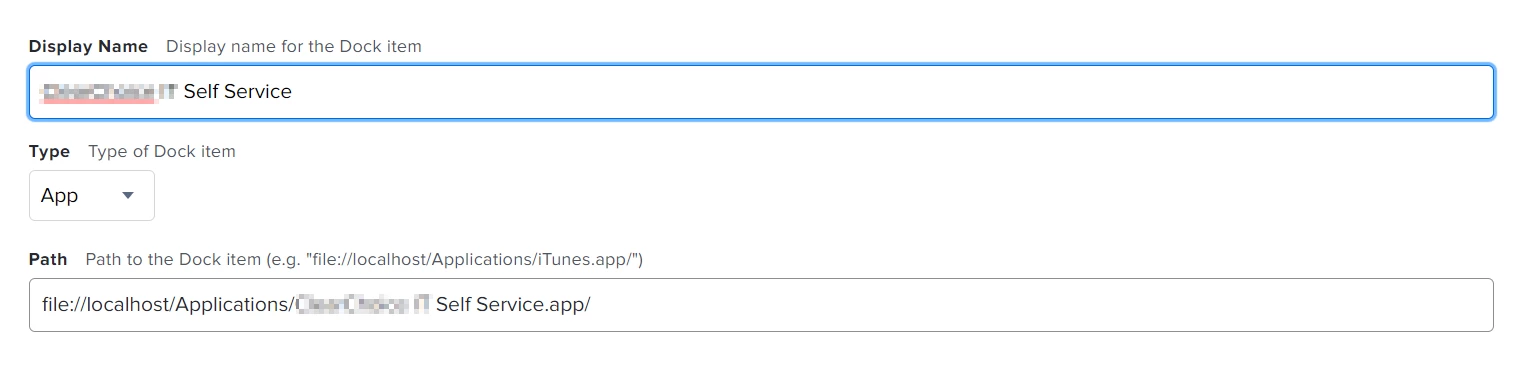
Hi @sfaeder you have to fill the spaces in the path with %20
For Example:
file://localhost/Applications/CompanyName%20IT%20Self%20Service.app
Then it should work.


Forum|alt.badge.img+3

Hi. How would you add a user's Documents and Download folders to the Dock?


Forum|alt.badge.img+6
  • Contributor
  • June 24, 2021
Hi @sfaeder you have to fill the spaces in the path with %20 For Example: file://localhost/Applications/CompanyName%20IT%20Self%20Service.app Then it should work.

Hi @pkleiber , unfortunately that did not seem to work either. Could this possibly be an issue with Big Sur?


pkleiber
Forum|alt.badge.img+9
  • Contributor
  • June 25, 2021

Hi @sfaeder so I did the following. Dragged Self Service to my dock on my machine. Then opened Jamf Admin then clicked on Add Dock Item and choose the self service app. It will generate the following entry in Computer Management / Dock Items:
PATH: file:///Applications/Company%20Self%20Service.app/
I tested it on a test machine, but it is not working under Big Sur.


pkleiber
Forum|alt.badge.img+9
  • Contributor
  • June 25, 2021

So tested again, sometimes I get an error, sometimes it works with the Jamf Admin method and the path
file:///Applications/Company%20Self%20Service.app/
Very strange :/


pkleiber
Forum|alt.badge.img+9
  • Contributor
  • June 25, 2021

Hi @michael.deagonia I think for this you should take a look at dockutil


kgam
Forum|alt.badge.img+8
  • Valued Contributor
  • June 25, 2021

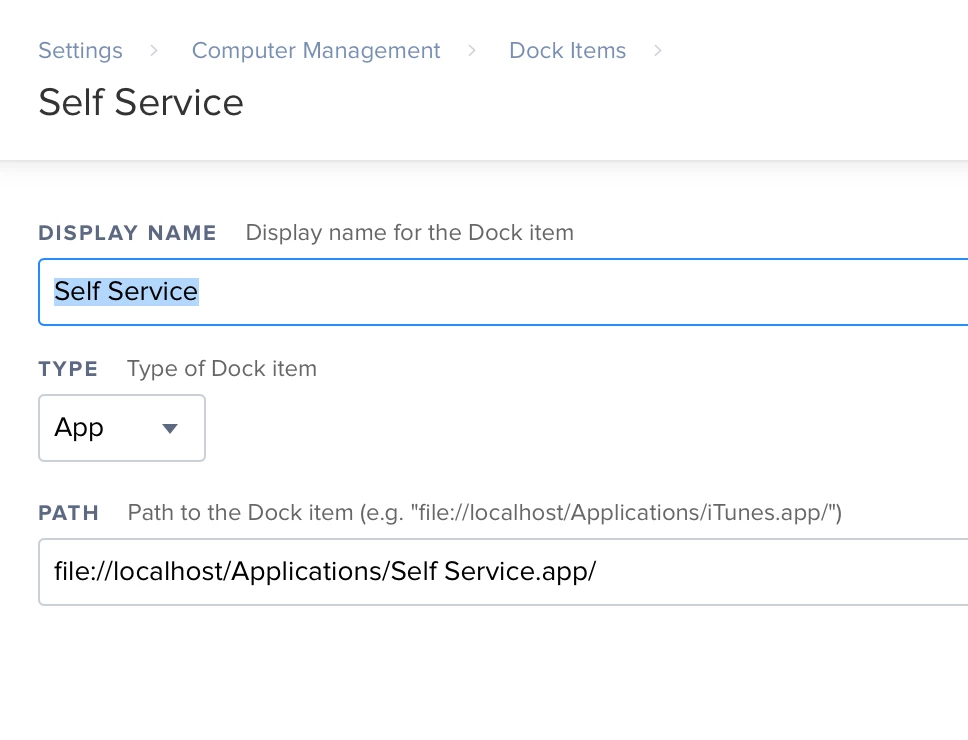
We're using the following string in Dock Items and it works fine but it was difficult finding a consistent pattern which worked. Still can't move System Preferences for example.

file://localhost/Applications/Self Service.app/


jordan_m1
Forum|alt.badge.img+5
  • Contributor
  • June 25, 2021

file:///Applications/Self Service.app/ has been working for me. I have that set in Computer Management -> Dock Items. For the Policy it's Dock Items -> Self Service set to Add to Beginning of Dock.