Solved

SentinelOne Agent Installation

  • January 10, 2023
  • 9 replies
  • 769 views

Forum|alt.badge.img+3

Good afternoon JAMF Nation. Just want to get your professional guide/advice on how to install the SentinelOne agents in our MacOS devices using JAMF. I have the PKG file needed but when I tried installing it as normal, it failed. Looking for a friend, TIA!

Best answer by AJPinto

@AJPinto What are you doing to ensure full disk access / all other approvals?
We are using the PPPC tool, but it seems like there may still be some that are not approved by that.


SentinelOnes Documentation covers this, you need to approve three items and give them SystemPolicyAllFiles access. I honestly recommend pinging SentinelOne as they have good documentation for macOS and even have JAMF specific documentation.


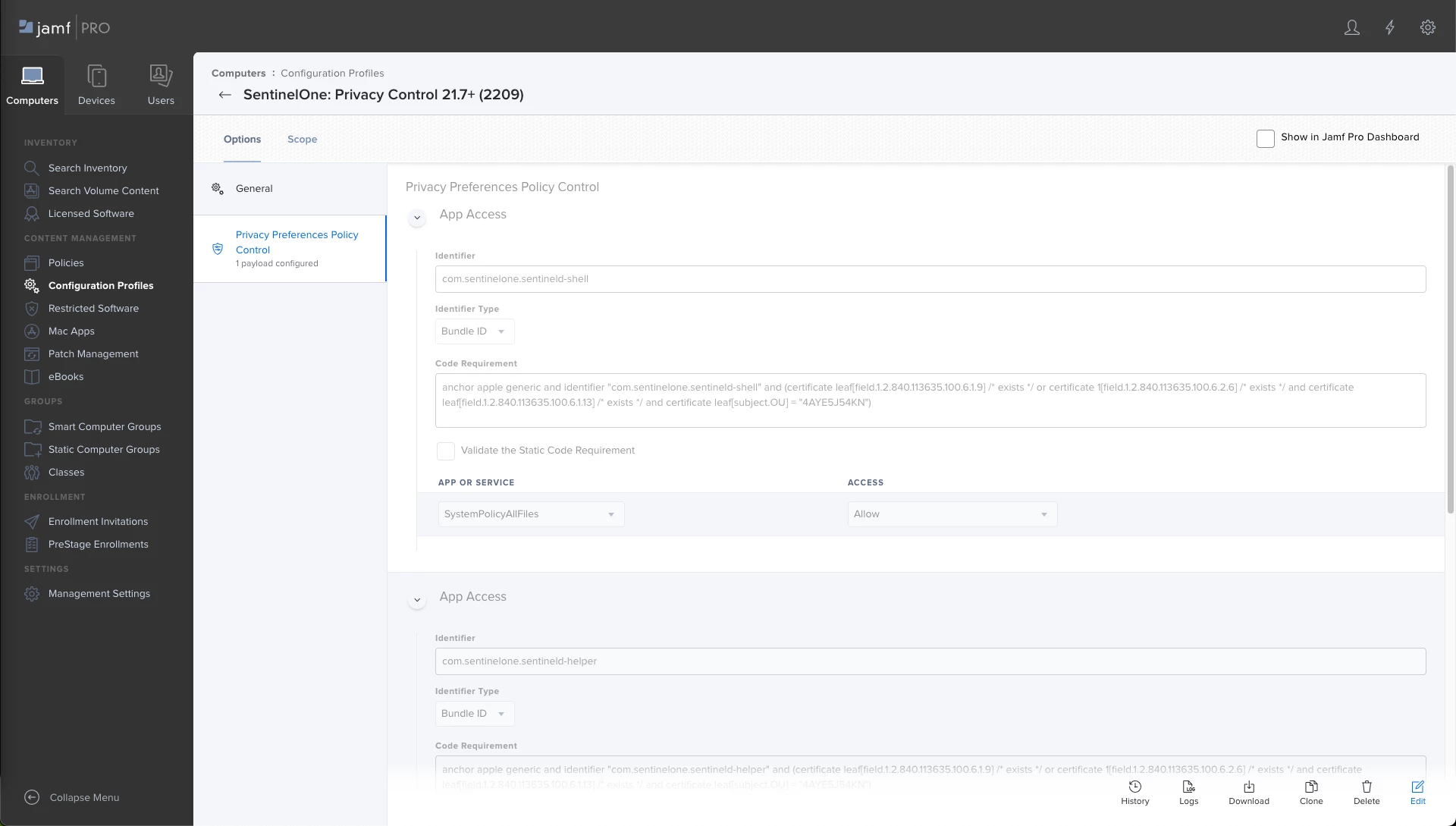
Below is what I use. I always hate when people copy paste screenshots with the code requirements I needed but you cant copy it. So I put the code requirement stuff in the code blocks. 


  • com.sentinelone.sentineld-shell


ID: com.sentinelone.sentineld-shell Code Requirement: anchor apple generic and identifier "com.sentinelone.sentineld-shell" and (certificate leaf[field.1.2.840.113635.100.6.1.9] /* exists */ or certificate 1[field.1.2.840.113635.100.6.2.6] /* exists */ and certificate leaf[field.1.2.840.113635.100.6.1.13] /* exists */ and certificate leaf[subject.OU] = "4AYE5J54KN") App or Service: SystemPolicyAllFiles Access: Allow


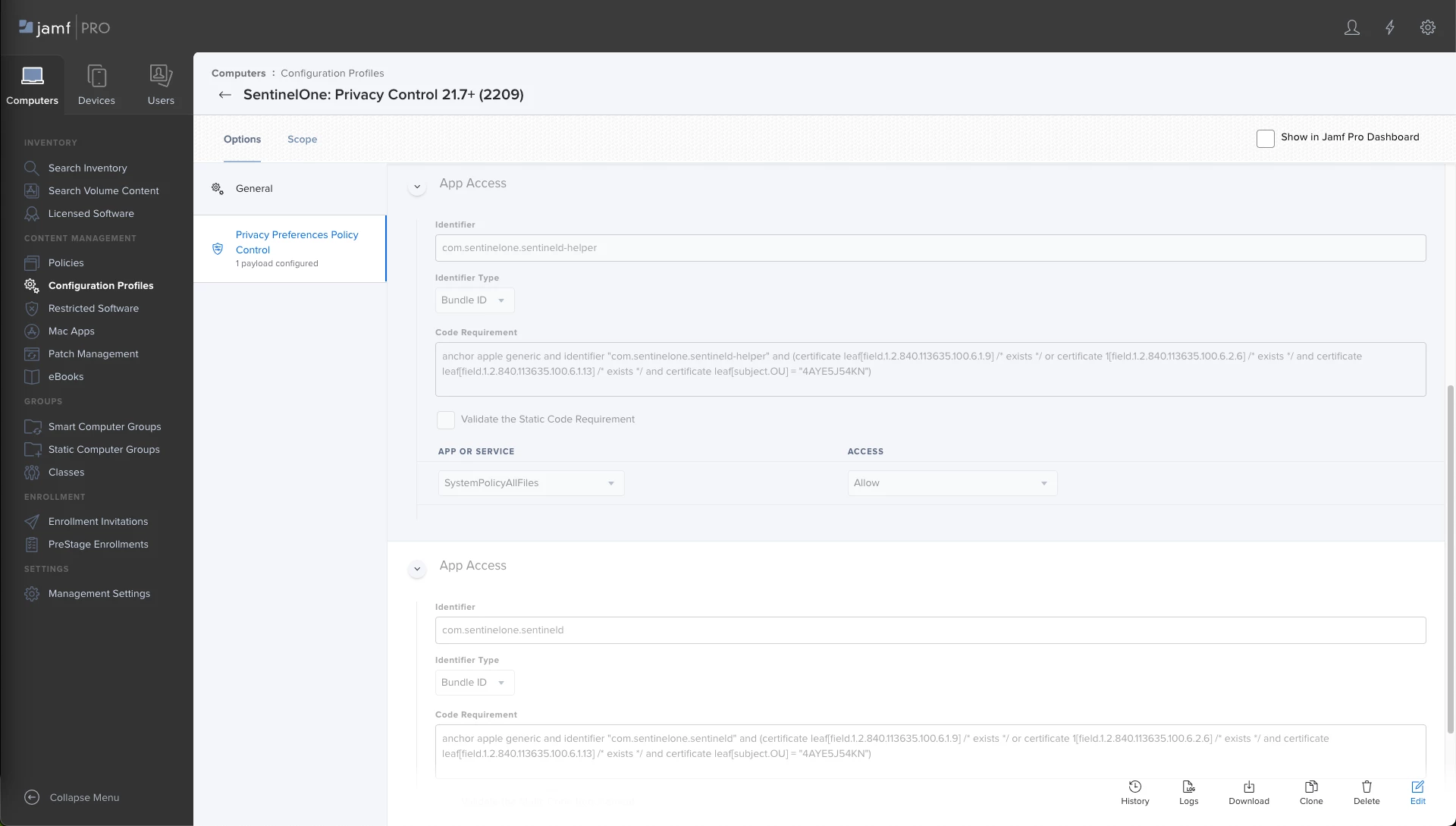
  • com.sentinelone.sentineld-helper


ID: com.sentinelone.sentineld-helper Code Requirement: anchor apple generic and identifier "com.sentinelone.sentineld-helper" and (certificate leaf[field.1.2.840.113635.100.6.1.9] /* exists */ or certificate 1[field.1.2.840.113635.100.6.2.6] /* exists */ and certificate leaf[field.1.2.840.113635.100.6.1.13] /* exists */ and certificate leaf[subject.OU] = "4AYE5J54KN") App or Service: SystemPolicyAllFiles Access: Allow


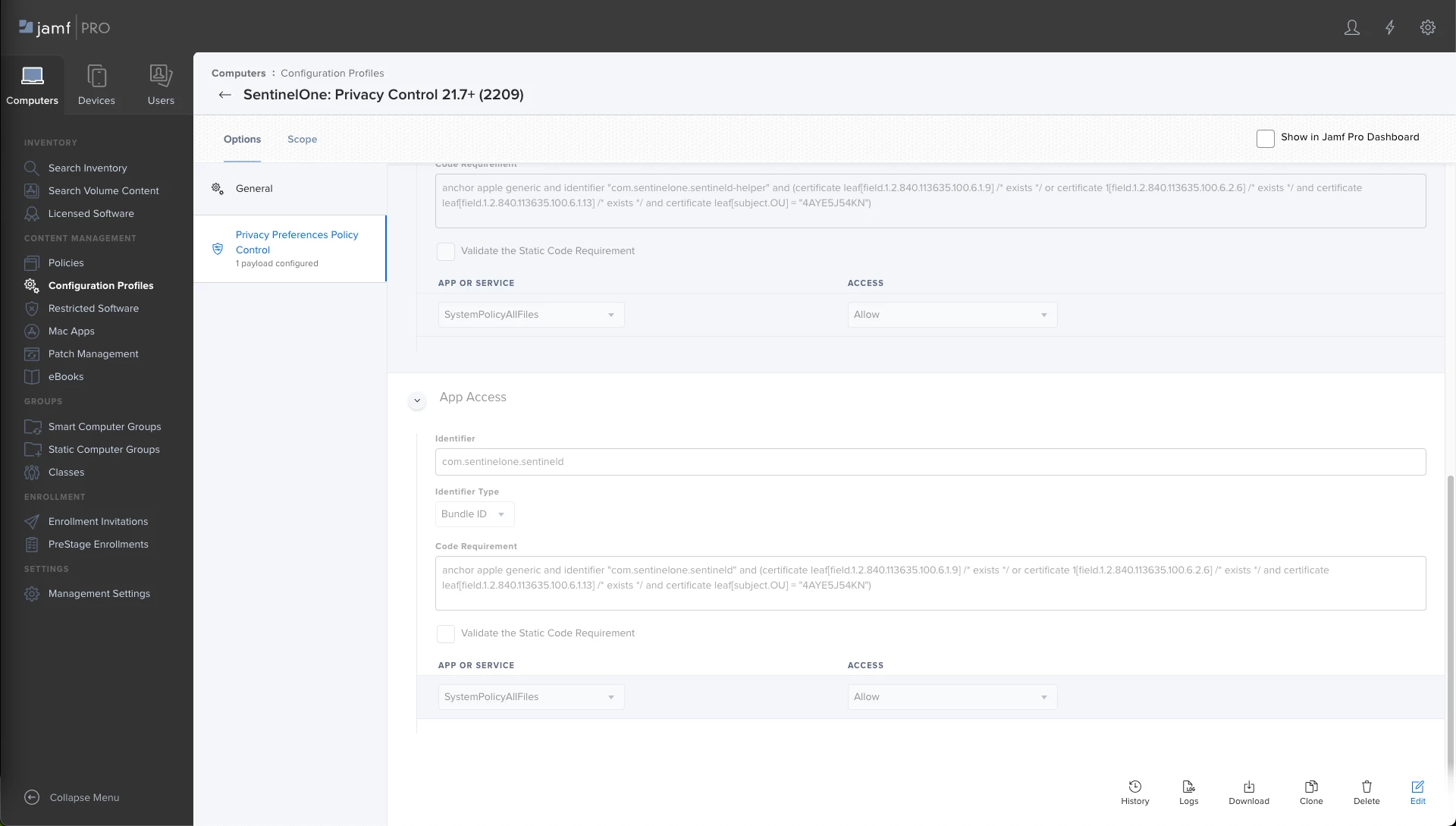
  • com.sentinelone.sentineld


ID: com.sentinelone.sentineld Code Requirement: anchor apple generic and identifier "com.sentinelone.sentineld" and (certificate leaf[field.1.2.840.113635.100.6.1.9] /* exists */ or certificate 1[field.1.2.840.113635.100.6.2.6] /* exists */ and certificate leaf[field.1.2.840.113635.100.6.1.13] /* exists */ and certificate leaf[subject.OU] = "4AYE5J54KN") App or Service: SystemPolicyAllFiles Access: Allow


9 replies

AJPinto
Forum|alt.badge.img+26
  • Legendary Contributor
  • January 10, 2023

Sent1 has really good documentation for macOS and JAMF, reach out to your Sent1 rep and they should be able to get you going. 


A quick over view. Sent1's package needs to be cached, and run with a script. The script contains the token sent1 needs to install. In the policy, cache the package, and run the script with a priority "after".

#!/bin/bash sudo echo "$4" > /Library/Application\\ Support/JAMF/Waiting\\ Room/com.sentinelone.registration-token sudo /usr/sbin/installer -pkg "/Library/Application Support/JAMF/Waiting Room/$5" -target /

$4 is the token

$5 is the package name


Forum|alt.badge.img+2
  • New Contributor
  • February 28, 2023

@AJPinto What are you doing to ensure full disk access / all other approvals?
We are using the PPPC tool, but it seems like there may still be some that are not approved by that.


Forum|alt.badge.img+2
  • New Contributor
  • February 28, 2023

Sent1 has really good documentation for macOS and JAMF, reach out to your Sent1 rep and they should be able to get you going. 


A quick over view. Sent1's package needs to be cached, and run with a script. The script contains the token sent1 needs to install. In the policy, cache the package, and run the script with a priority "after".

#!/bin/bash sudo echo "$4" > /Library/Application\\ Support/JAMF/Waiting\\ Room/com.sentinelone.registration-token sudo /usr/sbin/installer -pkg "/Library/Application Support/JAMF/Waiting Room/$5" -target /

$4 is the token

$5 is the package name


Works like a charm.


AJPinto
Forum|alt.badge.img+26
  • Legendary Contributor
  • Answer
  • February 28, 2023

@AJPinto What are you doing to ensure full disk access / all other approvals?
We are using the PPPC tool, but it seems like there may still be some that are not approved by that.


SentinelOnes Documentation covers this, you need to approve three items and give them SystemPolicyAllFiles access. I honestly recommend pinging SentinelOne as they have good documentation for macOS and even have JAMF specific documentation.


Below is what I use. I always hate when people copy paste screenshots with the code requirements I needed but you cant copy it. So I put the code requirement stuff in the code blocks. 


  • com.sentinelone.sentineld-shell


ID: com.sentinelone.sentineld-shell Code Requirement: anchor apple generic and identifier "com.sentinelone.sentineld-shell" and (certificate leaf[field.1.2.840.113635.100.6.1.9] /* exists */ or certificate 1[field.1.2.840.113635.100.6.2.6] /* exists */ and certificate leaf[field.1.2.840.113635.100.6.1.13] /* exists */ and certificate leaf[subject.OU] = "4AYE5J54KN") App or Service: SystemPolicyAllFiles Access: Allow



  • com.sentinelone.sentineld-helper


ID: com.sentinelone.sentineld-helper Code Requirement: anchor apple generic and identifier "com.sentinelone.sentineld-helper" and (certificate leaf[field.1.2.840.113635.100.6.1.9] /* exists */ or certificate 1[field.1.2.840.113635.100.6.2.6] /* exists */ and certificate leaf[field.1.2.840.113635.100.6.1.13] /* exists */ and certificate leaf[subject.OU] = "4AYE5J54KN") App or Service: SystemPolicyAllFiles Access: Allow


  • com.sentinelone.sentineld


ID: com.sentinelone.sentineld Code Requirement: anchor apple generic and identifier "com.sentinelone.sentineld" and (certificate leaf[field.1.2.840.113635.100.6.1.9] /* exists */ or certificate 1[field.1.2.840.113635.100.6.2.6] /* exists */ and certificate leaf[field.1.2.840.113635.100.6.1.13] /* exists */ and certificate leaf[subject.OU] = "4AYE5J54KN") App or Service: SystemPolicyAllFiles Access: Allow


Forum|alt.badge.img+2
  • New Contributor
  • March 6, 2023

Here is SentinelOne's official documentation. 
If you follow all the steps, you will be able to install and configure everything without having end users have to approve anything.

https://usea1-012.sentinelone.net/docs/en/installing-and-upgrading-macos-kextless-agents-with-jamf.html#installing-and-upgrading-macos-kextless-agents-with-jamf


Franky779
Forum|alt.badge.img+7
  • Contributor
  • January 24, 2024

I have to reply in this post. I have a problem when installing/upgrading SentinelOne via JAMF.

I followed the documentation an https://euce1-104.sentinelone.net/docs/en/installing-and-upgrading-macos-agents-with-jamf.html#UUID-0cf68a1c-dbbb-18a9-1af4-997b78637af2_UUID-aa0f809d-b41a-fbc1-e8aa-016114785721

Package is set to cached but i get an error, probably because the client ist already installed. But my testmachine has an older version then the supplied one. So it should do an upgrade? There seems to be a path problem when moving things.


Script result: installer: Package name is SentinelOne
installer: Upgrading at base path / installer: The upgrade failed. (The installation failed due to an error. Contact the software manufacturer. An error occurred while moving the files to their destination.)


Installscript

sudo echo "abcdefg" > /Library/Application\\ Support/JAMF/Waiting\\ Room/com.sentinelone.registration-token
sudo /usr/sbin/installer -pkg /Library/Application\\ Support/JAMF/Waiting\\ Room/Sentinel-Release-23-3-2-7123_macos_v23_3_2_7123.pkg -target /

Forum|alt.badge.img+1
  • New Contributor
  • January 30, 2024

I have to reply in this post. I have a problem when installing/upgrading SentinelOne via JAMF.

I followed the documentation an https://euce1-104.sentinelone.net/docs/en/installing-and-upgrading-macos-agents-with-jamf.html#UUID-0cf68a1c-dbbb-18a9-1af4-997b78637af2_UUID-aa0f809d-b41a-fbc1-e8aa-016114785721

Package is set to cached but i get an error, probably because the client ist already installed. But my testmachine has an older version then the supplied one. So it should do an upgrade? There seems to be a path problem when moving things.


Script result: installer: Package name is SentinelOne
installer: Upgrading at base path / installer: The upgrade failed. (The installation failed due to an error. Contact the software manufacturer. An error occurred while moving the files to their destination.)


Installscript

sudo echo "abcdefg" > /Library/Application\\ Support/JAMF/Waiting\\ Room/com.sentinelone.registration-token
sudo /usr/sbin/installer -pkg /Library/Application\\ Support/JAMF/Waiting\\ Room/Sentinel-Release-23-3-2-7123_macos_v23_3_2_7123.pkg -target /

@Franky779 Same issue here. I'll get something started with S1 and keep y'all posted here. S1 really be breaking things lately. First (and still) locking out machines from network acces for no reason, and now this.


Franky779
Forum|alt.badge.img+7
  • Contributor
  • February 5, 2024

@Franky779 Same issue here. I'll get something started with S1 and keep y'all posted here. S1 really be breaking things lately. First (and still) locking out machines from network acces for no reason, and now this.


Somehow it went through a few hours later. Still can´t see a reason yet.....but its working. Fine for me ;-)


Forum|alt.badge.img+1
  • New Contributor
  • February 5, 2024

Somehow it went through a few hours later. Still can´t see a reason yet.....but its working. Fine for me ;-)


Yeah for me it all of a sudden started working as well over the weekend... I think they changed something, but they still have yet to come back to me about on my support ticket. Problem solved I guess! :D