Solved

Seperate instances of Self Service

  • June 20, 2016
  • 9 replies
  • 44 views

Forum|alt.badge.img+6

Is it possible to have 2 different instances of Self service, ex one for High School and one for k-6?

Best answer by stevewood

@sietsemaeri No need to apologize at all, we were all "a month into using JSS" at some point ourselves, and this list/community is how we get through it.

You can definitely scope the way that you have shown. I have some policies scoped that way myself. I use Smart Groups out of habit, I guess.

The way you have shown should work fine for what you need/want to do.

9 replies

stevewood
Forum|alt.badge.img+38
  • Hall of Fame
  • June 20, 2016

@sietsemaeri Not that I'm aware of, however you can accomplish this by using groups to scope Self Service items to only those that need it.

You can use the fields in the User & Location tab of a device record to indicate that a device is High School or K-6, then create a Smart Group to pick out the devices for each, and finally scope your Self Service policies based on these groups.


Forum|alt.badge.img+6
  • Author
  • Contributor
  • June 20, 2016

@stevewood thanks for the suggestion, I will take a look, and see if that will work for my situation.

Thanks


Forum|alt.badge.img+18
  • Contributor
  • June 20, 2016

Yeah, Self Service is just an app, it doesn't contain any policies or whatnot. Everything it does is served up by the JSS, so the JSS controls what the system or user can do.


Forum|alt.badge.img+6
  • Author
  • Contributor
  • June 20, 2016

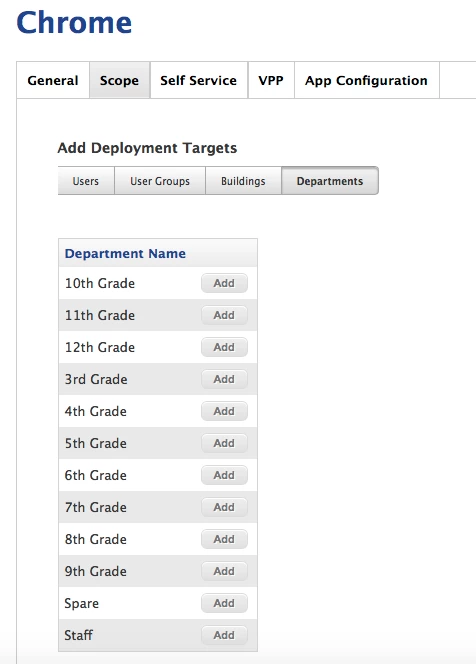
@stevewood with scoping the service policies are you talking about

mobile users > apps>(example a)>scope>target>department ??


stevewood
Forum|alt.badge.img+38
  • Hall of Fame
  • June 20, 2016

@sietsemaeri I'm talking about a multi-step process. I'm assuming you are deploying iPads and not computers in this example, but it's the same for computers.

  • For each device pick one of the fields on the User And Location tab, and enter some sort of identifying text to place in that field. I know you used Derpatment in your comment, however I'm using the Room field so I do not have to edit my JSS. For K-6 I might use "K6" and for High School use "HS". Keeps it simple so you're not having to deal with "special characters" in the name:

optional image ALT text

  • Now create a Smart Mobile Device Group that looks for devices with that Room:

optional image ALT text

  • Finally, go to the app/items you want in Self Service and scope to that group.

Does that make sense?


Forum|alt.badge.img+9
  • Contributor
  • June 20, 2016

This could be a good use case for Sites too. Separate site for each.


Forum|alt.badge.img+6
  • Author
  • Contributor
  • June 20, 2016

@stevewood yes i have the criteria set like yours in the picture about, I was looking at an app, and then scoping it to that department.
Sorry if it sounds simple i am a month into using JSS


stevewood
Forum|alt.badge.img+38
  • Hall of Fame
  • Answer
  • June 20, 2016

@sietsemaeri No need to apologize at all, we were all "a month into using JSS" at some point ourselves, and this list/community is how we get through it.

You can definitely scope the way that you have shown. I have some policies scoped that way myself. I use Smart Groups out of habit, I guess.

The way you have shown should work fine for what you need/want to do.


Forum|alt.badge.img+6
  • Author
  • Contributor
  • June 20, 2016

@stevewood Thanks, now I just need the ipads to test it out, were adding 240 for elementary and im trying to be a step ahead.