Question

Set Outlook 365 to default mail app

  • June 18, 2025
  • 7 replies
  • 1362 views

Forum|alt.badge.img+2

Does anyone has a way to setup MS Outlook 365 as default mail app?

If you want to setup it manually you have to do it in the Mac mail app, although you never used it.

I have to send out something to the organization with an mailto: link and I do not want all people calling me to ask why Mail is opening instead of Outlook.

Additionally it would be nice to set default programs via config profile in Jamf pro.

Thank you for your help.

7 replies

Corey_Nechkash
Forum|alt.badge.img+12

Easiest way to achieve this is to use the MailToOutlook application. It was previously hosted on MacAdmins.software but that site is down. Most of the content has been migrated to MOFA (Microsoft Overview Feed for Apple). MOFA 

Here's the page that contains the MailToOutlook v2.1 package (Office-Reset.com_MailToOutlook_2.1.pkg). It should be the first package listed on the page: https://github.com/cocopuff2u/MOFA/tree/main/office_reset_tools/office_reset_archived/packages 

Just push this package install via Jamf and the machines will default to using Outlook instead of the Mail client. I've been using this for about 4 years and have not had any issues. 


mvu
Forum|alt.badge.img+22
  • Jamf Heroes
  • June 18, 2025

Easiest way to achieve this is to use the MailToOutlook application. It was previously hosted on MacAdmins.software but that site is down. Most of the content has been migrated to MOFA (Microsoft Overview Feed for Apple). MOFA 

Here's the page that contains the MailToOutlook v2.1 package (Office-Reset.com_MailToOutlook_2.1.pkg). It should be the first package listed on the page: https://github.com/cocopuff2u/MOFA/tree/main/office_reset_tools/office_reset_archived/packages 

Just push this package install via Jamf and the machines will default to using Outlook instead of the Mail client. I've been using this for about 4 years and have not had any issues. 


Thank you.


Forum|alt.badge.img+20
  • Honored Contributor
  • June 18, 2025

You can also look at using this tool:

New tool updated: utiluti v1.1 – Scripting OS X


  • New Contributor
  • October 1, 2025

I tried running this Office-Reset.com_MailToOutlook_2.1 application in my jamf managed test machine manually. I see it did not reflect the outlook mail under the Share options dropdown for the files. before running this tool there used to be the Apple mail app. Now that is missing and the MS Outlook do not reflect there too.  

Am I missing anything?


BLLuten
  • New Contributor
  • April 24, 2026

I’ve noticed that the Office-Reset.com_MailToOutlook_2.1.pkg contains a MailToOutlook binary that appears to be Intel 64-bit.  Since this requires Rosetta 2, I’m wondering what we’ll use when Rosetta 2 is no longer available (after macOS 27?).


Tim
Forum|alt.badge.img+2
  • New Contributor
  • April 24, 2026

You can also look at using this tool:

New tool updated: utiluti v1.1 – Scripting OS X

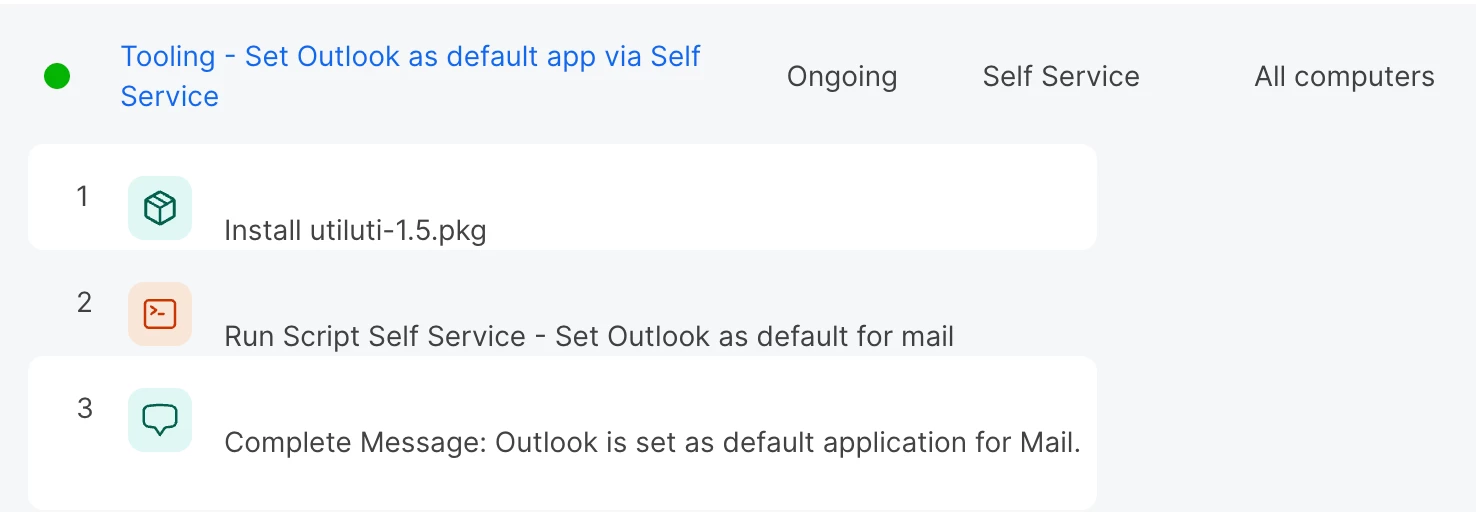
We use this as well. Setup a policy with the utility package and a script that sets it to outlook.
To get the latest package: https://github.com/scriptingosx/utiluti/releases

The script is a bit overkill maybe but here it is:
 

#!/bin/sh

if [[ -e /usr/local/bin/utiluti ]]; then
echo "utiluti is installed, let's proceed"
else
echo "utiluti is not installed, exiting"
exit 1
fi


# get current user
currentUser=$(scutil <<< "show State:/Users/ConsoleUser" | awk '/Name :/ { print $3 }')

# function for running as user
runAsUser() {
if [[ $currentUser != "loginwindow" ]]; then
uid=$(id -u "$currentUser")
launchctl asuser $uid sudo -u $currentUser "$@"
fi
}

# using the package to set Outlook as the default app for Mail
runAsUser utiluti url set mailto com.microsoft.Outlook

# removing utiluti
echo "Let's remove utiluti so we don't leave anything behind."
rm -r /usr/local/bin/utiluti
rm -r /usr/local/share/man/man1/utiluti.1
pkgutil --forget com.scriptingosx.utiluti


Forum|alt.badge.img+5
  • New Contributor
  • April 26, 2026

If there are a number of things you need the user to finish setting up, such as default mail app, default browser, enabling screen sharing options for MS Teams/Zooms etc then maybe consider looking at Setup Checklist - https://concepts.jamf.com/concepts/setup-checklist/

Easy to setup and deploy and will launch as soon as the user logs in the first time and guide them through the options you want.