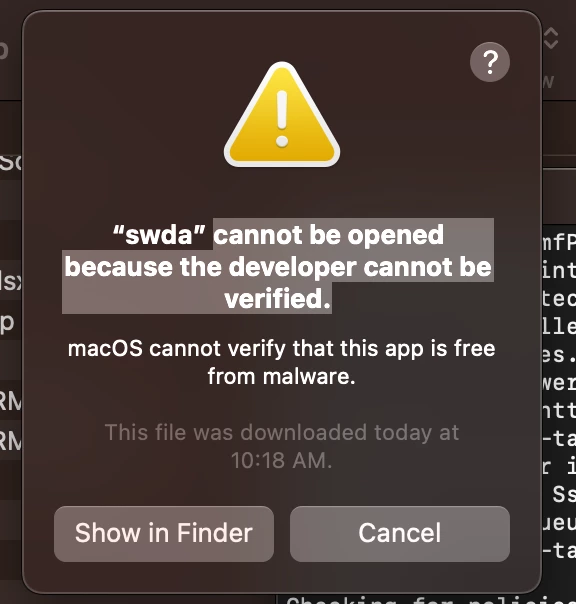
I'm trying to follow the documentation for deploying SwiftDefaultApps in order to make Outlook the Default Mail Reader and Excel the default app for CSV files for our production fleet of over 300 MacBook Air M1's.
I'm using GitHub - Lord-Kamina/SwiftDefaultApps: Replacement for RCDefaultApps, written in Swift. for material. I am also referencing this article for deploying a script via policy Configuring a Mac’s Default Apps for Different File Types | apizz (wordpress.com).
Here's my dumbed down verison of the script from wordpress:
#!/bin/bash
# Set default apps for users
SWDA="/usr/local/bin/swda"
MAIL="/Applications/Microsoft Outlook.app"
SHEET="/Applications/Microsoft Excel.app"
### MAIL ###
# Default mail client
$SWDA setHandler --app "$MAIL" --mail
# mailto: links
$SWDA setHandler --app "$MAIL" --URL mailto
# message
$SWDA setHandler --app "$MAIL" --URL message
# email
$SWDA setHandler --app "$MAIL" --UTI com.apple.mail.email
### FILE TYPES ###
# .csv
$SWDA setHandler --app "$SHEET" --UTI public.comma-separated-values-text
The error I get after running is this below:
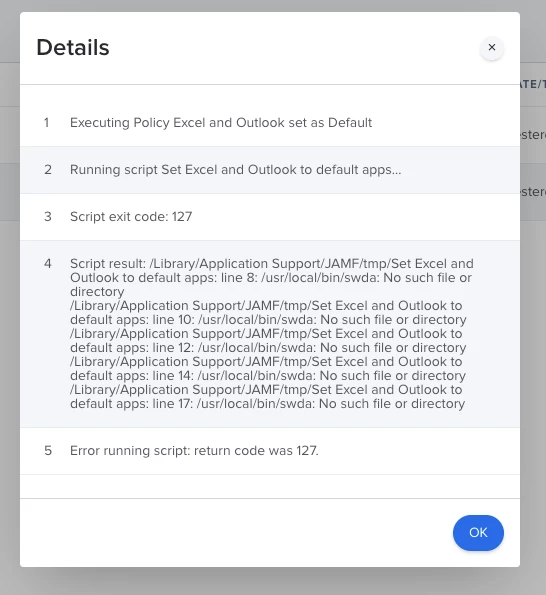
Im a novice in scripting so not sure if I need to make the "usr/local/bin/swda"? If I make that directory then I would get an error saying that "/usr/local/bin/swda: is a directory".
Any help here is appreciated.