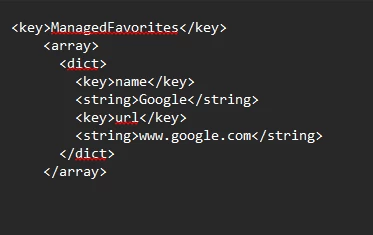
I am trying to setup managed favorites in Microsoft edge. can someone share a working plist for managed browsers in edge?
My basic requirement is to have few URLs in managed favorites and then few URLs in folders structure something like this:
url-Microsoft.com
url-Intune.microsoft.com
Jamf(folder) url-id.jamf.com
url-jamfcloud.com
Internal(folder)
url-abc.com
Appreciate your help in advanced.
Best answer by Kalpeshw
I was able to add some links in edge favorites with the help of above shown plist, however links with '&' character are not accepted by JAMF it shows 'XML format is incorrect. Validate the content and fix errors to continue.'
Example, in IT2 URL there is && sign and that was not accepted by JAMF while uploading custom plist
Microsoft documents all of Edges policies here Microsoft Edge Browser Policy Documentation | Microsoft Learn. You can also navigate to edge://policy and check the box next to Show policies with no value to see what values you are not managing. This is where I would check for what you can manage.
I was able to add some links in edge favorites with the help of above shown plist, however links with '&' character are not accepted by JAMF it shows 'XML format is incorrect. Validate the content and fix errors to continue.'
Example, in IT2 URL there is && sign and that was not accepted by JAMF while uploading custom plist
Workaround - Encoding the '&' Character You need to encode the & character to its HTML entity equivalent, which is &. However, given the issues with double encoding in Jamf Pro, you might need to use a different approach.