I have had the same issue..
Having the same issue on some of my test Macs.
Let us know what Apple responds... debating on opening a ticket myself
Same issues here... You guys using WPA2 enterprise I am guessing?
What model computers are you guys trying on?
So far I've tried a 15" late 2013, 13" late 16 non touchbar, and a 13" late 16 touchbar all updated to 10.12.5 and was able to sucessfully connect
https://support.apple.com/en-us/HT207797
802.1X
Available for: macOS Sierra 10.12.4
Impact: A malicious network with 802.1X authentication may be able to capture user network credentials
Description: A certificate validation issue existed in EAP-TLS when a certificate changed. This issue was addressed through improved certificate validation.
CVE-2017-6988: Tim Cappalli of Aruba, a Hewlett Packard Enterprise company
I did get a "Verify Certificate" before continuing to connect to my internal network here. Once I confirmed, I was on our internal network without any issues
Well...that makes me both happy I'm not the only one and extremely sad that it seem's like a bigger problem.
So far Apple has asked me to send it Wifi logs and SysDiagnostics. While they're looking at them, i've been doing some looking at logs as well. What I've found is that when it attempts to do a matchAndJoinSSID: it says it's "temporarily disabled, next"
Will report back anything I hear from Apple.
So...I found our issue before Apple did. Maybe it will be the same for all of you.
Our root and chain certs were not be accepted even though they showed up as validated. I had to go in and set the EAP Trust setting to "Always Trust". Once I did that and restarted wifi everything kicked in immediately.
Now to go back and figure out configuring that trust setting.
How is your wifi authentication configured?
Ours requires a root + intermediate cert to request a machine cert, then uses the machine cert to authenticate to wifi.
We deploy root + intermediate certs, AD cert request, and wifi config all through a configuration profile. On one machine, I was prompted for my login password to allow a change to the keychain.
On another test machine, my machine was kicked off the wifi. In the keychain, I found the com.apple.network.eap.user.identity.wlan.ssid.WIFINAMEHERE had a red X and that the preferred certificate was set to None.
No issues here. We have profile-based Wifi logon to accomplish a machine-auth type deal on our Macs, so nothing with certs (we're an AD shop).
Upgraded from 10.12.4 to 10.12.5 on test machine
I was working with nwiseman on this and to clarify, it appeared to only be an issue when the root/chain certs were imported using a configuration profile. At my company we import them directly to the keychain using the security command with appropriate trust options. Other than that our environments were the same, but his wasn't working and mine was.
It has broken both our 802.1x Wifi and Ethernet connections. This is really really really bad. I EVENTUALLY got a prompt to validate a cert, but it requires Admin credentials to do so. There is absolutely no way this is going to work.
Same for me. Updated to 10.12.5 from 10.12.4 or built from scratch with an AutoDMG restore and Our 802.1X Wifi now does't connect.
802.1x Machine based Wifi here and working fine on 10.12.5
Notes or Updates Since Initial Image Was Released
We're good here, too.
After I got back on the network, I restarted the computer and found that reconnecting to the network is all wonky now. WiFi won't even try to connect until after completely logged in and at the desktop (which means any Login triggers won't happen), Ethernet gets stuck in an infinite loop and never connects on its own. It gets a self assigned IP for a few seconds then falls back to "not connected" and then gets a self assigned IP... wash, rinse, repeat. The only way I can connect via Ethernet now is to click on Disconnect, wait a few seconds then click Connect. Then I get a valid IP.
Same problem for us. Just submitted an enterprise case (100194327871). Only workaround that works for us is to manually go into the system keychain and set issuing and wireless certs to "always trust" (the root is already set to always trust). Doesn't seem to be a good way to script this since the certs are deployed via config profile and already in the system keychain (so we can't really leverage a security add-trusted-cert command)
Anyone having any luck setting the update to be ignored? I can't get sudo softwareupdate --ignore "macOS Sierra Update-10.12.5" to actually ignore the update. I've also tried "macOSSierraUpdate-10.12.5" "Mac OS Sierra Update (10.12.5)" "10.12.5" and "macOS Sierra Update" to no avail.
We have update scheduled to push to clients this weekend but looks like I'm going to have to reschedule until this is fixed cause this is BAD.
@jasonaswell Not an immediate solution, but I'd suggest setting up reposado or another SUS so that you can control distribution
We recently moved away from using a SUS to instead lean on caching server since Apple is sunsetting their SUS - this also makes it easier for users not on site to keep up to date. We've got a blacklist script that we run to ignore problematic updates, but unfortunately I can't find a phrasing for this update to successfully ignore it. This is the direction Apple has been moving in, so we were trying to skate to where the puck was heading, but unfortunately between the directory auth lockout issue in 10.12.2 and earlier, and now this - it's clear that we need to rethink that since Apple is failing to consistently test critical enterprise level functionality.
FYI, my test machines running El Capitan 10.11.6 experience the same issue after installing Security Update 2017-002
Ignore that comment. Further investigation revealed AD binding issues with test machines were the actual problem, and Security Update 2017-002 has not impeded the ability of our 10.11.6 systems to authenticate via 802.1x for WiFi.
FYI, ignoring "macOS Sierra Update" does actually work for anyone who is managing updates via the software update command.
To second @jasonaswell, I had to sudo the ignore command to get the update to be ignored (wouldn't need to do so from a JAMF script).
Here's my output from terminal in testing to see how it can be done:
bash-3.2$ softwareupdate -l
Software Update Tool
Finding available software
Software Update found the following new or updated software:
macOS Sierra Update-10.12.5
macOS Sierra Update (10.12.5), 873261K [recommended] [restart]
iTunesXPatch-12.6.1
iTunes (12.6.1), 191180K [recommended]
bash-3.2$ sudo softwareupdate --ignore "macOS Sierra Update"
Ignored updates:
(
"macOS Sierra Update"
)
bash-3.2$ softwareupdate -l
Software Update Tool
Finding available software
Software Update found the following new or updated software:
* iTunesXPatch-12.6.1
iTunes (12.6.1), 191180K [recommended]
Same issue here. Intermediate Certs are deployed via config profile and configured with Use System Defaults. Roots are set to always trust.
No issues here on 10.12.5 and a fresh 10.11.6 Mac with the latest Security update from yesterday. Full 802.1x on wired and wireless.
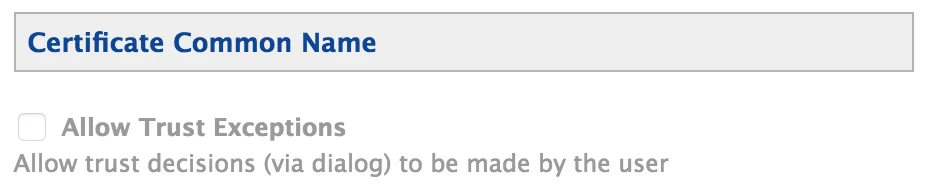
For those have issues, in the trust section of your configuration profiles delivering your payloads are you trusting by common name or by exact certificate name?

If you're trusting by common name, that's probably what the issue is. Make sure that box is unchecked and check to trust exact certificate and see if it's resolved.
@perrycj Our trust section in the config profile is blank. For the trust section, would this be the certificate required to connect to wifi? In our case, we use machine certificates requested from AD. How do I specify the exact certificate name in a configuration profile when all the certificate names are different?
dumb question? Where's the "Trust" section? It must be right in front of me, but I can't find it!
Thanks!