Question

Sierra 10.12.5 Upgrade breaking Corp Wifi

  • May 15, 2017
  • 87 replies
  • 414 views

Show first post

87 replies

Forum|alt.badge.img+1
  • New Contributor
  • May 23, 2017

After testing it looks like pushing these certs out through a configuration profile are not being trusted. So I just packaged them up to install them that way. Looks to be working fine authenticating through 802.1x. I'm just going to create a policy to publish out this package install. Here is a the the security command that can be used to import and trust the certs:

security add-trusted-cert -d -r trustAsRoot -k /Library/Keychains/System.keychain /tmp/PATH_TO_CERTIFICATE

Forum|alt.badge.img+10
  • Valued Contributor
  • May 23, 2017

The reply I got from Apple

To resolve this on your end, make sure that you anchor trust to the appropriate Intermediate or Root certificate in the Network payload or your configuration profile. In the profile, this will create a key for “PayloadCertificateAnchorUUID".

AVmcclint
Forum|alt.badge.img+21
  • Esteemed Contributor
  • May 23, 2017

@MatG What exactly does "anchor trust" mean and how do we do that in the context of using JAMF Pro?


Forum|alt.badge.img+10
  • Valued Contributor
  • May 23, 2017

I was posting to hope someone else would answer that!


Forum|alt.badge.img+16
  • Contributor
  • May 23, 2017

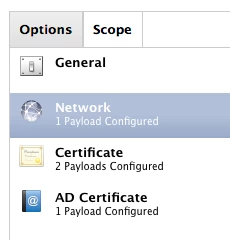
We have been working with Apple on this and the fix is to put your Certs into your 802.1X Profile as a separate Payload. Once the Certs have been added you need to Trust them in the Profile. Go back into the Network Payload, click the Trust tab and select the Certs you added in the Certificates Payload. You MUST include the whole Cert chain from Root down. Good luck!


Forum|alt.badge.img+12
  • Contributor
  • May 23, 2017

I'm wondering if there's something funky with my environment. I've tried combinations of separate profiles with just the certs. Tried trusting just the root, just the intermediate, or both. I've also tried typing in the common name, with combination of checking the boxes and without. The only way I got my wifi to connect was having nothing checked and nothing typed in for common name.


Forum|alt.badge.img+7
  • Valued Contributor
  • May 24, 2017

I tried to create a new Configuration Profil including the certificates, the network payload with the suggested settings and the AD Certificate Payload which I think I need for the network payload (Identity Certificate)

But this just failed to install on my MacBook
"The 'Active Directory Certificate' payload could not be installed. The certificate request failed."

But if I switch back to the standard AD Cert & Certificate Payload Conf Profile it is immediately installed, but in this Profile is not the network payload, so I cannot trust the certs. The settings are absolute the same.

Any ideas why?

EDIT: I found the problem.
There was a blank in front of the Certificate Server Address. (noob error - sorry for bothering you)

Now it is working with the Configuration Profile like a charm. Thank you very much JAMFnation! :)

BR
Daniel


Forum|alt.badge.img
  • New Contributor
  • May 24, 2017

I've lost all bonjour printers ( over wifi )when upgrading to 10.12.5 , If i patch the ethernet in. Then the bonjour printers re-appear. 10.12.5 with wifi connection to network you can only see bonjour shared printers and then the drivers fail. Very strange. This has happened on a number of macs, 10.12.4 was fine.


Forum|alt.badge.img
  • New Contributor
  • June 13, 2017

I'm having the same problem and this fixed it immediately. Hope this helps other people.

How to Fix SSL certificate problem

Click on the Wi-Fi icon on your Mac’s menu bar
Select Open Network Preferences..
Click Advanced and then choose the current network that you’re connecting to
Select the Subtract sign next to the addition sign and click Ok
Stay on the same Network Preferences… page and click on Wi-Fi on the left side
And click the subtract sign at the bottom > Apply
Now, click the addition sign and choose Wi-Fi under Interface and Service name
Click Apply to save all your changes
Re-connect to the Wi-Fi network that you were having trouble with earlier. This will help you fix the SSL error in Google Chrome.


Forum|alt.badge.img+6
  • Contributor
  • June 19, 2017

Thought I'd post an update about my 10.12.5 and certificates woes with wifi, we hadn't updated the version of ios on our Cisco wireless LAN controller in nearly 2 years, we updated them last week to the latest, without changing my configuration profile it connects instantly and super fast too and also resolved this intermittent problem we had with connecting to smb shares over wifi.


Forum|alt.badge.img
  • New Contributor
  • December 15, 2017

Redacting. Wrong place.


Forum|alt.badge.img+3
  • New Contributor
  • March 7, 2018

Anyone have file wifi.mobileconfig that using PEAP EAP-TLS authentication with certificate on Mac OS 10.12.6 ?
Help me plz Thanks,