Hello fellow Mac Admins,
Last year I had a number of frustrations with doing an unattended upgrade to Mojave for our end users. In my environment, users don't want to deal with Self-Service or anything user initiated. They want to come in and have everything be done and ready to go :)
The main issue I ran into was that after the initial upgrade was completed upon an end user logging in, there was an initial instal dialog with progress bar that would indicate 13-14 minutes remaining. The easiest solution I discovered was that it was time based--if several hours went by the additional installation would not occur.
With September fast approaching, I'm back to upgrading. But I'm running into a couple of issues:
I've downloaded the complete installer again via this site: http://osxdaily.com/2018/09/29/download-full-macos-mojave-installer/
Then moved it to Applications and used Composer to create a pkg which I uploaded to Jamf. (Not sure if this is the latest version of Mojave).
I then created a policy with that pkg and under files and processes have this:
/Applications/Install macOS Mojave.app/Contents/Resources/startosinstall --agreetolicense --nointeraction
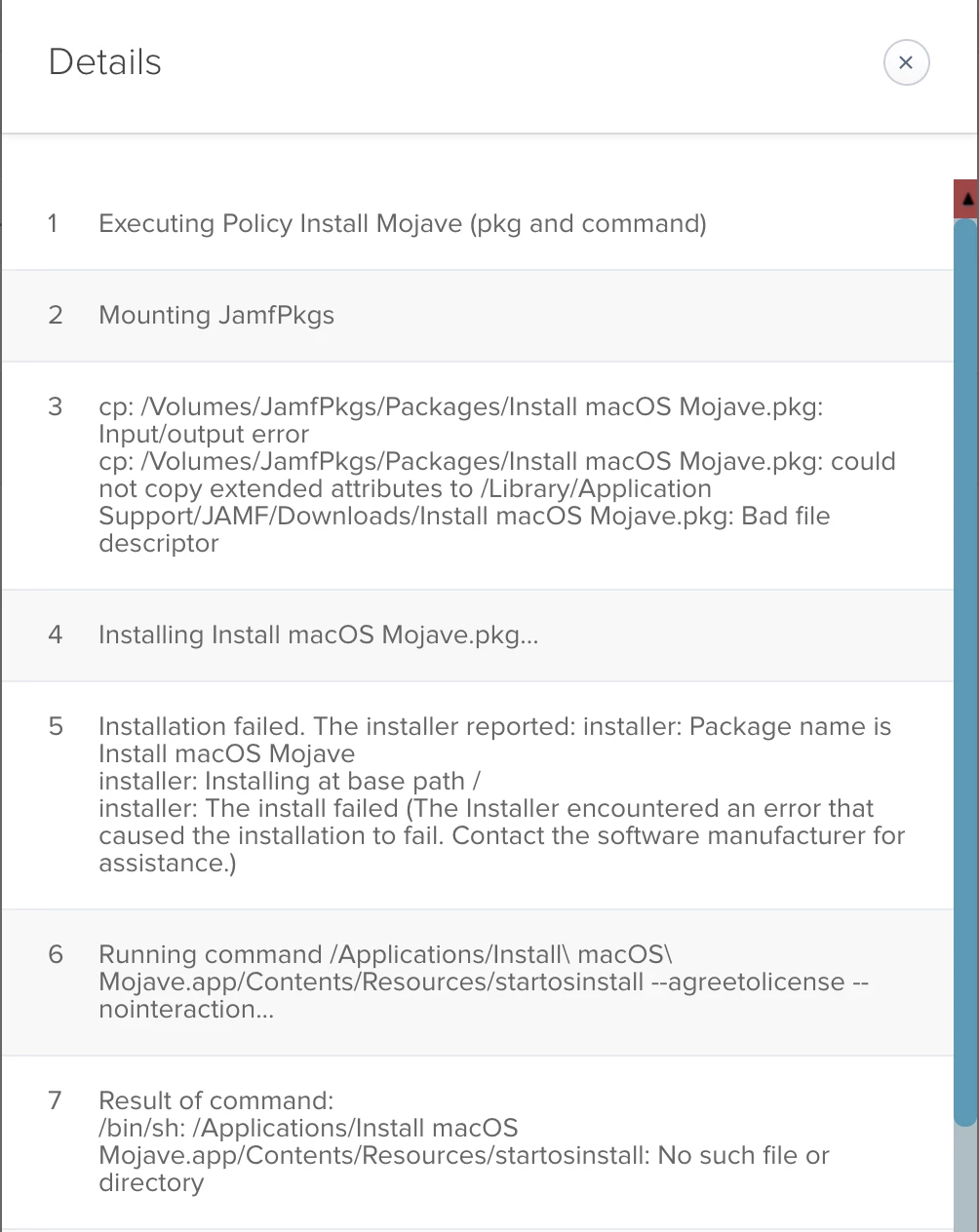
What I'm finding is that on some iMacs the install is failing or getting stuck.
I've attached one error message.
Any ideas or recommendations.
PS: I had tried installing and upgrading via VPP. That was problematic--took a long time and there was no way to measure progress and didn't work if the iMac had already downloaded the install file to applications (even if I deleted it).