Question

Simple "Update Inventory" Button for each device

  • April 12, 2016
  • 5 replies
  • 34 views

Forum|alt.badge.img+7

I got tired of having to go into JSS every time I needed to Update Inventory on a kid's iPad, so I wrote a SUPER simple python script that runs a webserver (using Flask) to update it via the API. Basically, you set the script to run, create a configuration profile, and enjoy.
Further instructions and the script at my GitHub repo

5 replies

Forum|alt.badge.img+12
  • Valued Contributor
  • April 12, 2016

Fantastic!

Now if only Apple would implement a way to do it without the command being generated on the server...


Forum|alt.badge.img+7
  • Contributor
  • September 29, 2017

Awesome work! This worked flawlessly... It's so much easier having a quick way to update the inventory on the fly for student devices.


Forum|alt.badge.img+4
  • Contributor
  • December 13, 2017

This worked flawlessly... Thanks @GSSRyan and @bumbletech for telling me about this!


Forum|alt.badge.img
  • New Contributor
  • March 11, 2018

Why doesn't it work when you add the link in the a Web Kit or Web view in swift? It work correctly as a web clip in JSS. But you can't add a web clip in to a Casper (Focus) single app mode.


Forum|alt.badge.img+7
  • Contributor
  • April 6, 2021

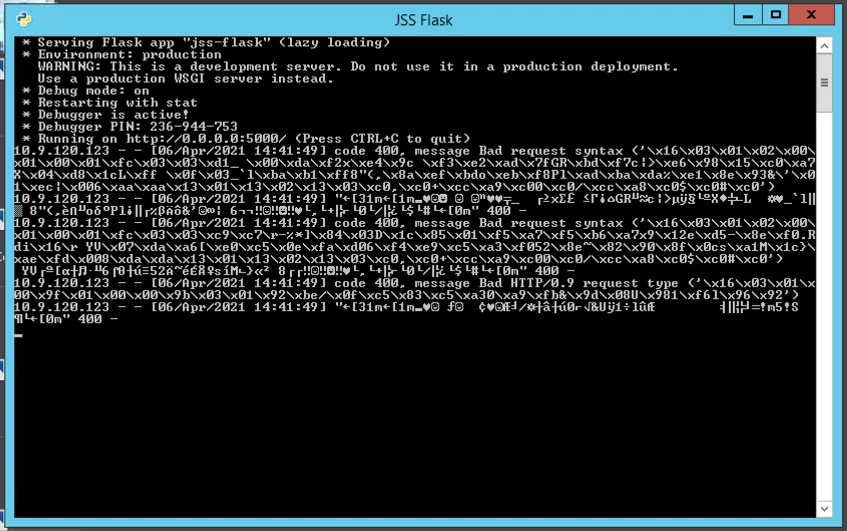
I know that this is an old solution, but is anyone else running into this issue? Everything has been working flawlessly for nearly 4 years now. Today we're seeing some odd behavior. When we submit a request for an update, it fails and all we get in the jss-flask window is gibberish.

I have wiped and reinstalled Python 2.7.18, Flask, requests, and jss-flask. Nothing has changed on the JSS other than updating to 10.27.0 a couple weeks back. Any thoughts or guidance is appreciated!