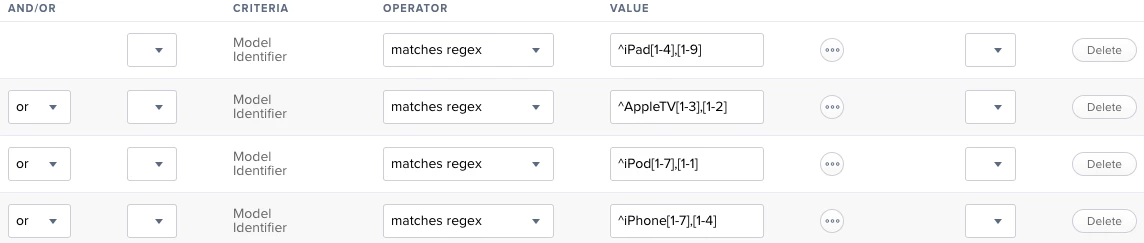
I've just created a smart group for iOS 11 compatible devices that you might find useful
<?xml version="1.0" encoding="UTF-8"?>
<mobile_device_group>
  <name>iOS 11 Compatible</name>
  <is_smart>true</is_smart>
  <criteria>
    <size>33</size>
    <criterion>
      <name>Model Identifier</name>
      <priority>0</priority>
      <and_or>AND</and_or>
      <search_type>is not</search_type>
      <value>iPad1,1</value>
      <opening_paren>false</opening_paren>
      <closing_paren>false</closing_paren>
    </criterion>
    <criterion>
      <name>Model Identifier</name>
      <priority>1</priority>
      <and_or>and</and_or>
      <search_type>is not</search_type>
      <value>iPad2,1</value>
      <opening_paren>false</opening_paren>
      <closing_paren>false</closing_paren>
    </criterion>
    <criterion>
      <name>Model Identifier</name>
      <priority>2</priority>
      <and_or>and</and_or>
      <search_type>is not</search_type>
      <value>iPad2,4</value>
      <opening_paren>false</opening_paren>
      <closing_paren>false</closing_paren>
    </criterion>
    <criterion>
      <name>Model Identifier</name>
      <priority>3</priority>
      <and_or>and</and_or>
      <search_type>is not</search_type>
      <value>iPad2,2</value>
      <opening_paren>false</opening_paren>
      <closing_paren>false</closing_paren>
    </criterion>
    <criterion>
      <name>Model Identifier</name>
      <priority>4</priority>
      <and_or>and</and_or>
      <search_type>is not</search_type>
      <value>iPad2,3</value>
      <opening_paren>false</opening_paren>
      <closing_paren>false</closing_paren>
    </criterion>
    <criterion>
      <name>Model Identifier</name>
      <priority>5</priority>
      <and_or>and</and_or>
      <search_type>is not</search_type>
      <value>iPad3,1</value>
      <opening_paren>false</opening_paren>
      <closing_paren>false</closing_paren>
    </criterion>
    <criterion>
      <name>Model Identifier</name>
      <priority>6</priority>
      <and_or>and</and_or>
      <search_type>is not</search_type>
      <value>iPad3,2</value>
      <opening_paren>false</opening_paren>
      <closing_paren>false</closing_paren>
    </criterion>
    <criterion>
      <name>Model Identifier</name>
      <priority>7</priority>
      <and_or>and</and_or>
      <search_type>is not</search_type>
      <value>iPad3,3</value>
      <opening_paren>false</opening_paren>
      <closing_paren>false</closing_paren>
    </criterion>
    <criterion>
      <name>Model Identifier</name>
      <priority>8</priority>
      <and_or>and</and_or>
      <search_type>is not</search_type>
      <value>iPad3,4</value>
      <opening_paren>false</opening_paren>
      <closing_paren>false</closing_paren>
    </criterion>
    <criterion>
      <name>Model Identifier</name>
      <priority>9</priority>
      <and_or>and</and_or>
      <search_type>is not</search_type>
      <value>iPad3,5</value>
      <opening_paren>false</opening_paren>
      <closing_paren>false</closing_paren>
    </criterion>
    <criterion>
      <name>Model Identifier</name>
      <priority>10</priority>
      <and_or>and</and_or>
      <search_type>is not</search_type>
      <value>iPad3,6</value>
      <opening_paren>false</opening_paren>
      <closing_paren>false</closing_paren>
    </criterion>
    <criterion>
      <name>Model Identifier</name>
      <priority>11</priority>
      <and_or>and</and_or>
      <search_type>is not</search_type>
      <value>iPad2,5</value>
      <opening_paren>false</opening_paren>
      <closing_paren>false</closing_paren>
    </criterion>
    <criterion>
      <name>Model Identifier</name>
      <priority>12</priority>
      <and_or>and</and_or>
      <search_type>is not</search_type>
      <value>iPad2,6</value>
      <opening_paren>false</opening_paren>
      <closing_paren>false</closing_paren>
    </criterion>
    <criterion>
      <name>Model Identifier</name>
      <priority>13</priority>
      <and_or>and</and_or>
      <search_type>is not</search_type>
      <value>iPad2,7</value>
      <opening_paren>false</opening_paren>
      <closing_paren>false</closing_paren>
    </criterion>
    <criterion>
      <name>Model Identifier</name>
      <priority>14</priority>
      <and_or>and</and_or>
      <search_type>is not</search_type>
      <value>AppleTV1,1</value>
      <opening_paren>false</opening_paren>
      <closing_paren>false</closing_paren>
    </criterion>
    <criterion>
      <name>Model Identifier</name>
      <priority>15</priority>
      <and_or>and</and_or>
      <search_type>is not</search_type>
      <value>AppleTV2,1</value>
      <opening_paren>false</opening_paren>
      <closing_paren>false</closing_paren>
    </criterion>
    <criterion>
      <name>Model Identifier</name>
      <priority>16</priority>
      <and_or>and</and_or>
      <search_type>is not</search_type>
      <value>AppleTV3,1</value>
      <opening_paren>false</opening_paren>
      <closing_paren>false</closing_paren>
    </criterion>
    <criterion>
      <name>Model Identifier</name>
      <priority>17</priority>
      <and_or>and</and_or>
      <search_type>is not</search_type>
      <value>iPod1,1</value>
      <opening_paren>false</opening_paren>
      <closing_paren>false</closing_paren>
    </criterion>
    <criterion>
      <name>Model Identifier</name>
      <priority>18</priority>
      <and_or>and</and_or>
      <search_type>is not</search_type>
      <value>iPod2,1</value>
      <opening_paren>false</opening_paren>
      <closing_paren>false</closing_paren>
    </criterion>
    <criterion>
      <name>Model Identifier</name>
      <priority>19</priority>
      <and_or>and</and_or>
      <search_type>is not</search_type>
      <value>iPod3,1</value>
      <opening_paren>false</opening_paren>
      <closing_paren>false</closing_paren>
    </criterion>
    <criterion>
      <name>Model Identifier</name>
      <priority>20</priority>
      <and_or>and</and_or>
      <search_type>is not</search_type>
      <value>iPod4,1</value>
      <opening_paren>false</opening_paren>
      <closing_paren>false</closing_paren>
    </criterion>
    <criterion>
      <name>Model Identifier</name>
      <priority>21</priority>
      <and_or>and</and_or>
      <search_type>is not</search_type>
      <value>iPod5,1</value>
      <opening_paren>false</opening_paren>
      <closing_paren>false</closing_paren>
    </criterion>
    <criterion>
      <name>Model Identifier</name>
      <priority>22</priority>
      <and_or>and</and_or>
      <search_type>is not</search_type>
      <value>iPhone1,1</value>
      <opening_paren>false</opening_paren>
      <closing_paren>false</closing_paren>
    </criterion>
    <criterion>
      <name>Model Identifier</name>
      <priority>23</priority>
      <and_or>and</and_or>
      <search_type>is not</search_type>
      <value>iPhone1,2</value>
      <opening_paren>false</opening_paren>
      <closing_paren>false</closing_paren>
    </criterion>
    <criterion>
      <name>Model Identifier</name>
      <priority>24</priority>
      <and_or>and</and_or>
      <search_type>is not</search_type>
      <value>iPhone2,1</value>
      <opening_paren>false</opening_paren>
      <closing_paren>false</closing_paren>
    </criterion>
    <criterion>
      <name>Model Identifier</name>
      <priority>25</priority>
      <and_or>and</and_or>
      <search_type>is not</search_type>
      <value>iPhone3,1</value>
      <opening_paren>false</opening_paren>
      <closing_paren>false</closing_paren>
    </criterion>
    <criterion>
      <name>Model Identifier</name>
      <priority>26</priority>
      <and_or>and</and_or>
      <search_type>is not</search_type>
      <value>iPhone3,3</value>
      <opening_paren>false</opening_paren>
      <closing_paren>false</closing_paren>
    </criterion>
    <criterion>
      <name>Model Identifier</name>
      <priority>27</priority>
      <and_or>and</and_or>
      <search_type>is not</search_type>
      <value>iPhone4,1</value>
      <opening_paren>false</opening_paren>
      <closing_paren>false</closing_paren>
    </criterion>
    <criterion>
      <name>Model Identifier</name>
      <priority>28</priority>
      <and_or>and</and_or>
      <search_type>is not</search_type>
      <value>iPhone5,1</value>
      <opening_paren>false</opening_paren>
      <closing_paren>false</closing_paren>
    </criterion>
    <criterion>
      <name>Model Identifier</name>
      <priority>29</priority>
      <and_or>and</and_or>
      <search_type>is not</search_type>
      <value>iPhone5,2</value>
      <opening_paren>false</opening_paren>
      <closing_paren>false</closing_paren>
    </criterion>
    <criterion>
      <name>Model Identifier</name>
      <priority>30</priority>
      <and_or>and</and_or>
      <search_type>is not</search_type>
      <value>iPhone5,3</value>
      <opening_paren>false</opening_paren>
      <closing_paren>false</closing_paren>
    </criterion>
    <criterion>
      <name>Model Identifier</name>
      <priority>31</priority>
      <and_or>and</and_or>
      <search_type>is not</search_type>
      <value>iPhone5,4</value>
      <opening_paren>false</opening_paren>
      <closing_paren>false</closing_paren>
    </criterion>
    <criterion>
      <name>Model Identifier</name>
      <priority>32</priority>
      <and_or>and</and_or>
      <search_type>is not</search_type>
      <value>iPhone3,2</value>
      <opening_paren>false</opening_paren>
      <closing_paren>false</closing_paren>
    </criterion>
  </criteria>
  <mobile_devices/>
</mobile_device_group>
Save this as an XML file and you can upload it to your JSS with this command. Using id/0 will automatically assign the next available smart group ID after your existing groups in the JSS (Thanks Mike!).
curl -skfu adminuser:adminpassword https://jssURL.com:8443/JSSResource/mobiledevicegroups/id/0 -T /pathtofile.xml -X POST;Hope that saves you a bit of time!