
Solved

Smart Group membership based on EntraID membership

  • Apr 2, 2024 1:29 PM UTC
  • 13 replies
  • 1465 views

Fjordmonkey
Forum|alt.badge.img+3

New and somewhat confused JAMF-user here, and thus: silly questions.

I'm using Entra as my Cloud Identity provider and I'm trying to create a smart user group based on membership in an Entra-group (JAMF_KLA) in order to build configurations for said usergroups. But I cannot for the life of me get it to work (nor do I know if it's actually possible).

Looked at the mapping of both the SUG and in the CIP-setup, and everything there looks like it should work. Can also do a test against various users, and it works (User that is in the Entra-group gets green checkmark, user that is not in group gets red checkmark). Which tells me that the lookup is working.

I see that I can also add users from a Directory Service from the Settings-menu. However, is that only for admins/auditors? I see that there's an option for Enrollment Only. Does this mean that the imported users do *not* have access to the JAMF-console?

Best answer by mvu

This should be doable, especially if your LDAP test lookups are working. It sounds like it is.

My first note would be to put a ticket in with your Jamf Support and see if you can get help there. They helped me with this...

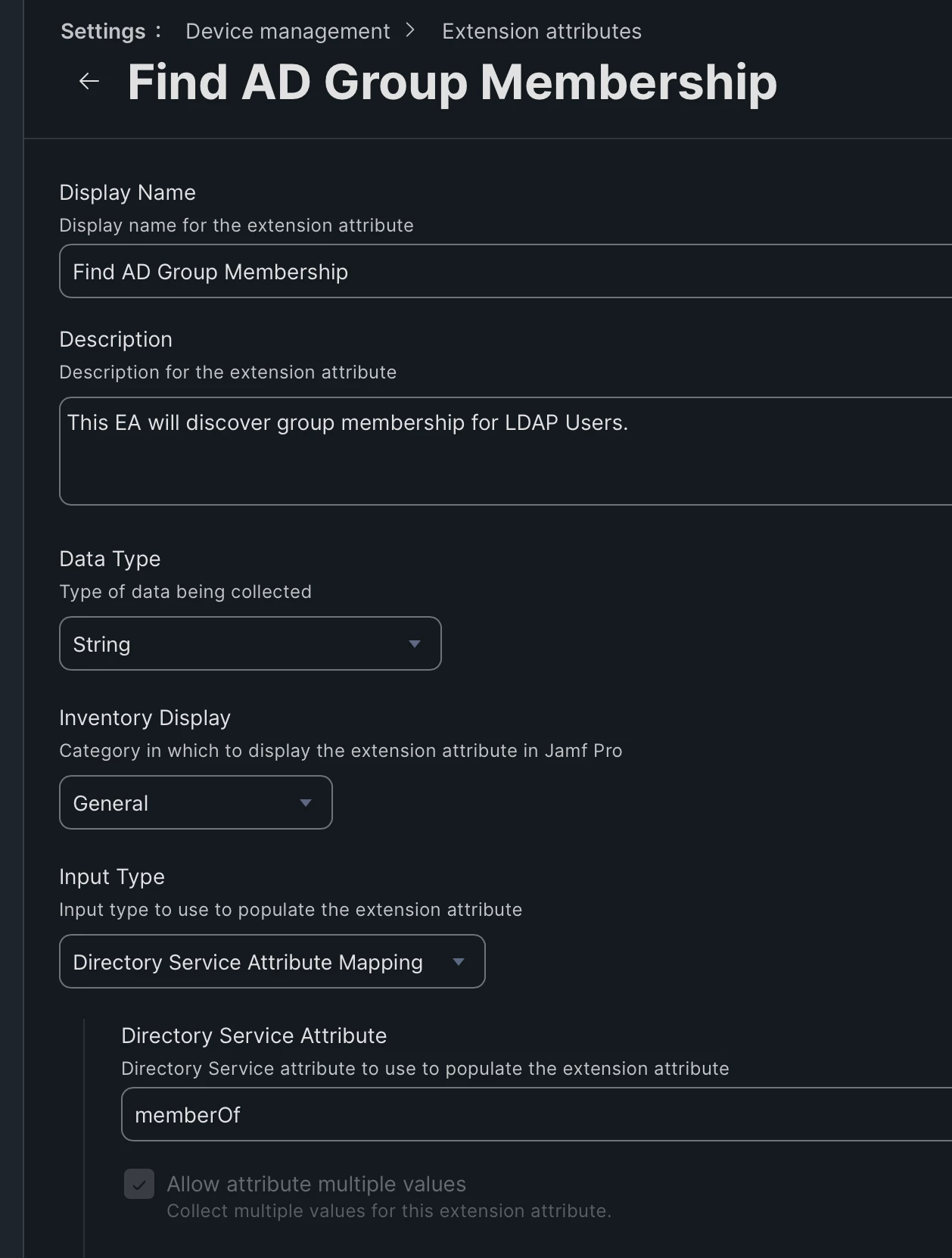
• You could implement an EA with the Directory Service Attribute Mapping and "memberOf" to pull in group memberships.

• From there, you'd create a smart group with criteria for that EA to build configurations for the EntraID memberships.

• I look up these groups after the EA is run, and search for the membership in the computer, inventory, and extension attribute listings.

View original

13 replies

mvu
Forum|alt.badge.img+25
  • Jamf Heroes
  • Answer
  • Apr 2, 2024 4:17 PM UTC

This should be doable, especially if your LDAP test lookups are working. It sounds like it is.

My first note would be to put a ticket in with your Jamf Support and see if you can get help there. They helped me with this...

• You could implement an EA with the Directory Service Attribute Mapping and "memberOf" to pull in group memberships.

• From there, you'd create a smart group with criteria for that EA to build configurations for the EntraID memberships.

• I look up these groups after the EA is run, and search for the membership in the computer, inventory, and extension attribute listings.


Fjordmonkey
Forum|alt.badge.img+3
  • Author
  • New Contributor
  • Apr 3, 2024 5:41 AM UTC

This should be doable, especially if your LDAP test lookups are working. It sounds like it is.

My first note would be to put a ticket in with your Jamf Support and see if you can get help there. They helped me with this...

• You could implement an EA with the Directory Service Attribute Mapping and "memberOf" to pull in group memberships.

• From there, you'd create a smart group with criteria for that EA to build configurations for the EntraID memberships.

• I look up these groups after the EA is run, and search for the membership in the computer, inventory, and extension attribute listings.


Thanks, will have a look!


Fjordmonkey
Forum|alt.badge.img+3
  • Author
  • New Contributor
  • Apr 3, 2024 6:37 AM UTC

This should be doable, especially if your LDAP test lookups are working. It sounds like it is.

My first note would be to put a ticket in with your Jamf Support and see if you can get help there. They helped me with this...

• You could implement an EA with the Directory Service Attribute Mapping and "memberOf" to pull in group memberships.

• From there, you'd create a smart group with criteria for that EA to build configurations for the EntraID memberships.

• I look up these groups after the EA is run, and search for the membership in the computer, inventory, and extension attribute listings.


Had to check the box "Collect user and location information from Directory Service" under Settings - Device Management - Inventory Collection before I had the option of using the Directory Service Attribute Mapping. Will test further, but looks promising.

Thanks for the help and response!


mvu
Forum|alt.badge.img+25
  • Jamf Heroes
  • Apr 3, 2024 11:54 AM UTC

Had to check the box "Collect user and location information from Directory Service" under Settings - Device Management - Inventory Collection before I had the option of using the Directory Service Attribute Mapping. Will test further, but looks promising.

Thanks for the help and response!


Nice catch. We had this checked already, but good to add to notes.

If it helps, I replicated this for iOS mobile devices and Macs. Should work for you if you have Macs too.


mtory
Forum|alt.badge.img+3
  • New Contributor
  • Jun 27, 2024 1:11 AM UTC

@mvu Hey Obi-K I was trying this for Directory Service Attribute Mapping and "memberOf' for Entra ID and isn't working. Could this be a mapping issue?

Any thoughts?


mvu
Forum|alt.badge.img+25
  • Jamf Heroes
  • Jun 27, 2024 11:16 AM UTC

@mvu Hey Obi-K I was trying this for Directory Service Attribute Mapping and "memberOf' for Entra ID and isn't working. Could this be a mapping issue?

Any thoughts?


• When you go to a computer or a device inventory tab, and Extension Attributes, are there LDAP groups listed under EA?

• Did you do an inventory update on the device/s

• When you run an LDAP "test" connection, is it successful under Settings, LDAP Server?
• Did you check the box on "Collect user and location information from Directory Service" box under Settings, Inventory Collection?


mtory
Forum|alt.badge.img+3
  • New Contributor
  • Jun 28, 2024 4:15 AM UTC

• When you go to a computer or a device inventory tab, and Extension Attributes, are there LDAP groups listed under EA?

• Did you do an inventory update on the device/s

• When you run an LDAP "test" connection, is it successful under Settings, LDAP Server?
• Did you check the box on "Collect user and location information from Directory Service" box under Settings, Inventory Collection?


Hey Obi-k

LDAP Server settings are no longer set up, though use to be. 
Question if you used the same EA that we used for LDAP when it was configured and just changed the input type from LDAP to Directory Service Attribute Mapping.. could this be the problem as some devices that still showing the old ldap file paths.


Would I need to delete this original EA and reset it up?


Forum|alt.badge.img+1
  • New Contributor
  • Jun 28, 2024 3:28 PM UTC

Hey Obi-k

LDAP Server settings are no longer set up, though use to be. 
Question if you used the same EA that we used for LDAP when it was configured and just changed the input type from LDAP to Directory Service Attribute Mapping.. could this be the problem as some devices that still showing the old ldap file paths.


Would I need to delete this original EA and reset it up?


I'm trying to implement this as well after our migration to Entra (cloud identity provider) from LDAP. "memberOf" definitely does not work.


trevoredwards
Forum|alt.badge.img+3
  • New Contributor
  • Sep 19, 2024 10:57 PM UTC

Anyone figure this out? 

Trying to create a mobile device Smart Group based on membership of a shared Entra group, but can't quite get it figured out. 

memberOf definitely doesn't work.


Forum|alt.badge.img+8
  • Contributor
  • Nov 21, 2024 3:14 PM UTC

memberOf is also not working for me with Entra and cloud lookups.


Forum|alt.badge.img+17
  • Contributor
  • Nov 26, 2024 9:50 PM UTC

There is an open PI for this - PI103644 - PI-009562 Using the 'memberOf' attribute with Azure LDAP integrations returns no results.


AjWilliams
Forum|alt.badge.img+1
  • New Contributor
  • Feb 11, 2026 3:03 PM UTC

​@Fjordmonkey  did you get this working as Myself and a colleague are Trying to do this now. Would be good to know if you were successful in doing this


Cheers


seavernyc
Forum|alt.badge.img+2
  • New Contributor
  • Apr 16, 2026 3:51 PM UTC

I had to open a ticket to find this out, but you have to actually make it memberOf.displayName