Question

Smartgroup and completed policy

  • September 28, 2016
  • 6 replies
  • 32 views

Forum|alt.badge.img+5

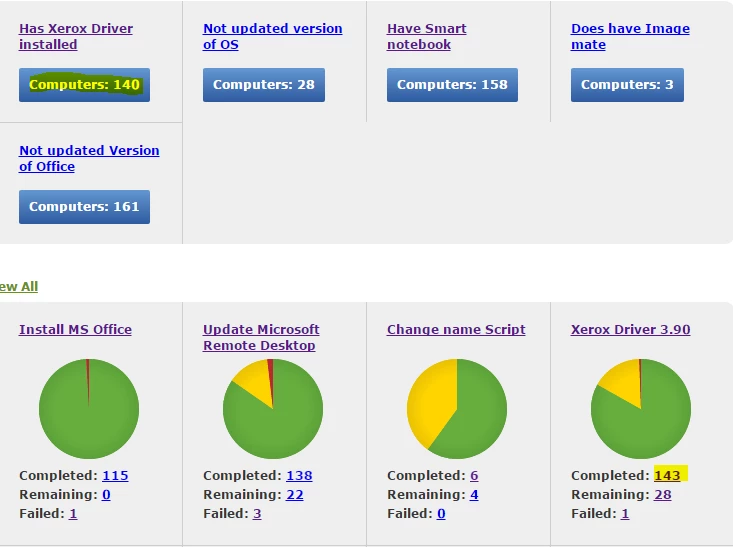
Any idea why we are having different numbers?


6 replies

Forum|alt.badge.img+7
  • Valued Contributor
  • September 28, 2016

In your policy, add Maintenance and check Update Inventory (recon) so your smart group will be updated once the policy is ran.


Forum|alt.badge.img+5
  • Author
  • Contributor
  • September 28, 2016

but it should be updating every 15mins right?


Forum|alt.badge.img+7
  • Valued Contributor
  • September 28, 2016

That is check in policy to check available policy to be ran.

There should be an Update Inventory Policy under Policies. You can change the execution frequency to your liking. To be honest, once a week is ideal.

Otherwise, you can set it to update inventory when the policy is ran.


Forum|alt.badge.img+7
  • Contributor
  • September 28, 2016

Also completed shows all successful runs of the policy, so if it was targeted to test group previously but no longer is i think they show up in the successes even though it is no longer targeted to that group.

K


Forum|alt.badge.img+8

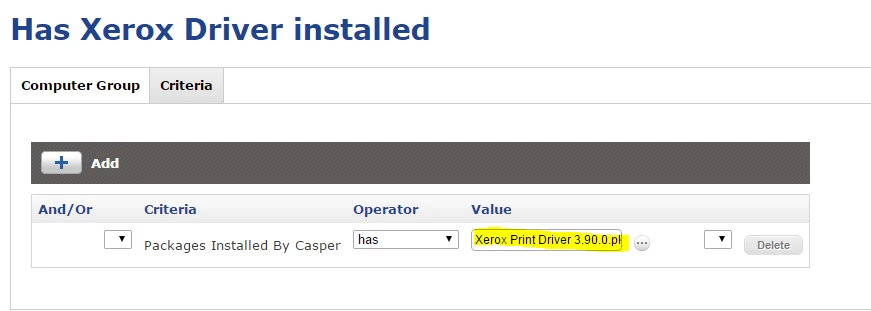
Another possibility is that if the machines existed in your organization prior to the existence of Casper Suite, they could've had the driver installed without the help of the policy.


scottb
Forum|alt.badge.img+18
  • Valued Contributor
  • September 28, 2016

@duffcalifornia - if that were the case - and I've seen that too - the numbers would be reversed. The "has xxx installed" would likely be higher than the "installed by Casper". Looks like there was not a recon at the end of the policy, I'd guess.