Question

Software update 031-51913 impacting Ethernet driver on El Capitan

  • February 28, 2016
  • 20 replies
  • 64 views

Forum|alt.badge.img+3

Disclosure: I saw this information on two different sites, MacRumors Forums and Reddit. I'm posting this here so that you don't have to spend the time looking for those pages.

If you are running El Capitan and your Ethernet port suddenly disappears or stops working, it may be because of this update that was pushed out on February 26, 2016:

031-51913 | Incompatible Kernel Extension Configuration Data 3.28.1

Apparently it disables the stock AppleBCM5701Ethernet driver, and prevents Thunderbolt to Ethernet adapters from working too.

You can verify if you have this update installed by going to About This Mac > System Report > Software > Installations. Sort by Install Date and check to see if you have the update above listed.

This issue affected my personal Mac Mini at home within the last 24 hours, and was frustrating me because normal network troubleshooting procedures did not produce any results. Both posts on MacRumors and Reddit had multiple suggestions on how to fix this, and I tried most of them. What worked for me was booting into my Recovery partition, disabling SIP, rebooting, installing a PKG file from Apple's software content delivery network, rebooting back into my Recovery partition, re-enabling SIP, and rebooting again.

Link to that PKG file that resolves the issue: http://swcdn.apple.com/content/downloads/47/55/031-52551/djk479pucjbs7r2ln9u3n0573nt31ifb45/AppleKextExcludeList_10_11.pkg

Many thanks to those who reported this on MacRumors and on Reddit!!! :-) This is also my first post on JAMFNation, so I apologize in advance if I don't tag this appropriately.

MacRumors Forum Link: http://forums.macrumors.com/threads/software-update-031-51913-will-break-your-ethernet-driver.1958521/

Reddit Link: https://www.reddit.com/r/apple/comments/47tfos/warning_software_update_03151913_breaks_ethernet

20 replies

gskibum
Forum|alt.badge.img+13
  • Valued Contributor
  • 288 replies
  • February 28, 2016

I got burned by this today.

Felt like Wile E. Coyote when he would get blown up by one of his bombs. Except this one was set by the Roadrunner.

I downloaded the .pkg kext. Then booted the recovery partition and used Terminal to copy the good kext to where it belongs. Then purged kext caches (kextcache -invalidate /Volumes/<your boot volume>) and rebooted.


acodega
Forum|alt.badge.img+15
  • Valued Contributor
  • 383 replies
  • February 28, 2016

Rich Trouton has an excellent write up. (As he often does)

If your Mac installed the offending Incompatible Kernel Extension Configuration Data 3.28.1, it won't disable the ethernet port until the Mac restarts. You can install the fix, Incompatible Kernel Extension Configuration Data 3.28.2, by running

softwareupdate --background-critical

As long as you hadn't restarted your Mac on Saturday you'll probably be fine. Your Mac would have installed the offending update and then the fixed update.


bentoms
Forum|alt.badge.img+35
  • Hall of Fame
  • 4331 replies
  • February 28, 2016

I blog something earlier, including possible smart group criteria to detect those affected. (Which may include those in labs & Ethernet only & therefore no longer on the network).

It's here.


Forum|alt.badge.img+3
  • Author
  • New Contributor
  • 2 replies
  • February 28, 2016

Apple has posted a support article about this as well (Last Modified: Feb 28, 2016):

"If the Ethernet connection on your Mac stopped working recently" - https://support.apple.com/en-us/HT6672


donmontalvo
Forum|alt.badge.img+36
  • Hall of Fame
  • 4293 replies
  • February 29, 2016

Another reason Help Desk should always tell users to reboot as a first troubleshooting step. ;)


Forum|alt.badge.img+17
  • Valued Contributor
  • 404 replies
  • February 29, 2016

Forum|alt.badge.img+18
  • Honored Contributor
  • 645 replies
  • February 29, 2016

Hah good thing that we manage the enablement of Software Updates!


AVmcclint
Forum|alt.badge.img+21
  • Esteemed Contributor
  • 1043 replies
  • February 29, 2016

I read numerous reports about this but none of them specified which OS version was affected. Not even Apple's support page specifies. I can confirm that Macs running Yosemite are running version 2.13 of the file in question and do not appear to be affected by Apple's blunder.


Forum|alt.badge.img+26
  • Honored Contributor
  • 457 replies
  • February 29, 2016

@AVmcclint I wish Apple would publish better details. As best I can tell from various web sources, it's only El Capitan, since that has support for SIP, and it's only iMac and MacBook Pro (non-retina)... which have built-in Ethernet ports. At this time, I can't find conclusive info that USB or Thunderbolt adapters would be effected.


bpavlov
Forum|alt.badge.img+18
  • Esteemed Contributor
  • 1206 replies
  • February 29, 2016

Don't forget the Mac Mini and Mac Pro which also include built-in Ethernet.


Forum|alt.badge.img+26
  • Honored Contributor
  • 457 replies
  • February 29, 2016

It's possible that the Mac mini and Mac Pro are not effected because they don't have the same Broadcom adapter/driver.

I'll open a case with Apple to see if they can provide better information about the population effected.


gskibum
Forum|alt.badge.img+13
  • Valued Contributor
  • 288 replies
  • February 29, 2016

@jhalvorson The Mac mini was definitely hit by this.

On Saturday I was picking up with the setup of a new Mac mini I had started about a month ago. After a reboot I was in for fun & games. In fact I found the solution I used on the Mac mini area of Apple Discussions. Other Mac mini users were impacted.

Shudders at the thought of following through with tonight's scheudled upgrade of a couple of Mac mini servers to El Capitan...


ImAMacGuy
Forum|alt.badge.img+23
  • Esteemed Contributor
  • 1310 replies
  • February 29, 2016

what would be the easiest way for the JSS to report affected machines? I'd like to get the support teams a heads up of what they can expect.

I tried doing a smart group for installed applications/SWU's but couldn't find the 'incompatible kernel extension" in there.


bpavlov
Forum|alt.badge.img+18
  • Esteemed Contributor
  • 1206 replies
  • February 29, 2016

Forum|alt.badge.img+26
  • Honored Contributor
  • 457 replies
  • February 29, 2016

Smart groups and EA might not have current information. Especially if the ethernet port is not working and inventories were run prior to the update.

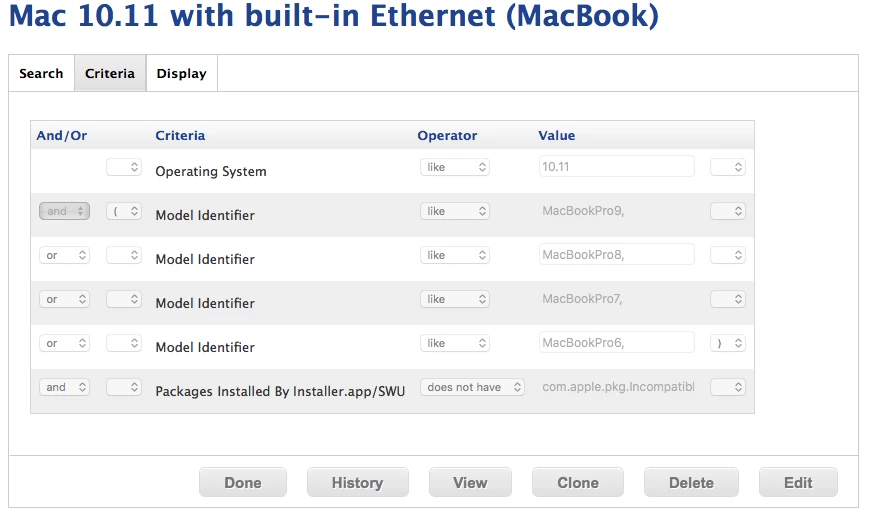
To get a general idea of the impact numbers, I've created advanced computer search like the following for MacBook Pro and another one for iMac's.

The last criteria is:
does not have "com.apple.pkg.IncompatibleKextConfigData.14U2130


Forum|alt.badge.img+3
  • Author
  • New Contributor
  • 2 replies
  • February 29, 2016

@jhalvorson - It affected my personal Mac Mini (mid 2011 model with built-in Ethernet). Thinking that my Ethernet port was bad, I bought a Thunderbolt to Ethernet adapter since I had an unused Thunderbolt port. Unfortunately, it didn't recognize that either in the Network pane of System Preferences when I tried to add a new interface.

Both the MacRumors and Reddit links had people mention that their Thunderbolt to Ethernet adapters didn't work either because of this update. You're right about not finding any mention of USB to Ethernet adapters; I just assumed they would be affected too. I will update the original post to remove that particular mention.


Forum|alt.badge.img+26
  • Valued Contributor
  • 909 replies
  • February 29, 2016

I was able to pull a copy of the fixed update (verified that it was Incompatible Kernel Extension Configuration Data 3.28.2) off of our Software Update server (which wasn't affected) and gave to techs on a thumb drive (and told them to reboot after installing. I have them verify that the Mac is afflicted by this by going to System Information. Has anyone else tried that by chance? Has it worked for you?


Forum|alt.badge.img+13
  • Honored Contributor
  • 550 replies
  • March 3, 2016

Hi Guys;

Just looking to confirm if anyone has deployed the Incompatible Kernel Extension Configuration Data v.3.28.2 without any problems.

Larry


gskibum
Forum|alt.badge.img+13
  • Valued Contributor
  • 288 replies
  • March 3, 2016

@LSinNY It's history now. I've run Software Update on a few minis since this weekend with no issues.

I can confirm that the Thunderbolt to Ethernet adapter was affected too. I had also rebooted a Macbook Air over the weekend that I mostly use on Wi-Fi, so I didn't notice the issue. Yesterday I found my Thunderbolt adapter wasn't working. A reboot installed the corrected kernel version.


Forum|alt.badge.img+13
  • Honored Contributor
  • 550 replies
  • March 5, 2016

Thanks G
Have a good Weekend

Larry