

Question

Spectra and Firefox/Chrome

  • January 17, 2018
  • 5 replies
  • 14 views

donmontalvo
Forum|alt.badge.img+36

Firefox (mainline and ESR)
Mozilla Foundation Security Advisory 2018-01 | Speculative execution side-channel attack ("Spectre")
- Fixed in Firefox 57.0.4 (mainline), or Firefox ESR 52.x.

Google Chrome
Actions required to mitigate Speculative Side-Channel Attack techniques
- Google Chrome for Enterprise can be handled by Google Admin policy.
- For standard Google Chrome, looks like the fix is GUI, go to [chrome://flags/#enable-site-per-process](chrome://flags/#enable-site-per-process) > Strict site isolation > Enable.

Ether beer to anyone who can come up with a way to programmatically set the non-enterprise version of Google Chrome. :)

5 replies

Forum|alt.badge.img+3
  • New Contributor
  • January 17, 2018

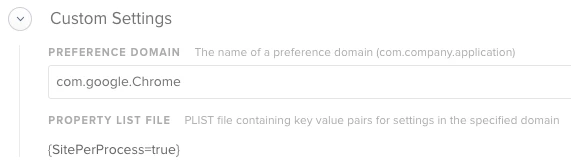
I am using the "Custom settings" option in a config profile with the following set:

Works really well, but only once Chrome gets relaunched.


donmontalvo
Forum|alt.badge.img+36
  • Author
  • Hall of Fame
  • January 17, 2018

@saul.herman Nice, they mention the SitePerProcess key, wish they'd get their documentation updated.

We'll test this...and yea ether beer...


donmontalvo
Forum|alt.badge.img+36
  • Author
  • Hall of Fame
  • January 17, 2018

Forum|alt.badge.img+3
  • New Contributor
  • January 17, 2018

@donmontalvo It might not show up unde the chrome://flags URL but if you go to chrome://policy it will show there as being enabled. Have you tried that?


donmontalvo
Forum|alt.badge.img+36
  • Author
  • Hall of Fame
  • January 18, 2018

@saul.herman yep, confirming you are right. Thanks for the heads up!