Solved

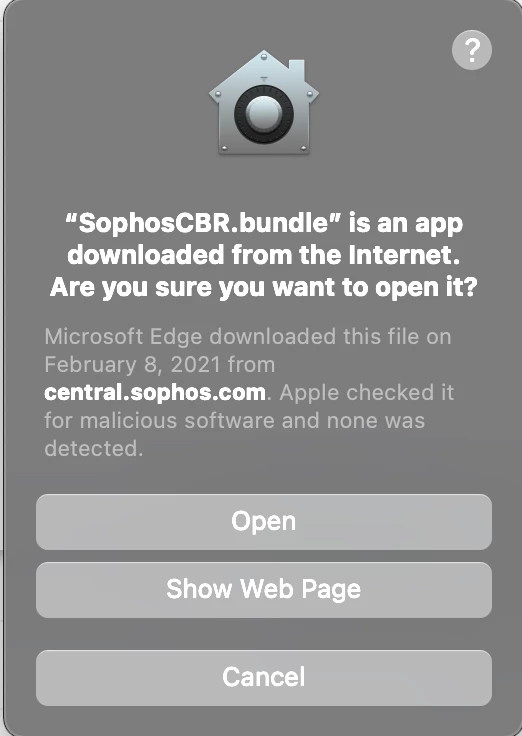
Stop "is an application downloaded from the internet" pop up on deployments

  • February 10, 2021
  • 7 replies
  • 37 views

Forum|alt.badge.img+4

Hey everyone,

I am in the home stretch of an application deployment but have one user experience issue I would like to resolve if possible. I have a new working Sophos deployment, however I get the attached pop up any time the policy runs for install. It must be accepted to install the software and bypassing that for our end users would be excellent.

So far i have tried

xattr -d com.apple.quarantine /var/tmp/SophosInstall/Contents/Helpers/SophosCBR.bundle

before the install kicks off with no success. Any input would be greatly appreciated on if this is even possible to prevent.

Best answer by jonw

@Errick.Pfuhl I too ran into this with recent Sophos deployments. What solved it for me (knock on wood) was adding this just before the chmod script steps:

xattr -rc /var/tmp/Sophos*

7 replies

Forum|alt.badge.img+10

You might want to add the -r option to recursively remove the quarantine flag from inside the bundle. So:

xattr -d -r com.apple.quarantine /var/tmp/SophosInstall/Contents/Helpers/SophosCBR.bundle

Forum|alt.badge.img+4
  • Author
  • Contributor
  • February 10, 2021

Still no dice on that one either. I have also attempted disabling Gatekeeper with spctl --master-disable and running locally, and that was also unsuccessful. May need to prep some user training documents for this one unfortunately


talkingmoose
Forum|alt.badge.img+36
  • Community Manager
  • February 10, 2021

Are you deploying Sophos via command line? I would expect that to take care of messages like that.

https://support.sophos.com/support/s/article/KB-000033340?language=en_US


Forum|alt.badge.img+4
  • Author
  • Contributor
  • February 11, 2021

I am. Contained the installer .app and the installer components folder inside SophosInstall and deployed as a .dmg to /var/tmp.

The following script runs with that policy

#!/bin/sh 

# Navigate to tmp folder
cd /var/tmp/SophosInstall
# Give permissions to sophos installer components
chmod a+x ./Sophos Installer.app/Contents/MacOS/Sophos Installer
chmod a+x ./Sophos Installer.app/Contents/MacOS/tools/com.sophos.bootstrap.helper
# run installer
./Sophos Installer.app/Contents/MacOS/Sophos Installer --install
# clean up
rm -rf /var/tmp/SophosInstall

I might be missing something obvious, but I have not found it.


jonw
Forum|alt.badge.img+10
  • New Contributor
  • Answer
  • February 22, 2021

@Errick.Pfuhl I too ran into this with recent Sophos deployments. What solved it for me (knock on wood) was adding this just before the chmod script steps:

xattr -rc /var/tmp/Sophos*

Forum|alt.badge.img+4
  • Author
  • Contributor
  • February 22, 2021

@jonw You are my hero! I didn't even consider running it against the entire .app. No pop up during the install and it allowed me to add the device to 11.0 EAP in Central. Thank you for that line


Forum|alt.badge.img+3
  • New Contributor
  • July 19, 2024

@Errick.Pfuhl I too ran into this with recent Sophos deployments. What solved it for me (knock on wood) was adding this just before the chmod script steps:

xattr -rc /var/tmp/Sophos*

are you running this on terminal right before making "Sophos*" executable via chmod script? What file is contained on this path?