Question

sudo jamf policy not fetching group membership

  • July 19, 2024
  • 5 replies
  • 30 views

shikhartodaria
Forum|alt.badge.img+3

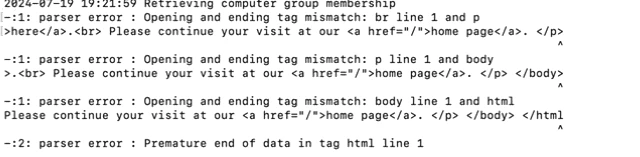
While fetching policy using sudo jamf policy, we are getting the error:

Any idea what might be causing this issue?
 

5 replies

mm2270
Forum|alt.badge.img+24
  • Legendary Contributor
  • July 19, 2024

I would check to see if you have a policy running that's using an API call in it. The parser errors typically happen when the result of an API call failed to get proper XML and it was being parsed with something like xmllint or another similar tool. Maybe the policy is running an out of date script that isn't getting a token first before doing the rest of the API calls. Just a guess.


howie_isaacks
Forum|alt.badge.img+23
  • Esteemed Contributor
  • July 19, 2024

Can you post more details about this policy?


shikhartodaria
Forum|alt.badge.img+3
  • Author
  • New Contributor
  • July 22, 2024

I would check to see if you have a policy running that's using an API call in it. The parser errors typically happen when the result of an API call failed to get proper XML and it was being parsed with something like xmllint or another similar tool. Maybe the policy is running an out of date script that isn't getting a token first before doing the rest of the API calls. Just a guess.


Thanks. I am new JAMF admin so I will have to figure out if the script is out of date or if it is getting the proper XML.


shikhartodaria
Forum|alt.badge.img+3
  • Author
  • New Contributor
  • July 22, 2024

Can you post more details about this policy?


The policy was created by an old employee and since I am new to JAMF stuff, I am kind of clueless of what it does. :(


mm2270
Forum|alt.badge.img+24
  • Legendary Contributor
  • July 22, 2024

The policy was created by an old employee and since I am new to JAMF stuff, I am kind of clueless of what it does. :(


Well, it's easy to find out. Figure out what policy it is, then locate it in Jamf Pro under the Policies section and open it. See what's included in the policy. My guess would be there's at least one script in it being run at execution time. Locate the script under Settings > Computer Management > Scripts, and examine them from there to see what they may be doing.