Solved

sudo /usr/sbin/softwareupdate --fetch-full-installer

  • April 8, 2020
  • 19 replies
  • 116 views

Forum|alt.badge.img+4

Only works under Catalina. Why is Apple making it so difficult to automate OS replacement/updates?

Best answer by MehdiYawari

Hello everyone
I habe tested the command "usr/sbin/softwareupdate --fetch-full-installer" on different macs. Mojave, Catalina and Bigsur. On some Mac it work but on the other not. We just cant rely on this command

19 replies

Forum|alt.badge.img+9
  • Contributor
  • April 8, 2020

Hi @adminNWA ,
The fetch full installer command was introduced on macOS Catalina. So, if you were to run that command on macOS Mojave and older, you'd get an error. As of now, its only benefit is downloading Catalina on Macs that already have Catalina, but it will certainly be helpful in the future.

If you're looking for a method of deploying Catalina, HCS has a great workflow.


easyedc
Forum|alt.badge.img+16
  • Esteemed Contributor
  • April 8, 2020

You can request legacy installers going back to 10.13/High Sierra. It's actually pretty handy.

    --fetch-full-installer      Install the latest macOS Installer
        --full-installer-version    The version of macOS to install. Ex: --full-installer-version 10.15

Older installers should still be available in the MAS for you past that.


noahdowd
Forum|alt.badge.img+10
  • Contributor
  • July 2, 2020

Anybody else getting

SUPreferenceManager: Failed to set object of class: __NSCFConstantString for key: LastRecommendedMajorOSBundleIdentifier with error: Error Domain=SUPreferenceManagerErrorDomain Code=1 "(null)"
Install failed with error: Update not found

when running softwareupdate --fetch-full-installer with or without --full-installer-version?


Forum|alt.badge.img+31
  • Honored Contributor
  • July 2, 2020

this feature is buggy go file feedback tickets with Apple please


Forum|alt.badge.img+11
  • Valued Contributor
  • November 20, 2020

still seems to be a bug


Forum|alt.badge.img+6
  • Contributor
  • November 20, 2020

Seems to work fine on Catalina, but on Big Sur to download the installer I'm getting:
Install failed with error: Update not found


rpayne
Forum|alt.badge.img+11
  • Contributor
  • November 23, 2020
Seems to work fine on Catalina, but on Big Sur to download the installer I'm getting: Install failed with error: Update not found

Yup. Getting this same thing.


Forum|alt.badge.img+8
  • Valued Contributor
  • November 23, 2020

I've actually never been able to get this to work on Catalina reliably let alone Big Sur. It's never worked on Big Sur. Hopefully they'll fix it.


Forum|alt.badge.img+31
  • Honored Contributor
  • December 2, 2020

This never works just use the script from the mac admins scripts repo here. I just use this now and it works way better than the Apple tools

fetch full installer has never really worked, just like the rest of software update


bpstuder
Forum|alt.badge.img+7
  • Contributor
  • December 3, 2020

Confirmed by Apple, it's bugged in Catalina 10.15.7 & Big Sur 11.0.1
They are working on it but no ETA for now.


Forum|alt.badge.img+3
  • New Contributor
  • June 21, 2021

@bpstuder Did you have any update from apple about the fix?


Chris_Hafner
Forum|alt.badge.img+25
  • Jamf Heroes
  • June 22, 2021

The following worked for me yesterday. Though I am running an up-to-date version of Big Sur on the machine that downloaded it.

sudo /usr/sbin/softwareupdate --fetch-full-installer --full-installer-version 11.4

bpstuder
Forum|alt.badge.img+7
  • Contributor
  • July 9, 2021

@balakumaran the only fix is "update to another version and then you're good to go", which is definitely not a solution in some cases. So I managed to use links found here, use a script to curl them and install them. If you need, I can add the script here.


Forum|alt.badge.img+6
  • Contributor
  • July 9, 2021

@bpstuder please share the script please :)


bpstuder
Forum|alt.badge.img+7
  • Contributor
  • July 12, 2021

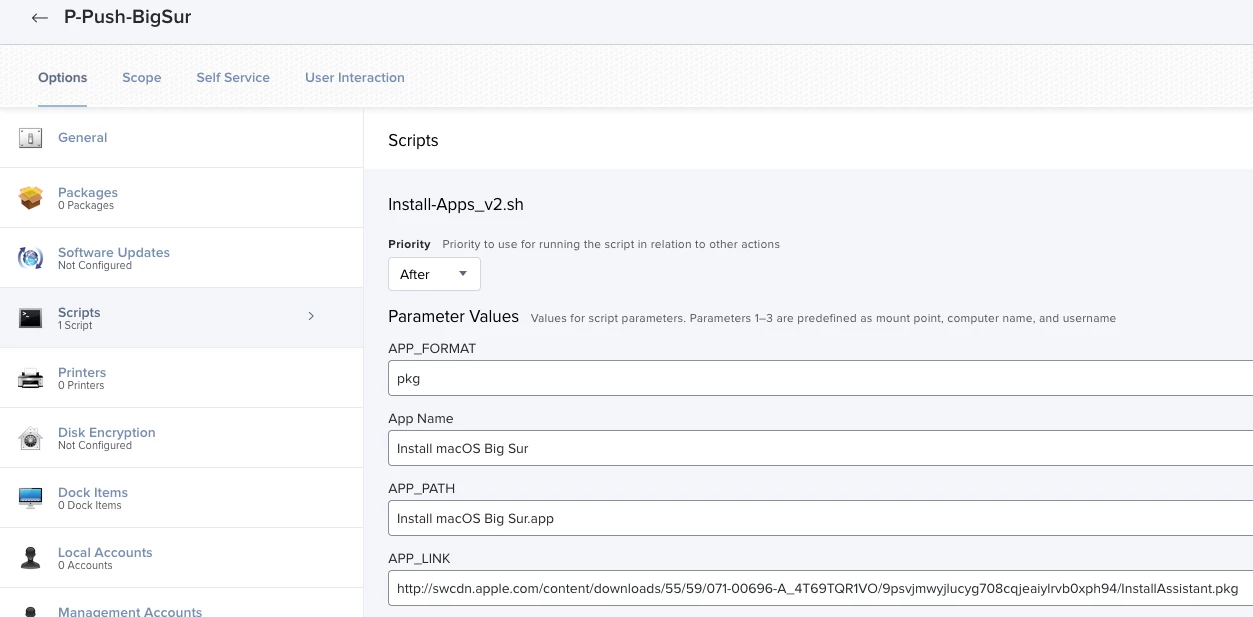
Script can be found here. Still need some improvements, but it's a start 🙂
Then I have a policy to push it :

Once it's pushed on your computers, you can use this script to start the update.


Forum|alt.badge.img+3
  • New Contributor
  • July 22, 2021

Script can be found here. Still need some improvements, but it's a start 🙂
Then I have a policy to push it :

Once it's pushed on your computers, you can use this script to start the update.


Sorry @bpstuder, it seems cannot access to your script link, can you share that again? thank you


bpstuder
Forum|alt.badge.img+7
  • Contributor
  • July 22, 2021

Sorry @bpstuder, it seems cannot access to your script link, can you share that again? thank you


Oops sorry, there was a typo in the link, it's fixed


Forum|alt.badge.img+7
  • Contributor
  • Answer
  • August 19, 2021

Hello everyone
I habe tested the command "usr/sbin/softwareupdate --fetch-full-installer" on different macs. Mojave, Catalina and Bigsur. On some Mac it work but on the other not. We just cant rely on this command



Forum|alt.badge.img+12
  • Valued Contributor
  • September 11, 2024

Hello everyone
I habe tested the command "usr/sbin/softwareupdate --fetch-full-installer" on different macs. Mojave, Catalina and Bigsur. On some Mac it work but on the other not. We just cant rely on this command


Hi Guys,

In our experience, the macOS 12 and 13 are giving us hard time when downloading macOS, however earlier versions have been downloading and updating to macOS 14.6.1 fine. We are using the following command.

softwareupdate --fetch-full-installer --full-installer-version 14.6.1