
Question

Suppress Intelligent Services for Office 16.17

  • October 9, 2018
  • 1 reply
  • 20 views

Forum|alt.badge.img+9

With the Office 16.17 upgrade, Microsoft is prompting users to enable Intelligent Services and to accept a new Terms and Conditions.

We do not want to turn the services on, we just want to suppress the dialog box for them. I've tried building the following CP but i'm unable to get the IS dialog to suppress, has anyone else had better luck?
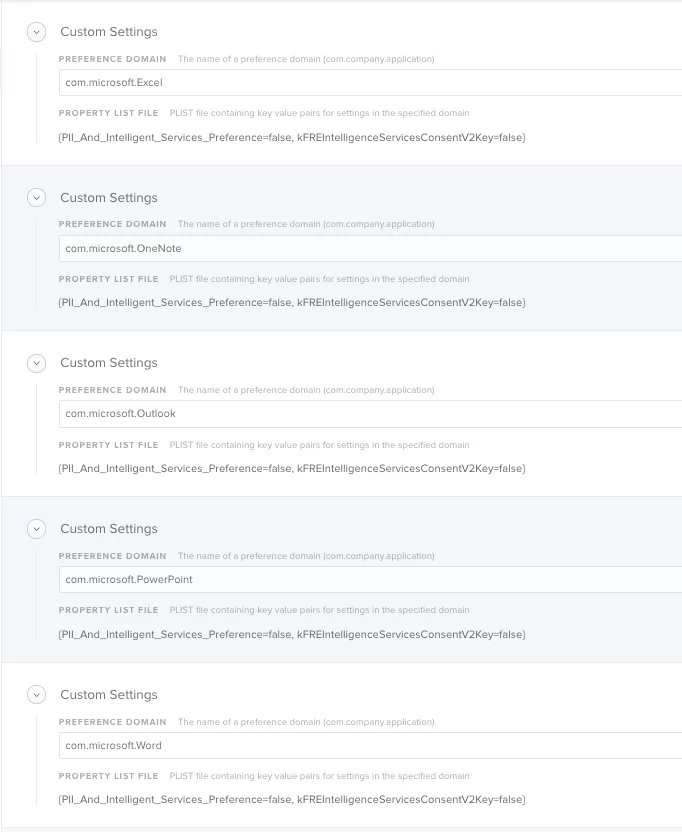
1 reply

Forum|alt.badge.img+13
  • Contributor
  • October 9, 2018

You will actually want to set the values as follows:

PII_And_Intelligent_Services_Preference=false, kFREIntelligenceServicesConsentV2Key=true

Setting to False for PII would not turn it on, then setting TRUE for kFREE would stop them from ever seeing the dialog again.