Solved

Suppress "New to Mac?"

  • February 10, 2017
  • 33 replies
  • 114 views

Forum|alt.badge.img+10

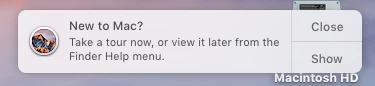
Currently working on our Sierra deployment and i hate the "New to Mac?" notification that pops out.

Is anyone suppressing this from popping up on their users and if so how did you accomplish that?

Thanks in advance for any help.

Best answer by CasperSally

Here's a profile for disabling it

33 replies

Forum|alt.badge.img+16
  • Valued Contributor
  • February 10, 2017

I noticed that Sierra is a little more insistent on taking that tour than previous versions were, so this is my (mostly-unverified) script. I haven't had a chance to validate this very widely yet, but on a couple of test boxes it seemed to do what you're asking for.

#!/bin/bash

#####
# disableTourNotifications.sh
# Brad Vrooman
###
# Attempts to disable the macOS "Take a Tour" notifications for the user account passed in $3.
# It is possible that this script may need to be run at each login to prevent reappearance.
#####

if [[ $3 == "" ]]; then
    echo "No username provided in expected argument."
    exit 1
fi

# Initialize the array of urls
tourURLs=()

# Get all of the "Tours" plist files
for toursFile in $(ls /System/Library/PrivateFrameworks/Tourist.framework/Resources/Tours*.plist); do

    # Find out how many URLs are in the file
    urlCount=$(/usr/libexec/PlistBuddy $toursFile -c "print :" | grep url | wc -l 2> /dev/null)

    # Add each URL to the array
    for arrayElement in $(seq 0 $urlCount); do
        tourURLs=(${tourURLs[@]} $(/usr/libexec/PlistBuddy $toursFile -c "print :$arrayElement:url" 2> /dev/null))
    done
done

# Add each URL to the user's com.apple.touristd domain with the value set to the current date
for singleURL in ${tourURLs[@]}; do
    su $3 -c "defaults write com.apple.touristd $singleURL -date "$(date)""
done

exit 0

Credit to Carl Ashley for getting me on the right path and finding these files/keys.


Forum|alt.badge.img+17
  • Honored Contributor
  • Answer
  • February 10, 2017

ImAMacGuy
Forum|alt.badge.img+23
  • Esteemed Contributor
  • February 10, 2017

when would you set this to run? can it be done at image time/first boot or at user login?


Forum|alt.badge.img+16
  • Valued Contributor
  • February 10, 2017

In my testing I've run the script at login (and it's a quick run, so I've left it "Ongoing" on my test boxes with no noticeable effect).

The profile should also work, with two caveats:
1. It will need to be updated as new URLs are added to the Tours*.plist files
2. There might come a time when touristd stops "trusting" a relatively-old firstOSLogin value, such as after a major OS update

Other than that, it's another way to accomplish the same thing.


Forum|alt.badge.img+13
  • Honored Contributor
  • February 14, 2017

Not having any luck with this. Roughly 5-10 minutes after logging in, the banner pops up. When I run the profile for disabling:
Script result: /Library/Application Support/JAMF/tmp/test.mobileconfig: line 1: syntax error near unexpected token `newline'
/Library/Application Support/JAMF/tmp/test.mobileconfig: line 1: `'
Error running script: return code was 2.

Anyone else with issues?


Forum|alt.badge.img+13
  • Honored Contributor
  • February 14, 2017

Succeeded. I uploaded as a custom setting in a configuration profile and and appears to be working.

P.S. Not working. The blasted banner is back. I reimaged the machine to be sure the profile was being applied. It's not and it's driving me nuts now.


Forum|alt.badge.img+13
  • Honored Contributor
  • April 20, 2017

Here is the updated script that runs when the user logs in:

# disableTourNotifications.sh

Brad Vrooman

Updated by CapDragon

# Attempts to disable the macOS "Take a Tour" notifications for the user account passed in $3.

It is possible that this script may need to be run at each login to prevent reappearance.

stat -f%Su /dev/console

consoleUsername=$(stat -f %Su /dev/console)

if [[ $3 == "" ]]; then

echo "No username provided in expected argument."

exit 1

fi

Initialize the array of urls

tourURLs=()

Get all of the "Tours" plist files

for toursFile in $(ls /System/Library/PrivateFrameworks/Tourist.framework/Resources/Tours*.plist); do

# Find out how many URLs are in the file urlCount=$(/usr/libexec/PlistBuddy $toursFile -c "print :" | grep url | wc -l 2> /dev/null)

# Add each URL to the array for arrayElement in $(seq 0 $urlCount); do tourURLs=(${tourURLs[@]} $(/usr/libexec/PlistBuddy $toursFile -c "print :$arrayElement:url" 2> /dev/null)) done
done

Add each URL to the user's com.apple.touristd domain with the value set to the current date

for singleURL in ${tourURLs[@]}; do su $consoleUsername -c "defaults write com.apple.touristd $singleURL -date "$(date)""
done

exit 0


Forum|alt.badge.img+8
  • Contributor
  • April 20, 2017

@CapU Use a triple-backtick (```) before and after your script so that it will display without being reformatted.


Forum|alt.badge.img+13
  • Honored Contributor
  • April 20, 2017

Thanks @StoneMagnet


Forum|alt.badge.img+13
  • Honored Contributor
  • April 20, 2017

Corrected script

#!/bin/bash

#####
# disableTourNotifications.sh
# Brad Vrooman
##Updated by Moe
###
# Attempts to disable the macOS "Take a Tour" notifications for the user account passed in $consoleUsername .
# It is possible that this script may need to be run at each login to prevent reappearance.
#####

stat -f%Su /dev/console
consoleUsername=$(stat -f %Su /dev/console)

# Initialize the array of urls
tourURLs=()

# Get all of the "Tours" plist files
for toursFile in $(ls /System/Library/PrivateFrameworks/Tourist.framework/Resources/Tours*.plist); do

    # Find out how many URLs are in the file
    urlCount=$(/usr/libexec/PlistBuddy $toursFile -c "print :" | grep url | wc -l 2> /dev/null)

    # Add each URL to the array
    for arrayElement in $(seq 0 $urlCount); do
        tourURLs=(${tourURLs[@]} $(/usr/libexec/PlistBuddy $toursFile -c "print :$arrayElement:url" 2> /dev/null))
    done
done

# Add each URL to the user's com.apple.touristd domain with the value set to the current date
for singleURL in ${tourURLs[@]}; do
    su $consoleUsername -c "defaults write com.apple.touristd $singleURL -date "$(date)""
done

exit 0

Forum|alt.badge.img+1
  • New Contributor
  • September 28, 2017

Just bumping this in the recent release of High Sierra...

The preference keys have changed a bit in macOS 10.13 - this profile has worked for me in my testing of a clean install of High Sierra.
https://gist.github.com/carlashley/0874fc5ba65897eff4ad38082e74ea38


Forum|alt.badge.img+4
  • Contributor
  • September 28, 2017

Thanks Carl. Champion as always.


Forum|alt.badge.img+17
  • Honored Contributor
  • April 20, 2018

thanks @carl for sharing the HS version. testing with 10.13.4.


Forum|alt.badge.img
  • New Contributor
  • July 17, 2018

On 10.13.6 ther is NO plist

/System/Library/PrivateFrameworks/Tourist.framework/Resources/Tours*.plist

Seb


MrRoboto
Forum|alt.badge.img+9
  • Valued Contributor
  • July 27, 2018

How are you addressing the tours in 10.13.6 if there is no plist?


metalfoot77
Forum|alt.badge.img+11
  • Valued Contributor
  • August 29, 2018

@MrRoboto did you ever get an answer on this question about 10.13.6 and the tours?


MrRoboto
Forum|alt.badge.img+9
  • Valued Contributor
  • August 29, 2018

@kricotta Not yet, I am going to test deploying managed preferences for com.apple.touristd.plist via a configuration profile.


metalfoot77
Forum|alt.badge.img+11
  • Valued Contributor
  • August 29, 2018

@MrRoboto I am testing out the config profile at https://gist.github.com/carlashley/0874fc5ba65897eff4ad38082e74ea38 and so far it doesn't appear to be doing anything.


Forum|alt.badge.img+10
  • Author
  • Valued Contributor
  • September 27, 2018

Bump.

Has anyone figured this out for 10.13.6?


Forum|alt.badge.img+10
  • Author
  • Valued Contributor
  • November 29, 2018

Bump again -- does anyone have a fix for this in 10.13.6 or 10.14 ? So Annoying...


Forum|alt.badge.img+10
  • Author
  • Valued Contributor
  • January 3, 2019

@kricotta @MrRoboto Did you guys ever figure out a way to suppress these messages in 10.13.6 or 10.14+? Any help would be appreciated -- it's so annoying.

thank you


gda
Forum|alt.badge.img+10
  • Contributor
  • January 4, 2019

I'm thinking about why I would disable the "New to Mac" notification. But I don't find any reasons.

Is it just one notification or does this notification prompt you every day?
Whats so wrong with the "New to Mac" website?

I don't have a Mac at hand. Maybe the pref is not in ~/Library/Preferences anymore, but in a different folder. Maybe in ~/Library/Containers?


Forum|alt.badge.img+2
  • New Contributor
  • January 5, 2019

@Chuey I just found @carl's configuration profile for macOS Mojave:
macOS_Mojave_touristd.mobileconfig

I applied it at the user computer level and it seems to work just fine! Thanks @carl!

Update: the configuration profile seems to work on several models, but not on all of them...


Forum|alt.badge.img+10
  • Author
  • Valued Contributor
  • January 7, 2019

@oklair Thanks so much! Awesome find.


Forum|alt.badge.img+3
  • New Contributor
  • April 15, 2019

Hey Guys how are you applying this? I copied the text into Bbedit saved the file and tried to upload it as a config profile. This is my first time to attempt uploading one.

Thanks for any direction.