

Answer

Suppressing "Enable Metadata Retrieval" prompt in VLC?

  • July 7, 2016
  • 6 replies
  • 178 views

donmontalvo
Forum|alt.badge.img+36

First launch of VLC tosses up a dialog box to Enable Metadata Retrieval:
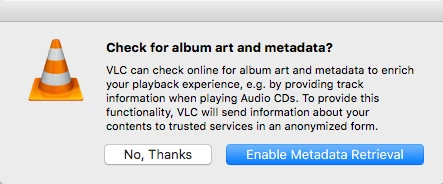
Apparently our FOSS buddies decided it is a good idea to hide this setting in a User level non standard preference locations (ala our buddies at Adobe) /Users/username/Library/Preferences/org.videolan.vlc/vlcrc.

If user selects No, Thanks, this value is set in the file:

# Allow metadata network access (boolean)
#metadata-network-access=0

If the user slects Enable Metadata Retrieval, this value is set in the file:

# Allow metadata network access (boolean)
metadata-network-access=1

Is there a programatic way to check/confirm this setting in /Users/username/Library/Preferences/org.videolan.vlc/vlcrc to ensure it is set to #metadata-network-access=0?

We can loop whatever command works, through all user directories and the User Template, unfortunately since defaults isn't used, haven't had luck finding the right command.

To tie loose ends, since I didn't find any other VLC discussions...

The other standard suppression stuff can be managed at the Computer level in /Library/Preferences/org.videolan.vlc:

/usr/bin/defaults write /Library/Preferences/org.videolan.vlc SUEnableAutomaticChecks -boolean "FALSE" 2>/dev/null
/usr/bin/defaults write /Library/Preferences/org.videolan.vlc SUSendProfileInfo -boolean "FALSE" 2>/dev/null
/usr/bin/defaults write /Library/Preferences/org.videolan.vlc SUHasLaunchedBefore -boolean "TRUE" 2>/dev/null
/usr/bin/defaults write /Library/Preferences/org.videolan.vlc VLCFirstRun -date "2015-05-22T00:00:00Z" 2>/dev/null

And to confirm the settings:

$ defaults read /Library/Preferences/org.videolan.vlc
{
    SUEnableAutomaticChecks = 0;
    SUHasLaunchedBefore = 1;
    SUSendProfileInfo = 0;
    VLCFirstRun = "2015-05-22 00:00:00 +0000";
}
$

Best answer by niklas_blomdale

Untested, guess the perl regexp replace might need some adjustments.

#!/bin/bash
file="/Users/username/Library/Preferences/org.videolan.vlc/vlcrc"
if [[ $(grep -c 'metadata-network-access=1' ${file}) -eq 1 ]]; then
 perl -pi -e 's/metadata-network-access/#metadata-network-access/g' ${file}
fi

6 replies

Forum|alt.badge.img+5

Untested, guess the perl regexp replace might need some adjustments.

#!/bin/bash
file="/Users/username/Library/Preferences/org.videolan.vlc/vlcrc"
if [[ $(grep -c 'metadata-network-access=1' ${file}) -eq 1 ]]; then
 perl -pi -e 's/metadata-network-access/#metadata-network-access/g' ${file}
fi

daz_wallace
Forum|alt.badge.img+13
  • Contributor
  • July 7, 2016

Hey @donmontalvo I know it goes into the user's folder by default but have you tried recreating the file in the top level library/ prefs /etc to see if that works?

If not, we've got an example of loop through the Users directory and doing stuff here
Link

Gimme an hour to get to a desk and I might be able to knock up something :)


daz_wallace
Forum|alt.badge.img+13
  • Contributor
  • July 7, 2016

Hey @donmontalvo,

Try this (in test, not production!):

#!/bin/sh

for USER_HOME in /Users/*
    do
        USER_UID=`basename "${USER_HOME}"`
        if [ ! "${USER_UID}" = "Shared" ]; then 
            if [ ! -d "${USER_HOME}"/Library/Preferences/org.videolan.vlc ]; then
                mkdir -p "${USER_HOME}"/Library/Preferences/org.videolan.vlc
                chown "${USER_UID}" "${USER_HOME}"/Library
                chown "${USER_UID}" "${USER_HOME}"/Library/Preferences/org.videolan.vlc
            fi
            if [ -d "${USER_HOME}"/Library/Preferences/org.videolan.vlc ]; then
                CHECK_FOR_METADATA=$(less "${USER_HOME}"/Library/Preferences/org.videolan.vlc/vlcrc | grep -c "metadata-network-access=")
                if [[ "${CHECK_FOR_ANALYTICS}" != 0 ]]; then
                    sed -i '' -e 's/#metadata-network-access=0/metadata-network-access=1/' "${USER_HOME}"/Library/Preferences/org.videolan.vlc/vlcrc
                else
                    echo "metadata-network-access=1" >> "${USER_HOME}"/Library/Preferences/org.videolan.vlc/vlcrc
                fi
            fi
        fi
done

This will Loop through the Users folder (excluding "Shared") and:
1. Check for the "~/Library/Preferences/org.videolan.vlc" directory, creating it as needed
2. Check for the "metadata-network-access=". If found, it will replace it. If not, it will add the desired value.

Test, test and test again : )

Also, This will only work on Home Folders in /Users. More work can be carried out go via DSCL and grab user home directory locations dynamically but this should get you out of most problems.

Hope that Helps!

Darren


Forum|alt.badge.img+10
  • New Contributor
  • July 7, 2016

That prompt is shown if the VLCFirstRun key does NOT exist in the org.videolan.vlc pref domain.

just create a config profile that contains a VLCFirstRun key and valid date time stamp value .

I just used mcxToProfile to convert an already configured org.videolan.vlc plist file into a config profile.

this has been around for a while, see here: https://forum.videolan.org/viewtopic.php?t=126302


donmontalvo
Forum|alt.badge.img+36
  • Author
  • Hall of Fame
  • July 24, 2016

@niklas.blomdalen @daz_wallace @calumhunter

Thanks for all the great input, and my apologies for the late response. Its been pretty busy the last couple weeks.

I did some testing to make sure any logic used wouldn't result in multiple # in the front of the value. Just in case we end up having to programmatically toggle this value. Determined as long as the value starts with a #s(even if there are multiple #s, its a moot point. If a user enables the checkbox via GUI, the entire line is replaced anyway.

#metadata-network-access=0 <-- disabled
metadata-network-access=1 <-- enabled

Here is what I came up with, after stealing...er...adapting what you guys posted. :)

#!/bin/sh

# Disable "Check for album art and metadata?" prompt, and auto updates for all users
/usr/bin/defaults write /Library/Preferences/org.videolan.vlc VLCFirstRun -date "2015-05-22T00:00:00Z" 2>/dev/null
/usr/bin/defaults write /Library/Preferences/org.videolan.vlc SUEnableAutomaticChecks -bool "false" 2>/dev/null
/usr/bin/killall cfprefsd 2>/dev/null

# Disable metadata-network-access in User Template
/bin/mkdir -p /System/Library/User Template/English.lproj/Library/Preferences/org.videolan.vlc/ 2>/dev/null
/bin/echo "# Allow metadata network access (boolean)" > /System/Library/User Template/English.lproj/Library/Preferences/org.videolan.vlc/vlcrc 2>/dev/null
/bin/echo "#metadata-network-access=0" >> /System/Library/User Template/English.lproj/Library/Preferences/org.videolan.vlc/vlcrc 2>/dev/null
/usr/sbin/chown -R root:wheel /System/Library/User Template/English.lproj/Library/Preferences/org.videolan.vlc 2>/dev/null
/bin/chmod -R 700 /System/Library/User Template/English.lproj/Library/Preferences/org.videolan.vlc 2>/dev/null

# Disable metadata-network-access per user
over500=`dscl . list /Users UniqueID | awk '$2 > 500 { print $1 }'`
for u in $over500 ;
do
    /bin/mkdir -p /Users/"$u"/Library/Preferences/org.videolan.vlc/ 2>/dev/null
    /bin/echo "# Allow metadata network access (boolean)" > /Users/"$u"/Library/Preferences/org.videolan.vlc/vlcrc 2>/dev/null
    /bin/echo "#metadata-network-access=0" >> /Users/"$u"/Library/Preferences/org.videolan.vlc/vlcrc 2>/dev/null
    /usr/sbin/chown -R "$u" /Users/"$u"/Library/Preferences/org.videolan.vlc 2>/dev/null
    /bin/chmod -R 700 /Users/"$u"/Library/Preferences/org.videolan.vlc 2>/dev/null
    /usr/bin/killall -u "$u" cfprefsd 2>/dev/null
done

exit 0

Hope to see you guys at JNUC2016. :)

HTH,
Don


donmontalvo
Forum|alt.badge.img+36
  • Author
  • Hall of Fame
  • June 29, 2022

@niklas.blomdalen @daz_wallace @calumhunter

Thanks for all the great input, and my apologies for the late response. Its been pretty busy the last couple weeks.

I did some testing to make sure any logic used wouldn't result in multiple # in the front of the value. Just in case we end up having to programmatically toggle this value. Determined as long as the value starts with a #s(even if there are multiple #s, its a moot point. If a user enables the checkbox via GUI, the entire line is replaced anyway.

#metadata-network-access=0 <-- disabled
metadata-network-access=1 <-- enabled

Here is what I came up with, after stealing...er...adapting what you guys posted. :)

#!/bin/sh

# Disable "Check for album art and metadata?" prompt, and auto updates for all users
/usr/bin/defaults write /Library/Preferences/org.videolan.vlc VLCFirstRun -date "2015-05-22T00:00:00Z" 2>/dev/null
/usr/bin/defaults write /Library/Preferences/org.videolan.vlc SUEnableAutomaticChecks -bool "false" 2>/dev/null
/usr/bin/killall cfprefsd 2>/dev/null

# Disable metadata-network-access in User Template
/bin/mkdir -p /System/Library/User Template/English.lproj/Library/Preferences/org.videolan.vlc/ 2>/dev/null
/bin/echo "# Allow metadata network access (boolean)" > /System/Library/User Template/English.lproj/Library/Preferences/org.videolan.vlc/vlcrc 2>/dev/null
/bin/echo "#metadata-network-access=0" >> /System/Library/User Template/English.lproj/Library/Preferences/org.videolan.vlc/vlcrc 2>/dev/null
/usr/sbin/chown -R root:wheel /System/Library/User Template/English.lproj/Library/Preferences/org.videolan.vlc 2>/dev/null
/bin/chmod -R 700 /System/Library/User Template/English.lproj/Library/Preferences/org.videolan.vlc 2>/dev/null

# Disable metadata-network-access per user
over500=`dscl . list /Users UniqueID | awk '$2 > 500 { print $1 }'`
for u in $over500 ;
do
    /bin/mkdir -p /Users/"$u"/Library/Preferences/org.videolan.vlc/ 2>/dev/null
    /bin/echo "# Allow metadata network access (boolean)" > /Users/"$u"/Library/Preferences/org.videolan.vlc/vlcrc 2>/dev/null
    /bin/echo "#metadata-network-access=0" >> /Users/"$u"/Library/Preferences/org.videolan.vlc/vlcrc 2>/dev/null
    /usr/sbin/chown -R "$u" /Users/"$u"/Library/Preferences/org.videolan.vlc 2>/dev/null
    /bin/chmod -R 700 /Users/"$u"/Library/Preferences/org.videolan.vlc 2>/dev/null
    /usr/bin/killall -u "$u" cfprefsd 2>/dev/null
done

exit 0

Hope to see you guys at JNUC2016. :)

HTH,
Don


We moved the update disable part to Configuration Profile.

Unfortunately the metadata bit is still on that silly file, refined the script a bit:

#!/bin/bash 

OVER500=$(/usr/bin/dscl . list /Users UniqueID | /usr/bin/awk '$2 > 500 { print $1 }')

for u in "${OVER500}"
do
DIR1="/Users/${u}/Library/Preferences/org.videolan.vlc"
FILE1="${DIR1}"/vlcrc
STR_ON="metadata-network-access=1"
STR_OFF="#metadata-network-access=0"

if [[ -e "${FILE1}" ]]
then
/usr/bin/sed -i '' "s/"${STR_ON}"/"${STR_OFF}"/g" "${FILE1}"
else
/bin/mkdir -p "${DIR1}"
/bin/echo "${STR_OFF}" > "${FILE1}"
fi
done