Question

TeamViewer Host - Configuration ID

  • February 16, 2024
  • 12 replies
  • 414 views

Forum|alt.badge.img+3
  • New Contributor

Hello everyone,

i wanted to roll out our new custom TeamViewer Host and everything works except that our custom design with the company logo is not displayed.


I did it exactly as in the instructions: https://hcsonline.com/images/PDFs/Jamf_Teamviewer_Host.pdf


After the custom logo didn't show up, I kept searching and came across these instructions: 

https://community.teamviewer.com/English/kb/articles/50739-mass-deployment-on-macos#perform-an-assignment

The groups and the membership works but unfortunately our custom layout does not. Am I missing something or have I done something wrong?



12 replies

VincentB
Forum|alt.badge.img+5
  • Employee
  • July 24, 2024

Hi @tgd

I came across the same issue recently and found a way to properly deploy a TeamViewer customization through Jamf Pro. I thought others may find this info useful.

Here are my deployments steps:

  1. Create and download a custom TeamViewerHost DMG file in TeamViewer's admin dashboard
  2. This DMG file should have a name like "TeamViewerHost-XXX1XXXX23.dmg", save the ID "XXX1XXXX23" at the end of the file name for later use
  3. Deploy the TeamViewerHost app using your preferred method in Jamf Pro. Personally, I used the Jamf App Catalog method to automatically deploy the latest version of this app without having to upload a PKG.
  4. Create a policy, enable the payload "Files and processes" and add the following command in the field "Execute Command":xattr -w "com.TeamViewer.ConfigurationId" "XXX1XXXX23" /Applications/TeamViewerHost.app​
  5. This will tell TeamViewerHost to use this customization ID to fetch its config online
  6. Restart the TeamViewer app and your company logo should appear in TeamViewer

Note: If you want to manually test in Terminal before using Jamf Pro, ensure you're root to be allowed to run the xattr command.


rcole
Forum|alt.badge.img+7
  • New Contributor
  • July 25, 2025

Have you had any luck with the PPC config profile applying properly in Sequoia for the Host file? -- update: Worked for me using a PPC file from TV. However, we’ve moved away from TV now.


kaydorrr
  • New Contributor
  • November 17, 2025

@rcole I have not had any luck with the PPPC config profile. If someone runs it successfully, it’d be great to hear about. 


@VincentB This was my solution and absolute life saver! Thank you SO MUCH!


alexander
Forum|alt.badge.img+1
  • New Contributor
  • January 30, 2026

Really great ​@VincentB, that also worked for me as well. Any chance to skip the confirmation dialog as well?


VincentB
Forum|alt.badge.img+5
  • Employee
  • February 3, 2026

Hi ​@alexander I’ll be honest it’s been a while I didn’t play with this deployment workflow, would you mind sharing a screenshot of the confirmation you’re talking about? It’ll be easier for me to check if we have ways to work around this one. Thanks!


alexander
Forum|alt.badge.img+1
  • New Contributor
  • February 6, 2026

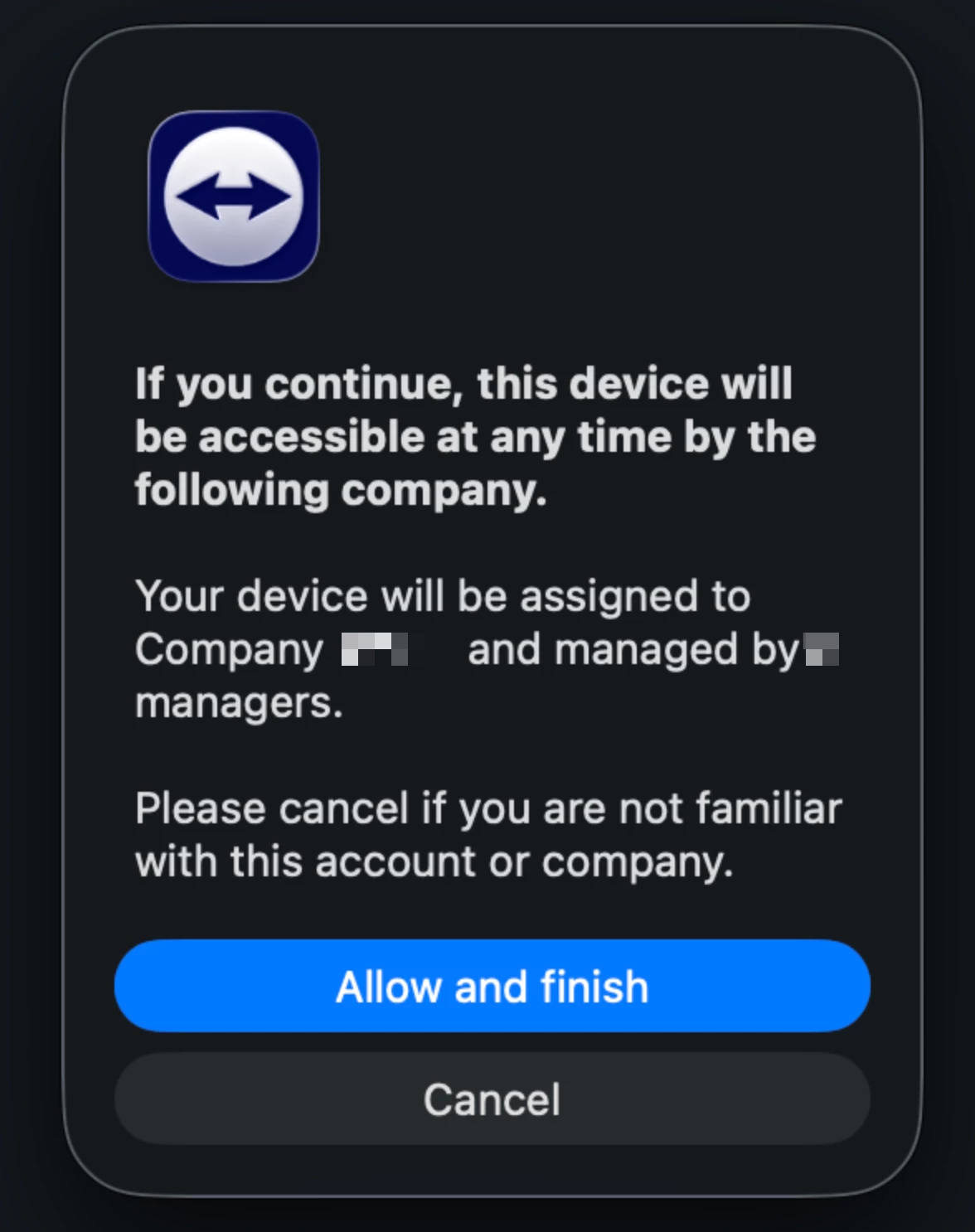
Hi ​@VincentB, it is the following dialog:


If the user clicks cancel, the whole configuration setup is not working.


VincentB
Forum|alt.badge.img+5
  • Employee
  • February 6, 2026

This particular popup message is directly displayed by Teamviewer apps so I’m not there are ways to suppress it.

I don’t have an enterprise Teamviewer license so I won’t be able to help much. If the message happens during PKG deployment, you may want to try tweaking the post_install script in the PKG and see if there‘s any way to avoid this message.

On Teamviewer’s forum I found someone asking the same question, on Windows there looks to be a \qn argument to make the install fully silent, but there’s no equivalent for the installer command on macOS: https://community.teamviewer.com/English/discussion/133287/your-device-will-be-assigned-to-company-message/p1?tab=accepted

Maybe Teamviewer’s support will be able to provide a more definitive answer to this popup issue? 


alexander
Forum|alt.badge.img+1
  • New Contributor
  • February 6, 2026

Yeah I am actually already in contact with them so they also update their official guide for the new custom host packages (mass deployment on macOS). No date on when that will happen though.

Thanks for the tips and the link!


alexander
Forum|alt.badge.img+1
  • New Contributor
  • February 10, 2026

Hey ​@VincentB, I just tried your approach via Jamf and it gave me this error:

xattr: [Errno 1] Operation not permitted: '/Applications/TeamViewerHost.app'

Any clue on what the issue here could be?

If you deploy the app via the Jamf App Catalog, how do you only run the assignment later via a policy on apps that have it installed? Smart Computer Group?


leonkaesmann
Forum|alt.badge.img+5
  • Jamf Heroes
  • February 11, 2026

This has been a topic for the last few weeks for us, so here’s our current solution:

  1. Download TeamViewerHost.pkg and rename it to TeamViewerHost-<config-id>.pkg
  2. Upload to Jamf Pro and create a policy to cache that package.
  3. In the same policy, deploy a script to install the cached package with a choices file (TV has one in their docs)
  4. Lastly, run the assignment script (also found in their docs)

We had to customize some parts of that due to timing issues with JSM. Works just fine now.


VincentB
Forum|alt.badge.img+5
  • Employee
  • February 13, 2026

Hey ​@VincentB, I just tried your approach via Jamf and it gave me this error:

xattr: [Errno 1] Operation not permitted: '/Applications/TeamViewerHost.app'

Any clue on what the issue here could be?

If you deploy the app via the Jamf App Catalog, how do you only run the assignment later via a policy on apps that have it installed? Smart Computer Group?

Hi ​@alexander the error you encounter usually means there’s a permission issue, did you run the xattr command as root? 

For your second question, yes you can use smart groups to detect computers with the Teamviewer app and run the policy. Although the steps from ​@leonkaesmann are good ones as well, if you deploy Teamviewer using a PKG policy, you can still configure the Jamf App Catalog to keep the app up to date once it has been installed by a policy. 


leonkaesmann
Forum|alt.badge.img+5
  • Jamf Heroes
  • February 23, 2026

@VincentB oh right, forgot to mention that we’re doing exactly that. Updating via Jamf App Catalog works perfectly.